 773-596-5625







Quick Ship
Showroom
Bestseller

LiberNovo Omni Pro Dynamic Ergonomic Chair with Active AirFlow Ventilation
SKU: OmniPro-CP-GW-01-MI-1-1-1
Your Price
$1,109.00+
$1,596.00
Save
$487.00
Fit: 5'0"–5’10" / up to 300 lbs. • 45cm (up to 5'5") / 48cm (5'6"–5'10") • Battery Powered • 6-Year Frame / 2-Year Electronics • Try in Our Chicago Showroom
Save up to 30% with HSA/FSA
*
Savings vary based on eligibility and individual tax rate.
|
Check Eligibility
Powered by
Dynamic Support. Cushioned Seating. Active AirFlow.
The LiberNovo Omni Pro combines a cushioned seat with powered Active AirFlow™ ventilation, motorized lumbar adjustment and a flexible Bionic FlexFit™ backrest. Its standard-size seating platform offers two seat-depth choices and five recline positions from 105° to 160°.
Consider the Omni Pro if you prefer foam cushioning over mesh and want active seat ventilation alongside adjustable back support. HPS can help you choose the seat size and configure the chair for your body and workstation.
Try before you decide: Experience the Omni Pro at Healthy Posture Store’s Chicago showroom, subject to current display availability.
Healthy Posture Quick Fit Guide
| Chair Size | Standard-size ergonomic chair |
|---|---|
| Healthy Posture Fit Guidance | Approximately 5'0"–5'10" for many users with a slim to average build. Fit varies with leg length, torso length, shoulder width and sitting preferences. |
| Seat Options | Choose a 45 cm or 48 cm seat depth. These are separate seat-size choices rather than a seat-depth slider. |
| 45 cm Seat Guidance | HPS recommends considering the 45 cm seat for users up to approximately 5'5", subject to thigh length and individual fit. |
| Foot Support | HPS recommends separate foot support for users below 5'8" or when desk height exceeds 25". Set the chair for your working surface and check that your feet remain supported. |
| Manufacturer Weight Capacity | Up to 300 lb / 136 kg |
| Seat Feel | Medium cushioned support with Active AirFlow™ ventilation |
| Recline | 105°–160° with five positions |
| Colors | Graphite and Glacier |
| Showroom | Available to try in our Chicago showroom, subject to availability |
Who Is the Omni Pro Best For?
Users who prefer cushioning over mesh
The multi-density foam seat provides a cushioned surface, while the powered ventilation system helps circulate air through the seat.
Workstations where changing position matters
Five recline settings, adjustable armrests and powered lumbar adjustment provide options for desk work, reading and breaks.
Slim to average body profiles
Based on HPS fitting experience, the Omni Pro is a useful starting point for many users approximately 5'0"–5'10". Seat choice and workstation setup remain important.
Shoppers comparing standard and larger seating platforms
Compare the Omni Pro with the Maxis Series if you need more seat depth or a roomier platform. Choose by fit rather than feature count alone.
Active AirFlow™ Seat Ventilation

A powered centrifugal fan system built into the seat circulates air through the cushioned seating surface. Active AirFlow provides ventilation rather than relying on breathable upholstery alone.
Choose between two fan speeds. The system remembers your setting and uses a seat sensor to pause airflow when you leave and resume when you return. LiberNovo publishes battery runtime of up to 36 hours on Low or up to 9 hours on High. Actual runtime varies with powered-function use and battery condition.
Dynamic Support & Bionic FlexFit™ Backrest

LiberNovo’s Dynamic Support System is designed to respond as your seated position changes. The Bionic FlexFit™ backrest uses flexible support zones to accommodate movement through the backrest.
The coordinated design allows the backrest, headrest, armrests and seat to work together as you move between task seating and recline. Fine-tune the controls so the support suits your proportions and working position.
Motorized Precision Lumbar Support
Powered lumbar adjustment lets you change the prominence of lower-back support using the chair’s controls. Adjust it while seated to find a comfortable amount of contact, then check the setting in your usual working position.
Powered functions require battery charge. Conventional chair functions, including seat-height adjustment and mechanical reclining, remain usable when the battery is depleted.
Five Recline Positions from 105° to 160°

105° — Deep Focus
The most upright setting for tasks such as typing, spreadsheets and video calls.
115° — Balance
A slightly more reclined position for everyday seated work.
125° — Solo Work
An option for reading, reviewing information and changing position between tasks.
135° — Soft Recline
A deeper recline for relaxed sitting and breaks.
160° — Spine Flow
The deepest recline setting for a more extended resting position. Position separate foot or leg support to suit your proportions.
Materials & Construction
Gabriel® Atlantic performance fabric
Textured performance upholstery complements the chair’s cushioned support surfaces.
Multi-density foam cushion
Different foam densities create a medium cushioned seating feel with support across the seat.
Sliding 4D armrests
Adjust the pads for your forearm position, keyboard and mouse placement, and preferred reclining posture.
Reinforced aluminum-alloy base
An aluminum-alloy base supports the chair’s standard-size seating platform.
3000mAh rechargeable battery
Powers Active AirFlow™ and motorized functions without requiring a permanent cable at the workstation.
Available in Graphite and Glacier

Choose Graphite for a darker finish or Glacier for a lighter workspace appearance. Color and seat-size availability are subject to inventory.
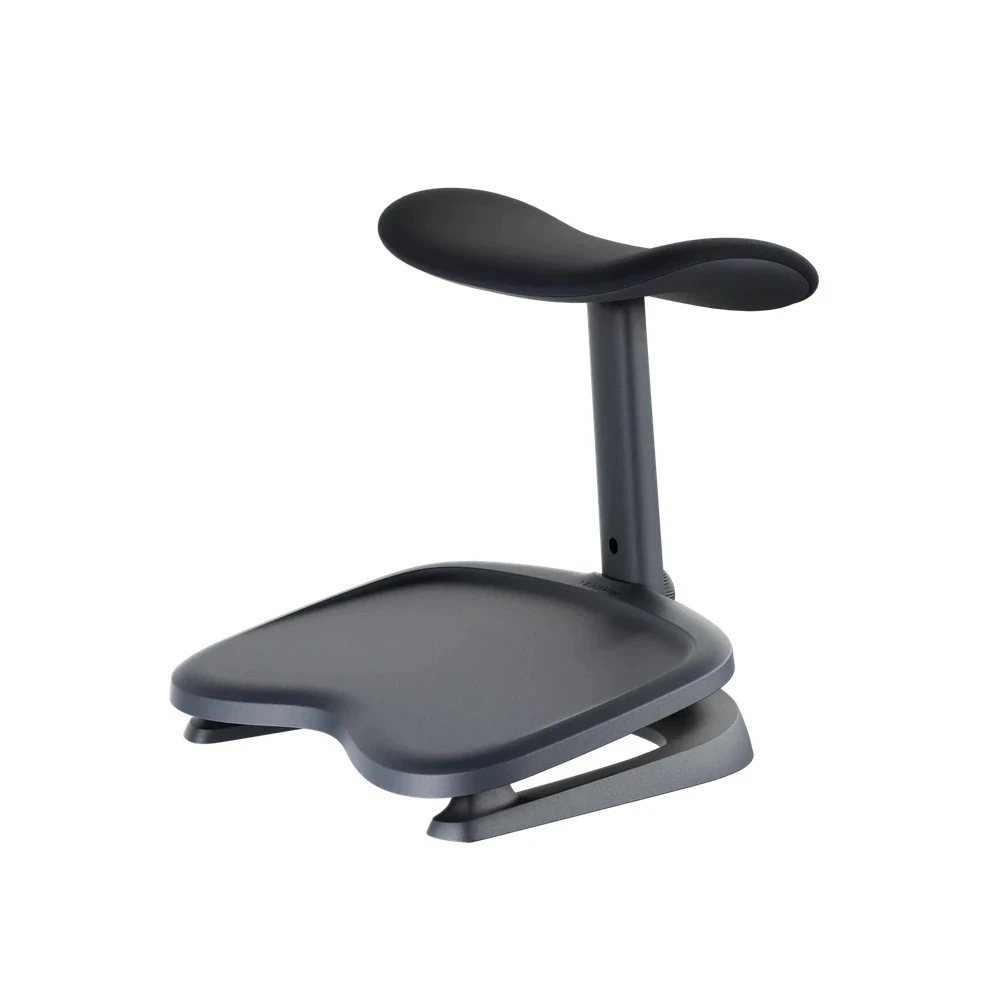
StepSync Footrest & HPS Foot-Support Guidance
HPS recommends foot support for users below 5'8" or when desk height exceeds 25". This is particularly relevant at a fixed-height desk without a keyboard tray: raising the chair to reach the keyboard comfortably may leave your feet unsupported.
Set the chair height for your working surface, then check your feet. A separate footrest provides a surface for support when the floor is too far below your working seat height. A footrest does not correct a seat that is too deep or replace choosing the appropriate seat size.
Separate Support for Desk Work and Reclining
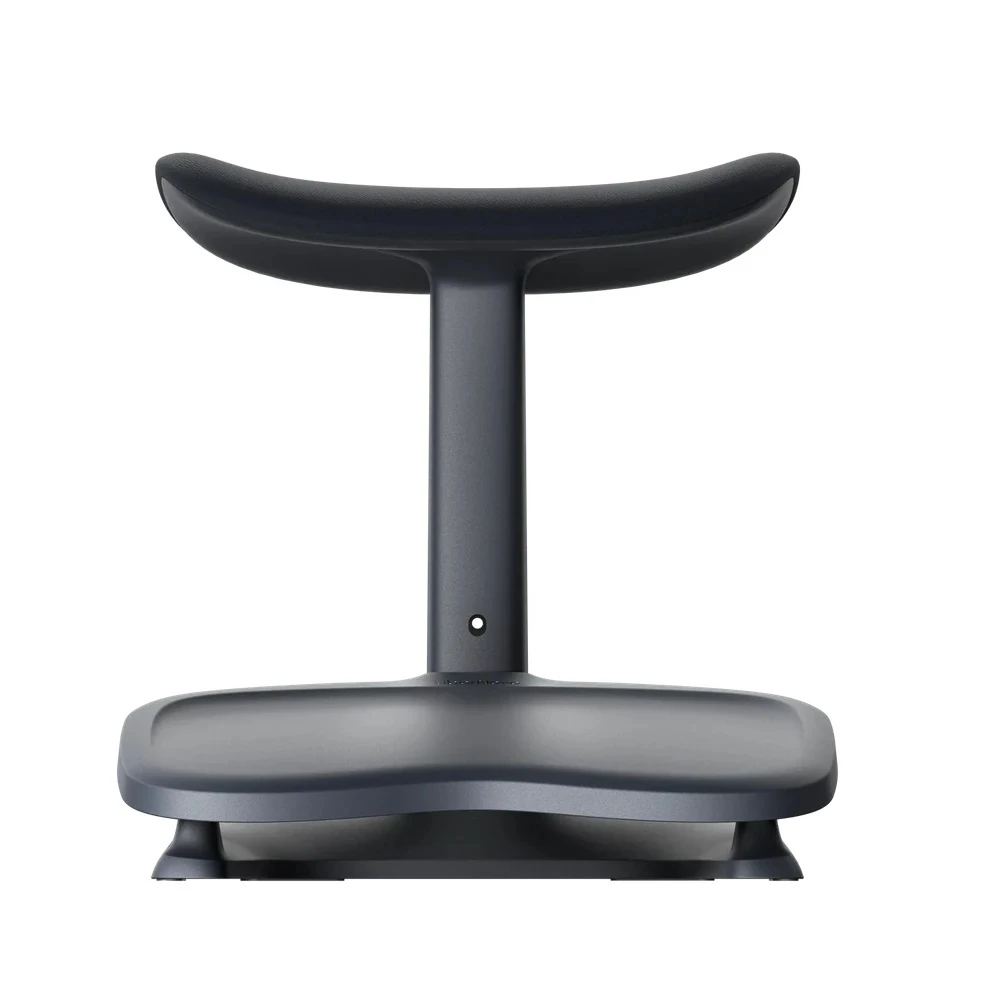
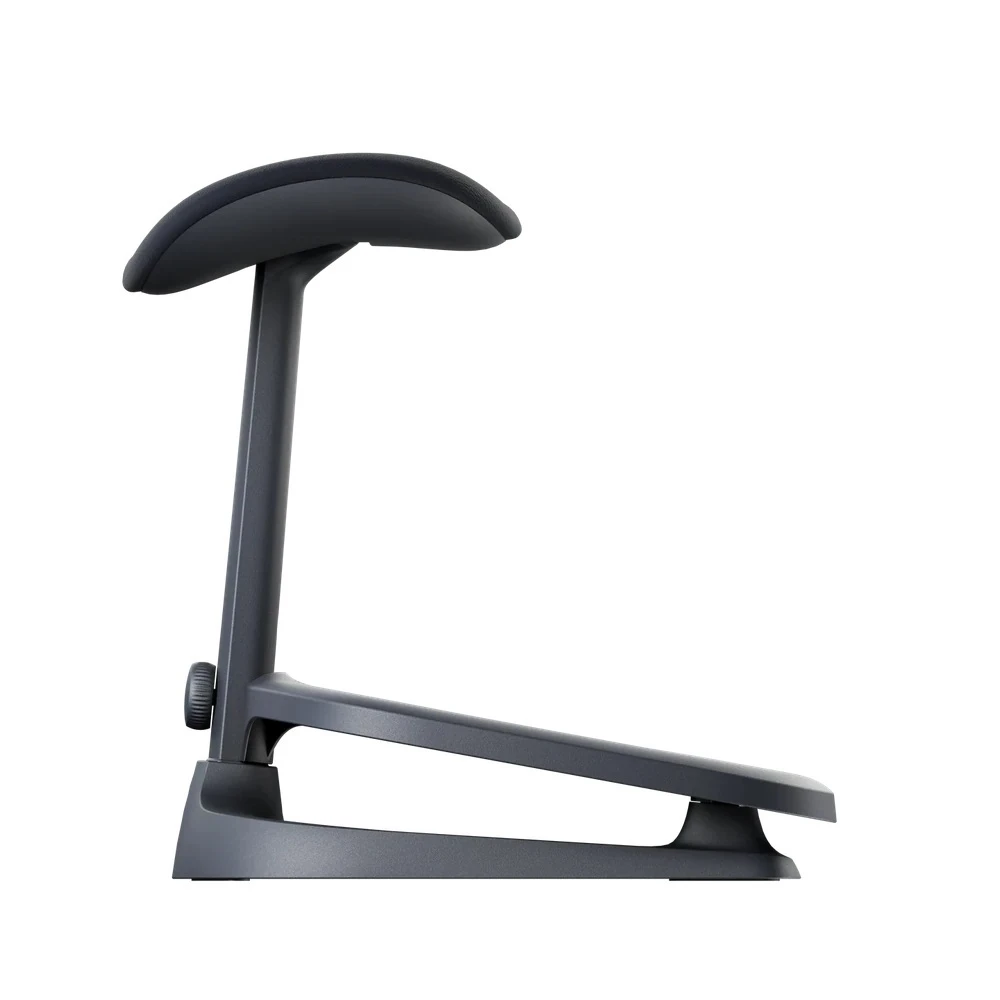
The LiberNovo StepSync is a separate floor-standing accessory with a lower foot platform and a raised padded support. Position it for comfortable foot support during desk work or reposition it for support while reclining. The most useful position depends on your leg length, chair height and available space beneath the desk.
Choose the Seat Size First
HPS recommends considering the 45 cm seat for users up to approximately 5'5", subject to thigh length and individual fit. Sit fully back and check for clearance behind your knees before deciding. Then position the footrest so your feet have support at the seat height you use for working.
Accessory availability: StepSync is sold separately unless expressly included in your selected package. Check the product options or contact HPS to confirm the compatible version and what your order includes.
Omni Pro or Maxis?
The Omni Pro and Maxis share LiberNovo’s dynamic ergonomic approach but use different seating platforms. Compare the dimensions and support feel before choosing.
| Omni Pro | Standard-size platform with Active AirFlow™, powered lumbar support, cushioned seating and a choice of 45 cm or 48 cm seat depth. |
|---|---|
| Maxis Series | Larger-format platform with a 20.5" / 520 mm seat depth and Manual, Electric and Airflow configurations. |
HPS can help you compare seat depth, seating space and workstation fit in person or before ordering online.
Try the Omni Pro in Our Chicago Showroom
Chair fit depends on more than height and weight. Seat depth, armrest position, torso length, desk height and foot support all affect how a chair works at your workstation.
At Healthy Posture Store, compare the Omni Pro with other ergonomic chairs and ask for help selecting the 45 cm or 48 cm seat. You can also discuss how a separate footrest fits into your setup. Contact us to confirm current showroom models and accessory availability before visiting.
Chair fit and workstation setup work together. Our goal is to help you choose settings that support you while working and allow you to change position comfortably.
Frequently Asked Questions
What makes the LiberNovo Omni Pro different from a standard cushioned office chair?
It combines powered Active AirFlow™ seat ventilation, motorized lumbar support, a flexible backrest system and five recline positions in a standard-size seating platform.
Is Active AirFlow™ just breathable fabric?
No. A powered centrifugal fan system circulates air through the cushioned seat. It provides ventilation; it is not refrigerated air conditioning.
How long does the battery last with AirFlow running?
LiberNovo publishes up to 36 hours on Low and up to 9 hours on High. Actual runtime varies with powered-function use and battery condition.
Can I use the chair if the battery is depleted?
Yes. Conventional functions such as seat-height adjustment and mechanical reclining remain usable. Ventilation and other powered functions require battery charge.
What height range does HPS recommend for the Omni Pro?
HPS suggests considering it for many users approximately 5'0"–5'10" with a slim to average build. This is HPS fit guidance rather than a guarantee; leg length, torso length and workstation setup also matter.
Should I choose the 45 cm or 48 cm seat?
HPS recommends considering the 45 cm seat for users up to approximately 5'5". The 48 cm seat provides greater depth for users whose thigh length suits it. Sit fully back and check for clearance behind your knees. These are separate seat-size choices, not a seat-depth slider.
Do I need a separate footrest?
HPS recommends foot support for users below 5'8" or when desk height exceeds 25". Check whether your feet remain supported after setting the chair height for your keyboard and work surface. A separate footrest can help when raising the chair leaves your feet unsupported.
Is the StepSync Footrest included?
It is sold separately unless expressly included in your selected package. Check your chosen options or contact HPS to confirm what is included.
What if I need a deeper seat or larger-format chair?
Compare the Maxis Series if you need more seat depth or a roomier platform. HPS can help you assess the dimensions against your proportions.
Can I try the Omni Pro before purchasing?
Yes. Experience it at Healthy Posture Store’s Chicago showroom, subject to current display availability. Contact us before visiting to confirm the seat sizes and accessories available to compare.
How long does assembly take?
Allow approximately 20–30 minutes for assembly.
Specifications & Dimensions
| Product Name | LiberNovo Omni Pro Dynamic Ergonomic Chair |
|---|---|
| Available Colors | Graphite, Glacier |
| Manufacturer Weight Capacity | Up to 300 lb / 136 kg |
| Healthy Posture Fit Guidance | Approximately 5'0"–5'10" for many users with a slim to average build. Individual fit depends on body proportions and workstation setup. |
| Seat Options | 45 cm / approximately 17.7" or 48 cm / approximately 18.9" seat depth; separate seat-size choices |
| 45 cm Seat Guidance | HPS recommends considering this size for users up to approximately 5'5", subject to individual fit. |
| Recline Range | 105°, 115°, 125°, 135° and 160° |
| Lumbar Adjustment | Motorized lower-back support adjustment |
| Armrests | Sliding 4D adjustable armrests |
| Neck Support | Hydrophilic sponge memory-foam headrest |
| Seat Cushion | Multi-density ergonomic foam cushion with Active AirFlow™ ventilation |
| Backrest Cover | Gabriel® Atlantic performance fabric |
| Backrest Construction | Flexible pressure-relieving foam with resilient support layer |
| Base | Reinforced aluminum alloy |
| Battery | 3000mAh rechargeable lithium battery |
| AirFlow Controls | Two speeds, setting memory and automatic pause/resume using a seat sensor |
| Published AirFlow Runtime | Up to 36 hours on Low or up to 9 hours on High; actual runtime varies with use. |
| Standards & Testing | UL962; FCC SDoC; BIFMA X5.1; RoHS; UN38.3 battery testing |
| StepSync Footrest | Optional accessory; sold separately unless expressly included in the selected package |
Specifications are based on information supplied by LiberNovo. HPS fit recommendations reflect showroom fitting experience; individual fit varies.
Shipping, Assembly & Customer Support
| Shipping | Most LiberNovo Omni Pro chairs ship within 2–3 business days, subject to selected color, seat size and stock availability. Transit time is additional. |
|---|---|
| Assembly | Approximately 20–30 minutes. |
| Assembly Video | Watch Assembly Video |
| Alaska, Hawaii & Puerto Rico | Standard free shipping applies to the contiguous United States only. Contact Healthy Posture Store before ordering for available shipping options. |
| Packaging | Please keep original packaging for at least 30 days after delivery. Retaining packaging does not create an open-box trial; HPS return-policy conditions apply. |
| Ergonomic Support | Healthy Posture Store can help with fit, setup, adjustments and product selection before and after purchase. |
Still Have Questions?
Visit our Chicago showroom to compare the Omni Pro with other ergonomic chairs, or contact Healthy Posture Store for help with seat size, foot support and workstation fit.
Call us at 773-596-5625 or contact us online.
Dynamic Support. Cushioned Seating. Active AirFlow.
The LiberNovo Omni Pro combines a cushioned seat with powered Active AirFlow™ ventilation, motorized lumbar adjustment and a flexible Bionic FlexFit™ backrest. Its standard-size seating platform offers two seat-depth choices and five recline positions from 105° to 160°.
Consider the Omni Pro if you prefer foam cushioning over mesh and want active seat ventilation alongside adjustable back support. HPS can help you choose the seat size and configure the chair for your body and workstation.
Try before you decide: Experience the Omni Pro at Healthy Posture Store’s Chicago showroom, subject to current display availability.
Healthy Posture Quick Fit Guide
| Chair Size | Standard-size ergonomic chair |
|---|---|
| Healthy Posture Fit Guidance | Approximately 5'0"–5'10" for many users with a slim to average build. Fit varies with leg length, torso length, shoulder width and sitting preferences. |
| Seat Options | Choose a 45 cm or 48 cm seat depth. These are separate seat-size choices rather than a seat-depth slider. |
| 45 cm Seat Guidance | HPS recommends considering the 45 cm seat for users up to approximately 5'5", subject to thigh length and individual fit. |
| Foot Support | HPS recommends separate foot support for users below 5'8" or when desk height exceeds 25". Set the chair for your working surface and check that your feet remain supported. |
| Manufacturer Weight Capacity | Up to 300 lb / 136 kg |
| Seat Feel | Medium cushioned support with Active AirFlow™ ventilation |
| Recline | 105°–160° with five positions |
| Colors | Graphite and Glacier |
| Showroom | Available to try in our Chicago showroom, subject to availability |
Who Is the Omni Pro Best For?
Users who prefer cushioning over mesh
The multi-density foam seat provides a cushioned surface, while the powered ventilation system helps circulate air through the seat.
Workstations where changing position matters
Five recline settings, adjustable armrests and powered lumbar adjustment provide options for desk work, reading and breaks.
Slim to average body profiles
Based on HPS fitting experience, the Omni Pro is a useful starting point for many users approximately 5'0"–5'10". Seat choice and workstation setup remain important.
Shoppers comparing standard and larger seating platforms
Compare the Omni Pro with the Maxis Series if you need more seat depth or a roomier platform. Choose by fit rather than feature count alone.
Active AirFlow™ Seat Ventilation
A powered centrifugal fan system built into the seat circulates air through the cushioned seating surface. Active AirFlow provides ventilation rather than relying on breathable upholstery alone.
Choose between two fan speeds. The system remembers your setting and uses a seat sensor to pause airflow when you leave and resume when you return. LiberNovo publishes battery runtime of up to 36 hours on Low or up to 9 hours on High. Actual runtime varies with powered-function use and battery condition.
Dynamic Support & Bionic FlexFit™ Backrest
LiberNovo’s Dynamic Support System is designed to respond as your seated position changes. The Bionic FlexFit™ backrest uses flexible support zones to accommodate movement through the backrest.
The coordinated design allows the backrest, headrest, armrests and seat to work together as you move between task seating and recline. Fine-tune the controls so the support suits your proportions and working position.
Motorized Precision Lumbar Support
Powered lumbar adjustment lets you change the prominence of lower-back support using the chair’s controls. Adjust it while seated to find a comfortable amount of contact, then check the setting in your usual working position.
Powered functions require battery charge. Conventional chair functions, including seat-height adjustment and mechanical reclining, remain usable when the battery is depleted.
Five Recline Positions from 105° to 160°
105° — Deep Focus
The most upright setting for tasks such as typing, spreadsheets and video calls.
115° — Balance
A slightly more reclined position for everyday seated work.
125° — Solo Work
An option for reading, reviewing information and changing position between tasks.
135° — Soft Recline
A deeper recline for relaxed sitting and breaks.
160° — Spine Flow
The deepest recline setting for a more extended resting position. Position separate foot or leg support to suit your proportions.
Materials & Construction
Gabriel® Atlantic performance fabric
Textured performance upholstery complements the chair’s cushioned support surfaces.
Multi-density foam cushion
Different foam densities create a medium cushioned seating feel with support across the seat.
Sliding 4D armrests
Adjust the pads for your forearm position, keyboard and mouse placement, and preferred reclining posture.
Reinforced aluminum-alloy base
An aluminum-alloy base supports the chair’s standard-size seating platform.
3000mAh rechargeable battery
Powers Active AirFlow™ and motorized functions without requiring a permanent cable at the workstation.
Available in Graphite and Glacier
Choose Graphite for a darker finish or Glacier for a lighter workspace appearance. Color and seat-size availability are subject to inventory.
StepSync Footrest & HPS Foot-Support Guidance
HPS recommends foot support for users below 5'8" or when desk height exceeds 25". This is particularly relevant at a fixed-height desk without a keyboard tray: raising the chair to reach the keyboard comfortably may leave your feet unsupported.
Set the chair height for your working surface, then check your feet. A separate footrest provides a surface for support when the floor is too far below your working seat height. A footrest does not correct a seat that is too deep or replace choosing the appropriate seat size.
Separate Support for Desk Work and Reclining
The LiberNovo StepSync is a separate floor-standing accessory with a lower foot platform and a raised padded support. Position it for comfortable foot support during desk work or reposition it for support while reclining. The most useful position depends on your leg length, chair height and available space beneath the desk.
Choose the Seat Size First
HPS recommends considering the 45 cm seat for users up to approximately 5'5", subject to thigh length and individual fit. Sit fully back and check for clearance behind your knees before deciding. Then position the footrest so your feet have support at the seat height you use for working.
Accessory availability: StepSync is sold separately unless expressly included in your selected package. Check the product options or contact HPS to confirm the compatible version and what your order includes.
Omni Pro or Maxis?
The Omni Pro and Maxis share LiberNovo’s dynamic ergonomic approach but use different seating platforms. Compare the dimensions and support feel before choosing.
| Omni Pro | Standard-size platform with Active AirFlow™, powered lumbar support, cushioned seating and a choice of 45 cm or 48 cm seat depth. |
|---|---|
| Maxis Series | Larger-format platform with a 20.5" / 520 mm seat depth and Manual, Electric and Airflow configurations. |
HPS can help you compare seat depth, seating space and workstation fit in person or before ordering online.
Try the Omni Pro in Our Chicago Showroom
Chair fit depends on more than height and weight. Seat depth, armrest position, torso length, desk height and foot support all affect how a chair works at your workstation.
At Healthy Posture Store, compare the Omni Pro with other ergonomic chairs and ask for help selecting the 45 cm or 48 cm seat. You can also discuss how a separate footrest fits into your setup. Contact us to confirm current showroom models and accessory availability before visiting.
Chair fit and workstation setup work together. Our goal is to help you choose settings that support you while working and allow you to change position comfortably.
Frequently Asked Questions
What makes the LiberNovo Omni Pro different from a standard cushioned office chair?
It combines powered Active AirFlow™ seat ventilation, motorized lumbar support, a flexible backrest system and five recline positions in a standard-size seating platform.
Is Active AirFlow™ just breathable fabric?
No. A powered centrifugal fan system circulates air through the cushioned seat. It provides ventilation; it is not refrigerated air conditioning.
How long does the battery last with AirFlow running?
LiberNovo publishes up to 36 hours on Low and up to 9 hours on High. Actual runtime varies with powered-function use and battery condition.
Can I use the chair if the battery is depleted?
Yes. Conventional functions such as seat-height adjustment and mechanical reclining remain usable. Ventilation and other powered functions require battery charge.
What height range does HPS recommend for the Omni Pro?
HPS suggests considering it for many users approximately 5'0"–5'10" with a slim to average build. This is HPS fit guidance rather than a guarantee; leg length, torso length and workstation setup also matter.
Should I choose the 45 cm or 48 cm seat?
HPS recommends considering the 45 cm seat for users up to approximately 5'5". The 48 cm seat provides greater depth for users whose thigh length suits it. Sit fully back and check for clearance behind your knees. These are separate seat-size choices, not a seat-depth slider.
Do I need a separate footrest?
HPS recommends foot support for users below 5'8" or when desk height exceeds 25". Check whether your feet remain supported after setting the chair height for your keyboard and work surface. A separate footrest can help when raising the chair leaves your feet unsupported.
Is the StepSync Footrest included?
It is sold separately unless expressly included in your selected package. Check your chosen options or contact HPS to confirm what is included.
What if I need a deeper seat or larger-format chair?
Compare the Maxis Series if you need more seat depth or a roomier platform. HPS can help you assess the dimensions against your proportions.
Can I try the Omni Pro before purchasing?
Yes. Experience it at Healthy Posture Store’s Chicago showroom, subject to current display availability. Contact us before visiting to confirm the seat sizes and accessories available to compare.
How long does assembly take?
Allow approximately 20–30 minutes for assembly.
Specifications & Dimensions
| Product Name | LiberNovo Omni Pro Dynamic Ergonomic Chair |
|---|---|
| Available Colors | Graphite, Glacier |
| Manufacturer Weight Capacity | Up to 300 lb / 136 kg |
| Healthy Posture Fit Guidance | Approximately 5'0"–5'10" for many users with a slim to average build. Individual fit depends on body proportions and workstation setup. |
| Seat Options | 45 cm / approximately 17.7" or 48 cm / approximately 18.9" seat depth; separate seat-size choices |
| 45 cm Seat Guidance | HPS recommends considering this size for users up to approximately 5'5", subject to individual fit. |
| Recline Range | 105°, 115°, 125°, 135° and 160° |
| Lumbar Adjustment | Motorized lower-back support adjustment |
| Armrests | Sliding 4D adjustable armrests |
| Neck Support | Hydrophilic sponge memory-foam headrest |
| Seat Cushion | Multi-density ergonomic foam cushion with Active AirFlow™ ventilation |
| Backrest Cover | Gabriel® Atlantic performance fabric |
| Backrest Construction | Flexible pressure-relieving foam with resilient support layer |
| Base | Reinforced aluminum alloy |
| Battery | 3000mAh rechargeable lithium battery |
| AirFlow Controls | Two speeds, setting memory and automatic pause/resume using a seat sensor |
| Published AirFlow Runtime | Up to 36 hours on Low or up to 9 hours on High; actual runtime varies with use. |
| Standards & Testing | UL962; FCC SDoC; BIFMA X5.1; RoHS; UN38.3 battery testing |
| StepSync Footrest | Optional accessory; sold separately unless expressly included in the selected package |
Specifications are based on information supplied by LiberNovo. HPS fit recommendations reflect showroom fitting experience; individual fit varies.
Shipping, Assembly & Customer Support
| Shipping | Most LiberNovo Omni Pro chairs ship within 2–3 business days, subject to selected color, seat size and stock availability. Transit time is additional. |
|---|---|
| Assembly | Approximately 20–30 minutes. |
| Assembly Video | Watch Assembly Video |
| Alaska, Hawaii & Puerto Rico | Standard free shipping applies to the contiguous United States only. Contact Healthy Posture Store before ordering for available shipping options. |
| Packaging | Please keep original packaging for at least 30 days after delivery. Retaining packaging does not create an open-box trial; HPS return-policy conditions apply. |
| Ergonomic Support | Healthy Posture Store can help with fit, setup, adjustments and product selection before and after purchase. |
Still Have Questions?
Visit our Chicago showroom to compare the Omni Pro with other ergonomic chairs, or contact Healthy Posture Store for help with seat size, foot support and workstation fit.
Call us at 773-596-5625 or contact us online.
Frame: 6 Years
Electronics: 2 Years
Dynamic Support. Cushioned Seating. Active AirFlow.
The LiberNovo Omni Pro combines a cushioned seat with powered Active AirFlow™ ventilation, motorized lumbar adjustment and a flexible Bionic FlexFit™ backrest. Its standard-size seating platform offers two seat-depth choices and five recline positions from 105° to 160°.
Consider the Omni Pro if you prefer foam cushioning over mesh and want active seat ventilation alongside adjustable back support. HPS can help you choose the seat size and configure the chair for your body and workstation.
Try before you decide: Experience the Omni Pro at Healthy Posture Store’s Chicago showroom, subject to current display availability.
Healthy Posture Quick Fit Guide
| Chair Size | Standard-size ergonomic chair |
|---|---|
| Healthy Posture Fit Guidance | Approximately 5'0"–5'10" for many users with a slim to average build. Fit varies with leg length, torso length, shoulder width and sitting preferences. |
| Seat Options | Choose a 45 cm or 48 cm seat depth. These are separate seat-size choices rather than a seat-depth slider. |
| 45 cm Seat Guidance | HPS recommends considering the 45 cm seat for users up to approximately 5'5", subject to thigh length and individual fit. |
| Foot Support | HPS recommends separate foot support for users below 5'8" or when desk height exceeds 25". Set the chair for your working surface and check that your feet remain supported. |
| Manufacturer Weight Capacity | Up to 300 lb / 136 kg |
| Seat Feel | Medium cushioned support with Active AirFlow™ ventilation |
| Recline | 105°–160° with five positions |
| Colors | Graphite and Glacier |
| Showroom | Available to try in our Chicago showroom, subject to availability |
Who Is the Omni Pro Best For?
Users who prefer cushioning over mesh
The multi-density foam seat provides a cushioned surface, while the powered ventilation system helps circulate air through the seat.
Workstations where changing position matters
Five recline settings, adjustable armrests and powered lumbar adjustment provide options for desk work, reading and breaks.
Slim to average body profiles
Based on HPS fitting experience, the Omni Pro is a useful starting point for many users approximately 5'0"–5'10". Seat choice and workstation setup remain important.
Shoppers comparing standard and larger seating platforms
Compare the Omni Pro with the Maxis Series if you need more seat depth or a roomier platform. Choose by fit rather than feature count alone.
Active AirFlow™ Seat Ventilation
A powered centrifugal fan system built into the seat circulates air through the cushioned seating surface. Active AirFlow provides ventilation rather than relying on breathable upholstery alone.
Choose between two fan speeds. The system remembers your setting and uses a seat sensor to pause airflow when you leave and resume when you return. LiberNovo publishes battery runtime of up to 36 hours on Low or up to 9 hours on High. Actual runtime varies with powered-function use and battery condition.
Dynamic Support & Bionic FlexFit™ Backrest
LiberNovo’s Dynamic Support System is designed to respond as your seated position changes. The Bionic FlexFit™ backrest uses flexible support zones to accommodate movement through the backrest.
The coordinated design allows the backrest, headrest, armrests and seat to work together as you move between task seating and recline. Fine-tune the controls so the support suits your proportions and working position.
Motorized Precision Lumbar Support
Powered lumbar adjustment lets you change the prominence of lower-back support using the chair’s controls. Adjust it while seated to find a comfortable amount of contact, then check the setting in your usual working position.
Powered functions require battery charge. Conventional chair functions, including seat-height adjustment and mechanical reclining, remain usable when the battery is depleted.
Five Recline Positions from 105° to 160°
105° — Deep Focus
The most upright setting for tasks such as typing, spreadsheets and video calls.
115° — Balance
A slightly more reclined position for everyday seated work.
125° — Solo Work
An option for reading, reviewing information and changing position between tasks.
135° — Soft Recline
A deeper recline for relaxed sitting and breaks.
160° — Spine Flow
The deepest recline setting for a more extended resting position. Position separate foot or leg support to suit your proportions.
Materials & Construction
Gabriel® Atlantic performance fabric
Textured performance upholstery complements the chair’s cushioned support surfaces.
Multi-density foam cushion
Different foam densities create a medium cushioned seating feel with support across the seat.
Sliding 4D armrests
Adjust the pads for your forearm position, keyboard and mouse placement, and preferred reclining posture.
Reinforced aluminum-alloy base
An aluminum-alloy base supports the chair’s standard-size seating platform.
3000mAh rechargeable battery
Powers Active AirFlow™ and motorized functions without requiring a permanent cable at the workstation.
Available in Graphite and Glacier
Choose Graphite for a darker finish or Glacier for a lighter workspace appearance. Color and seat-size availability are subject to inventory.
StepSync Footrest & HPS Foot-Support Guidance
HPS recommends foot support for users below 5'8" or when desk height exceeds 25". This is particularly relevant at a fixed-height desk without a keyboard tray: raising the chair to reach the keyboard comfortably may leave your feet unsupported.
Set the chair height for your working surface, then check your feet. A separate footrest provides a surface for support when the floor is too far below your working seat height. A footrest does not correct a seat that is too deep or replace choosing the appropriate seat size.
Separate Support for Desk Work and Reclining
The LiberNovo StepSync is a separate floor-standing accessory with a lower foot platform and a raised padded support. Position it for comfortable foot support during desk work or reposition it for support while reclining. The most useful position depends on your leg length, chair height and available space beneath the desk.
Choose the Seat Size First
HPS recommends considering the 45 cm seat for users up to approximately 5'5", subject to thigh length and individual fit. Sit fully back and check for clearance behind your knees before deciding. Then position the footrest so your feet have support at the seat height you use for working.
Accessory availability: StepSync is sold separately unless expressly included in your selected package. Check the product options or contact HPS to confirm the compatible version and what your order includes.
Omni Pro or Maxis?
The Omni Pro and Maxis share LiberNovo’s dynamic ergonomic approach but use different seating platforms. Compare the dimensions and support feel before choosing.
| Omni Pro | Standard-size platform with Active AirFlow™, powered lumbar support, cushioned seating and a choice of 45 cm or 48 cm seat depth. |
|---|---|
| Maxis Series | Larger-format platform with a 20.5" / 520 mm seat depth and Manual, Electric and Airflow configurations. |
HPS can help you compare seat depth, seating space and workstation fit in person or before ordering online.
Try the Omni Pro in Our Chicago Showroom
Chair fit depends on more than height and weight. Seat depth, armrest position, torso length, desk height and foot support all affect how a chair works at your workstation.
At Healthy Posture Store, compare the Omni Pro with other ergonomic chairs and ask for help selecting the 45 cm or 48 cm seat. You can also discuss how a separate footrest fits into your setup. Contact us to confirm current showroom models and accessory availability before visiting.
Chair fit and workstation setup work together. Our goal is to help you choose settings that support you while working and allow you to change position comfortably.
Frequently Asked Questions
What makes the LiberNovo Omni Pro different from a standard cushioned office chair?
It combines powered Active AirFlow™ seat ventilation, motorized lumbar support, a flexible backrest system and five recline positions in a standard-size seating platform.
Is Active AirFlow™ just breathable fabric?
No. A powered centrifugal fan system circulates air through the cushioned seat. It provides ventilation; it is not refrigerated air conditioning.
How long does the battery last with AirFlow running?
LiberNovo publishes up to 36 hours on Low and up to 9 hours on High. Actual runtime varies with powered-function use and battery condition.
Can I use the chair if the battery is depleted?
Yes. Conventional functions such as seat-height adjustment and mechanical reclining remain usable. Ventilation and other powered functions require battery charge.
What height range does HPS recommend for the Omni Pro?
HPS suggests considering it for many users approximately 5'0"–5'10" with a slim to average build. This is HPS fit guidance rather than a guarantee; leg length, torso length and workstation setup also matter.
Should I choose the 45 cm or 48 cm seat?
HPS recommends considering the 45 cm seat for users up to approximately 5'5". The 48 cm seat provides greater depth for users whose thigh length suits it. Sit fully back and check for clearance behind your knees. These are separate seat-size choices, not a seat-depth slider.
Do I need a separate footrest?
HPS recommends foot support for users below 5'8" or when desk height exceeds 25". Check whether your feet remain supported after setting the chair height for your keyboard and work surface. A separate footrest can help when raising the chair leaves your feet unsupported.
Is the StepSync Footrest included?
It is sold separately unless expressly included in your selected package. Check your chosen options or contact HPS to confirm what is included.
What if I need a deeper seat or larger-format chair?
Compare the Maxis Series if you need more seat depth or a roomier platform. HPS can help you assess the dimensions against your proportions.
Can I try the Omni Pro before purchasing?
Yes. Experience it at Healthy Posture Store’s Chicago showroom, subject to current display availability. Contact us before visiting to confirm the seat sizes and accessories available to compare.
How long does assembly take?
Allow approximately 20–30 minutes for assembly.
Specifications & Dimensions
| Product Name | LiberNovo Omni Pro Dynamic Ergonomic Chair |
|---|---|
| Available Colors | Graphite, Glacier |
| Manufacturer Weight Capacity | Up to 300 lb / 136 kg |
| Healthy Posture Fit Guidance | Approximately 5'0"–5'10" for many users with a slim to average build. Individual fit depends on body proportions and workstation setup. |
| Seat Options | 45 cm / approximately 17.7" or 48 cm / approximately 18.9" seat depth; separate seat-size choices |
| 45 cm Seat Guidance | HPS recommends considering this size for users up to approximately 5'5", subject to individual fit. |
| Recline Range | 105°, 115°, 125°, 135° and 160° |
| Lumbar Adjustment | Motorized lower-back support adjustment |
| Armrests | Sliding 4D adjustable armrests |
| Neck Support | Hydrophilic sponge memory-foam headrest |
| Seat Cushion | Multi-density ergonomic foam cushion with Active AirFlow™ ventilation |
| Backrest Cover | Gabriel® Atlantic performance fabric |
| Backrest Construction | Flexible pressure-relieving foam with resilient support layer |
| Base | Reinforced aluminum alloy |
| Battery | 3000mAh rechargeable lithium battery |
| AirFlow Controls | Two speeds, setting memory and automatic pause/resume using a seat sensor |
| Published AirFlow Runtime | Up to 36 hours on Low or up to 9 hours on High; actual runtime varies with use. |
| Standards & Testing | UL962; FCC SDoC; BIFMA X5.1; RoHS; UN38.3 battery testing |
| StepSync Footrest | Optional accessory; sold separately unless expressly included in the selected package |
Specifications are based on information supplied by LiberNovo. HPS fit recommendations reflect showroom fitting experience; individual fit varies.
Shipping, Assembly & Customer Support
| Shipping | Most LiberNovo Omni Pro chairs ship within 2–3 business days, subject to selected color, seat size and stock availability. Transit time is additional. |
|---|---|
| Assembly | Approximately 20–30 minutes. |
| Assembly Video | Watch Assembly Video |
| Alaska, Hawaii & Puerto Rico | Standard free shipping applies to the contiguous United States only. Contact Healthy Posture Store before ordering for available shipping options. |
| Packaging | Please keep original packaging for at least 30 days after delivery. Retaining packaging does not create an open-box trial; HPS return-policy conditions apply. |
| Ergonomic Support | Healthy Posture Store can help with fit, setup, adjustments and product selection before and after purchase. |
Still Have Questions?
Visit our Chicago showroom to compare the Omni Pro with other ergonomic chairs, or contact Healthy Posture Store for help with seat size, foot support and workstation fit.
Call us at 773-596-5625 or contact us online.
LiberNovo Omni Pro Dynamic Ergonomic Chair with Active AirFlow Ventilation
×
![Zoomed Variant Image]()

Hinomi X2 Pro Ergonomic Office Chair with Four-Panel Spinal Support
Your Price
$699.00+
$899.00
Was:
$899.00+
SKU: X2 Pro
