null Skip to main content
Quick Ship
Bestseller
Showroom

Hinomi H2 Pro Ergonomic Office Chair

SKU: H2 Pro-MO-1

Your Price

$729.00+
$799.00
Save $70.00
Available |
Ships in 2-3 Business Days

Fit: 5'5"–6'4" / up to 330 lbs • Aeron Alternative • 19 Adjustment Points • 10-Year Warranty • Try In Our Chicago Showroom

Selected Color is
Adding to cart… The item has been added
Save up to 30% with HSA/FSA * Savings vary based on eligibility and individual tax rate. | Check Eligibility
Powered by
  • PayPal icon
Hinomi H2 Pro Ergonomic Office Chair

Your Price

$729.00+
$799.00
Save $70.00
Hinomi H2 Pro Ergonomic Office Chair

Extensive Adjustability for Work, Movement & Recline

The Hinomi H2 Pro combines a highly adjustable mesh design with independent lumbar support, forward-tilt capability, BiPivot armrests, adjustable head and neck support, and deep recline. Its strength is not one feature alone, but the range available to configure the chair around the way you sit and work.

19 Adjustment Points Adaptive Lumbar Forward Tilt Up to 143° Recline

Who Is the Hinomi H2 Pro Best For?

Users who value adjustability

Useful for customers who want meaningful control over seat depth, lumbar position, arm support, headrest position, backrest height and recline.

Shared or changing work setups

The broad adjustment range can be helpful when a chair needs to accommodate different tasks, sitting positions or more than one user.

Mesh-chair shoppers

A strong option for customers who prefer a breathable mesh seating surface rather than a heavily cushioned task chair.

Work plus deeper recline

The H2 Pro moves beyond upright task seating with adjustable recline and an optional retractable legrest for relaxed sitting.

HPS Real-World Fit

Fit the Chair to the Workstation — Not Height Alone

Hinomi publishes a broad user-height range for the H2 Pro, but height alone does not determine chair fit. Seat depth, leg and torso proportions, arm position, desk height, keyboard and mouse position, and foot support all matter.

At a standard fixed-height desk, many users need to raise the chair to bring their arms into a better working position. If that leaves the feet unsupported, a separate under-desk footrest can become an important part of the workstation setup.

A great ergonomic chair only works when you're actually sitting in it correctly. The goal is to configure the chair and workstation so you can remain supported while actually working.

19 Adjustments. Set It Up Your Way.
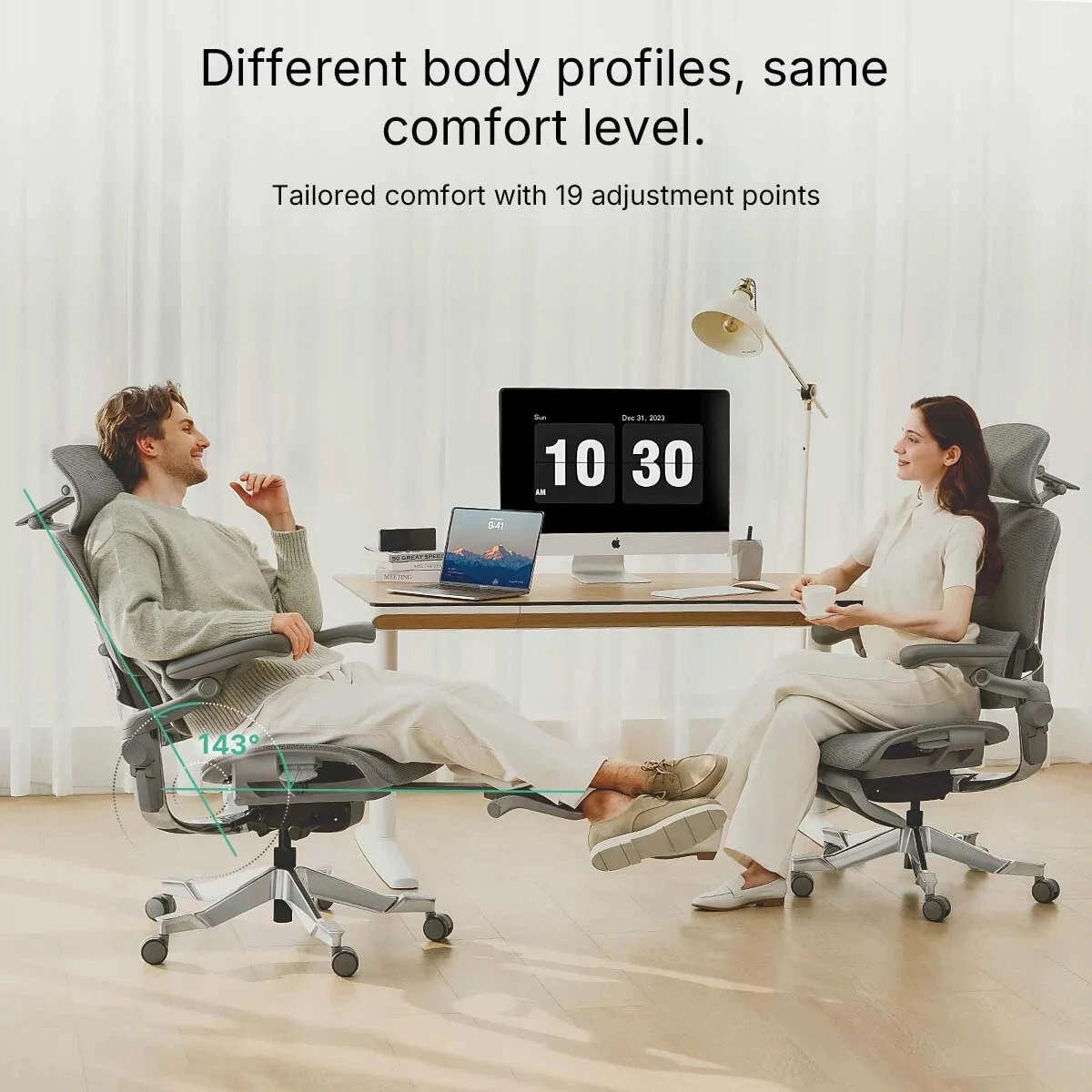
Hinomi H2 Pro ergonomic chair showing its range of adjustable positions

The H2 Pro offers extensive adjustability, but you don't need to master everything at once. Like a new car, you'll explore the controls at first, find the settings that work for you, and soon the chair simply becomes familiar.

Adaptive Lumbar Support
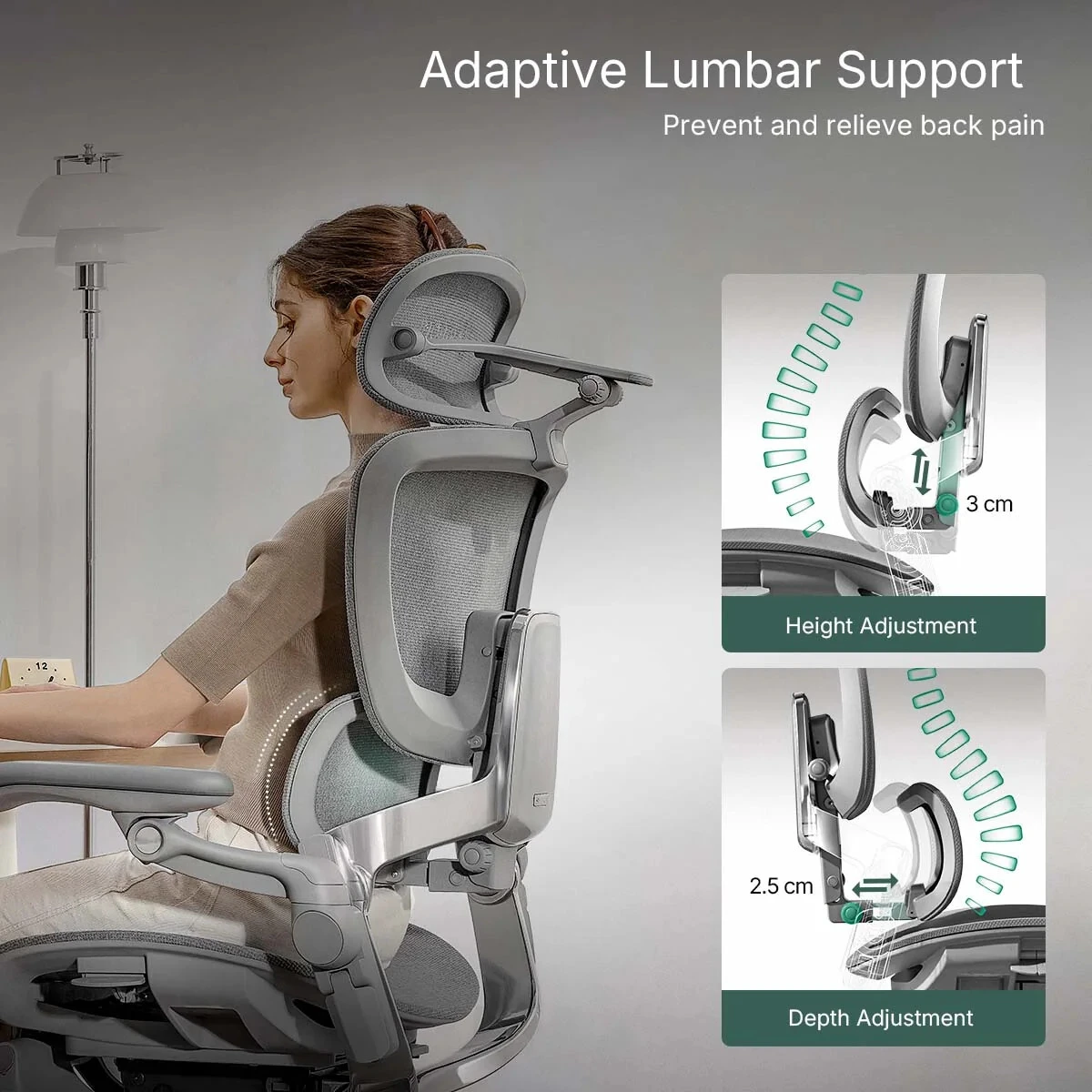
Hinomi H2 Pro adaptive lumbar support height and depth adjustment

The H2 Pro uses an independently adjustable lumbar system with approximately 3 cm of height adjustment and 2.5 cm of depth adjustment. The support is designed to respond as your seated position changes while still giving you control over where and how prominently it contacts the lower back.

Forward Tilt for More Engaged Tasking
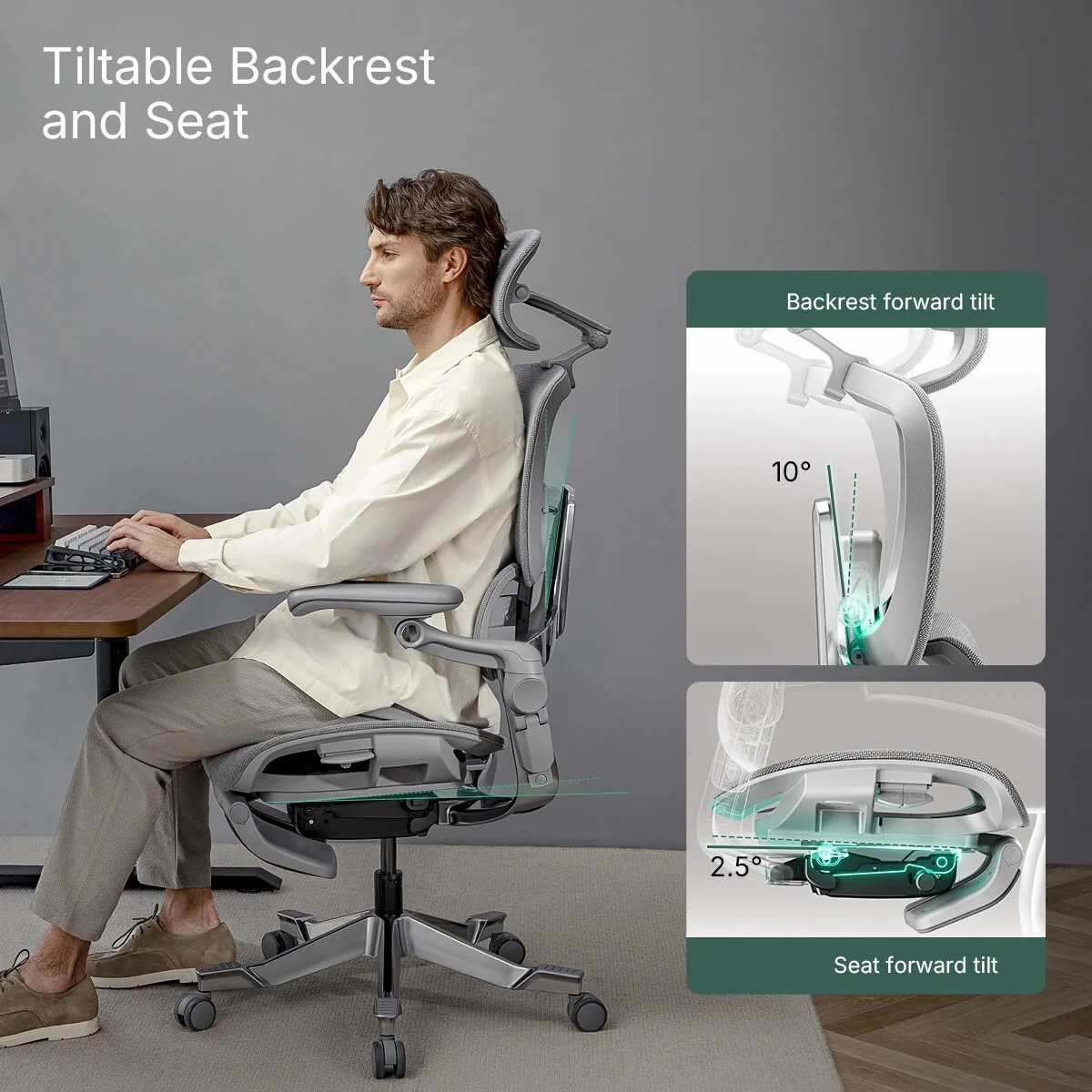
Hinomi H2 Pro forward tilting backrest and seat adjustment

The upper backrest can tilt forward approximately 10°, while the seat provides approximately 2.5° of forward tilt. This gives users another positioning option for typing, detailed computer work and other tasks where a more engaged posture is preferred.
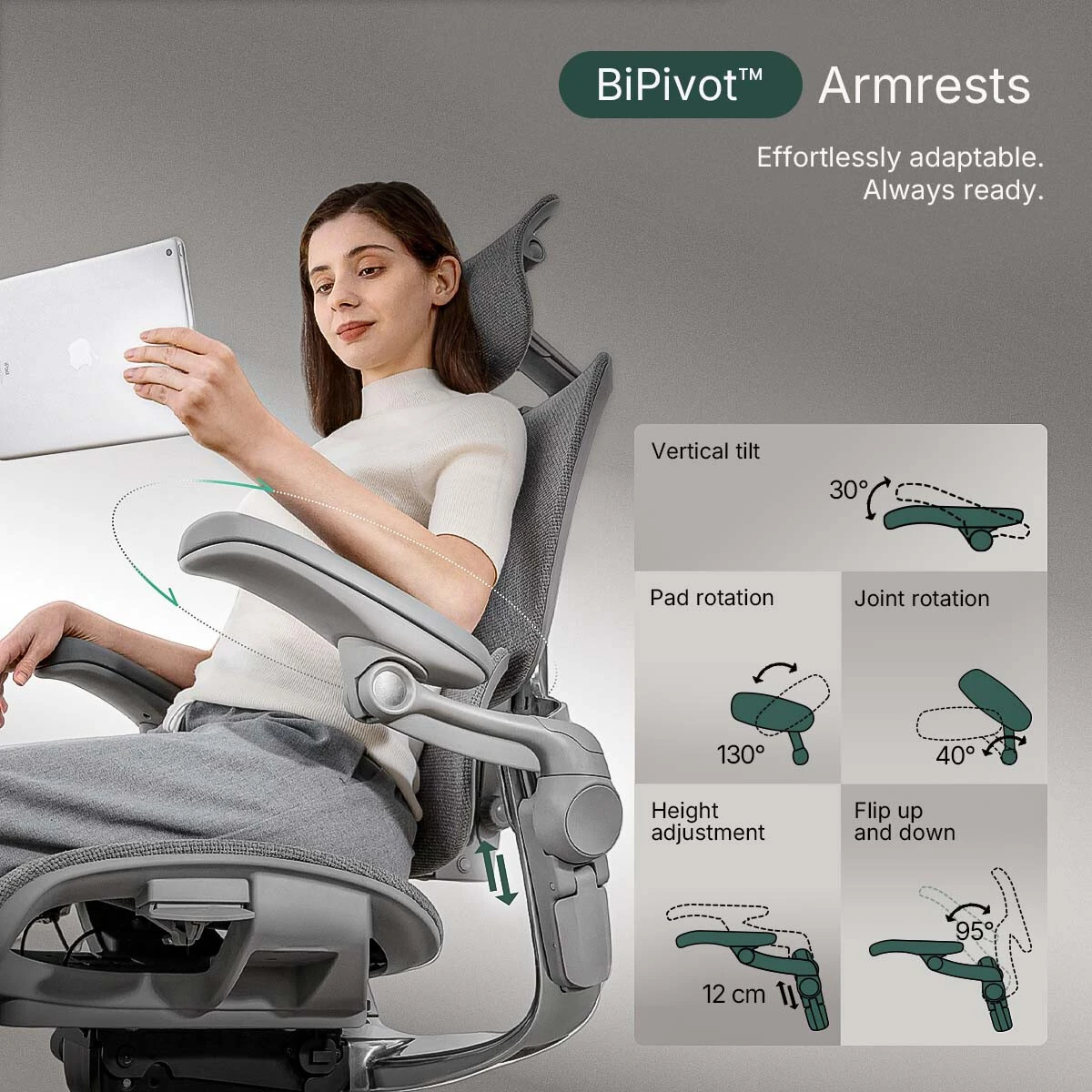
Hinomi H2 Pro BiPivot adjustable armrests

BiPivot Adjustable Armrests

The multi-direction armrests provide substantial positioning range so the arm pads can be brought closer to the body, repositioned for different tasks, or flipped up when you want them out of the way.
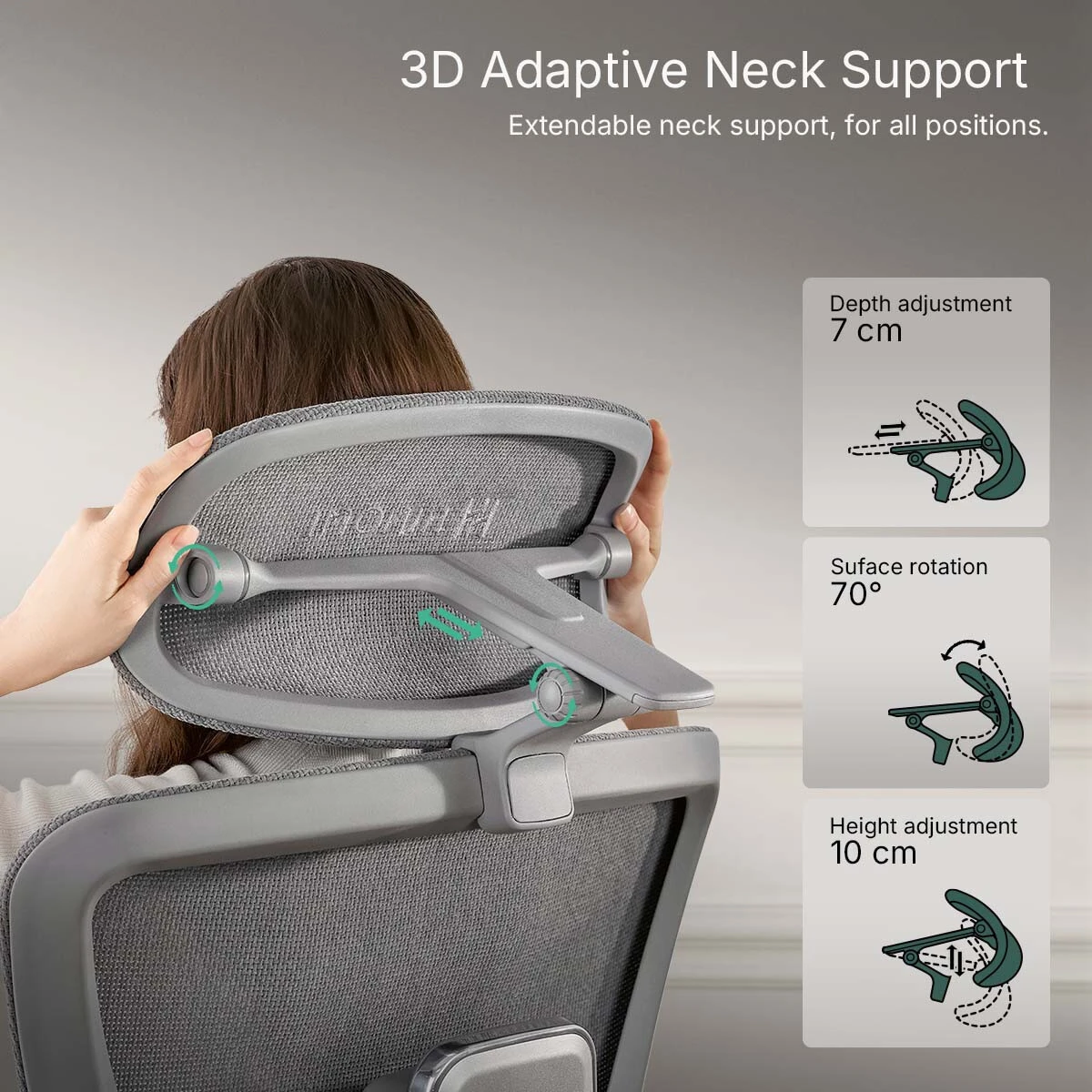
Hinomi H2 Pro adjustable headrest and neck support

3D Adaptive Neck Support

Height, depth and rotational adjustment help position the headrest for different torso lengths, head positions and reclining angles rather than locking the user into one fixed location.
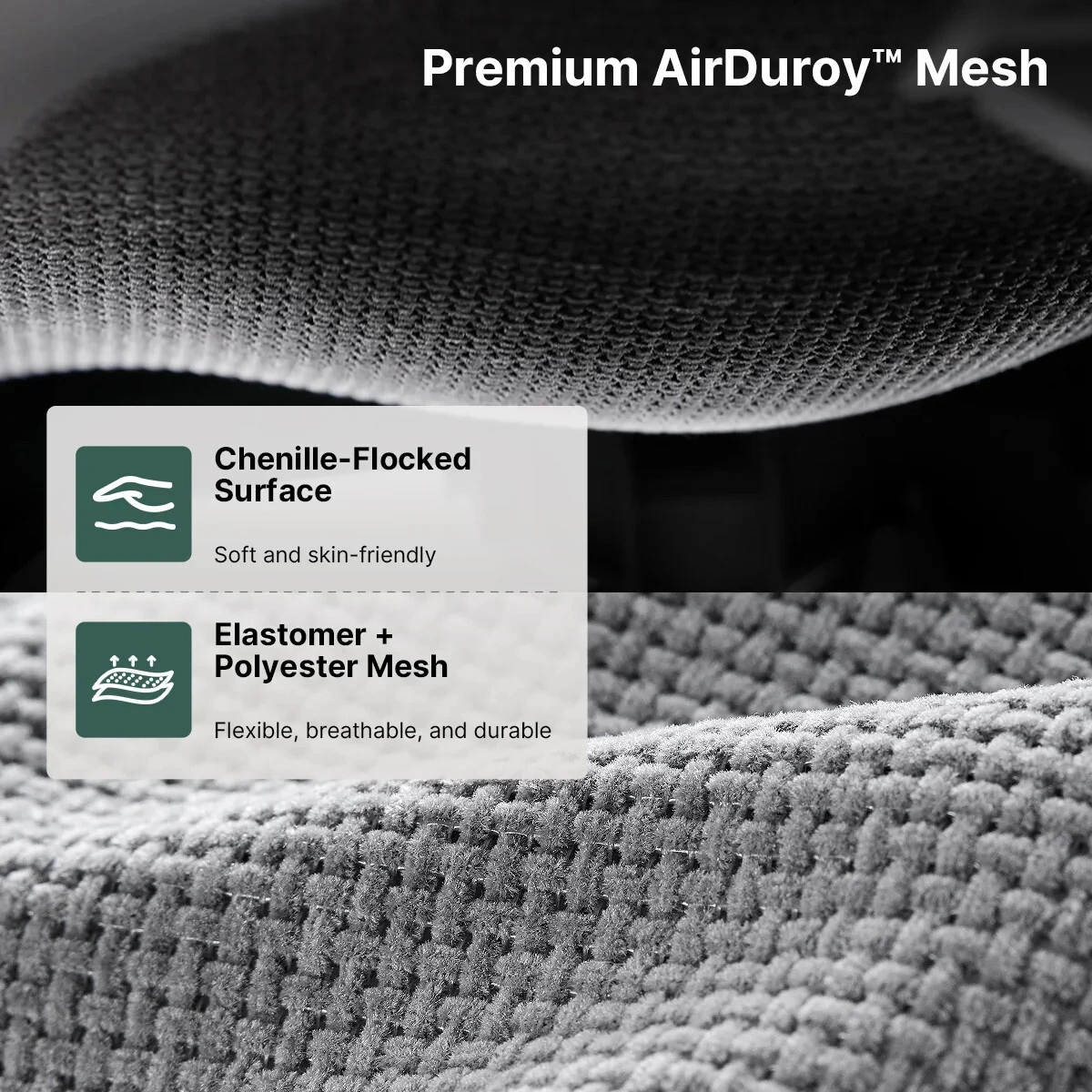
Hinomi H2 Pro breathable mesh material construction

Breathable Mesh Construction

The H2 Pro uses a breathable, flexible mesh seating surface across the seat and backrest, providing airflow while allowing the chair's support surfaces to move with the user.
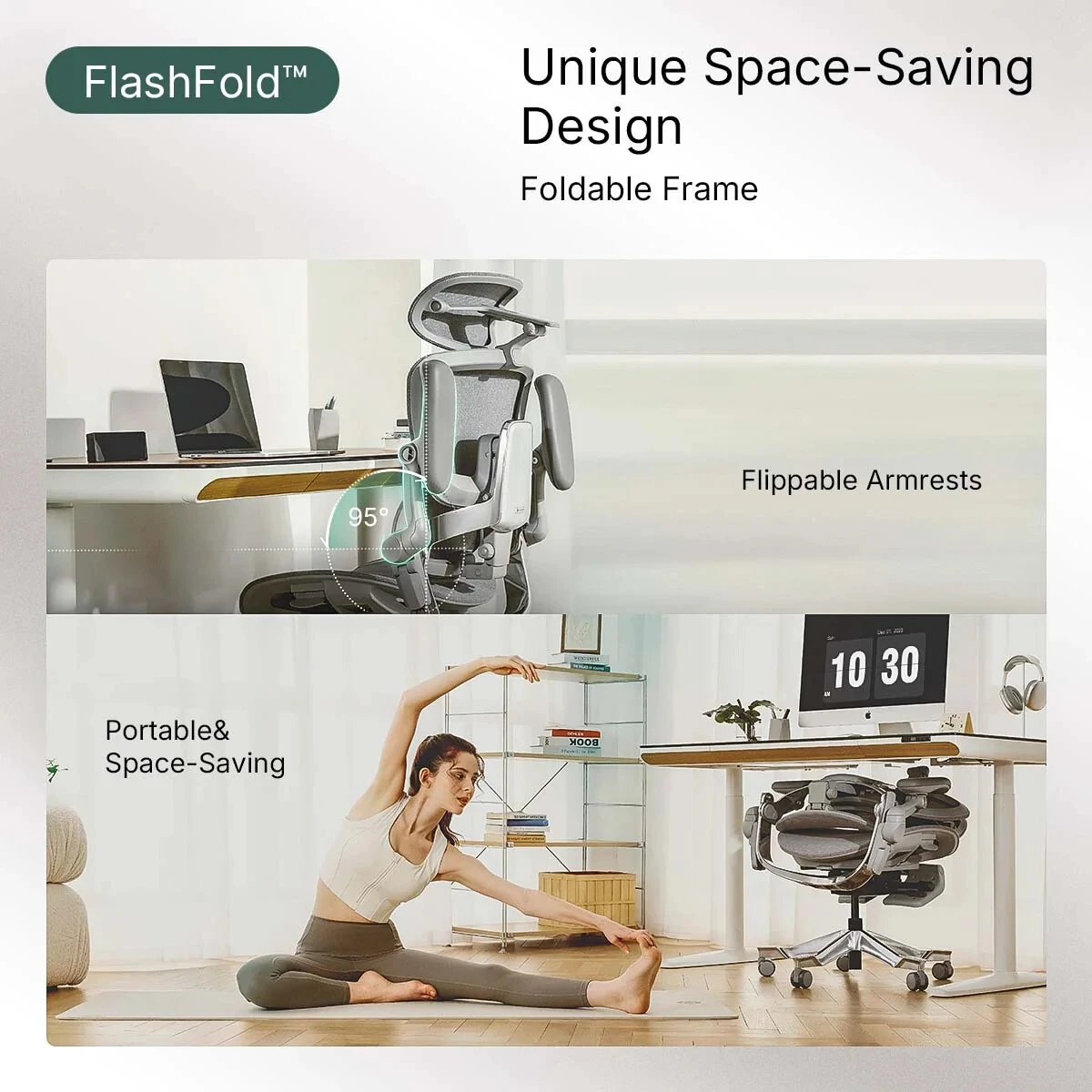
Hinomi H2 Pro FlashFold folding space-saving frame

FlashFold™ Space-Saving Design

The folding frame and flip-up armrests can reduce the chair's footprint when it needs to be stored or moved closer beneath a desk.
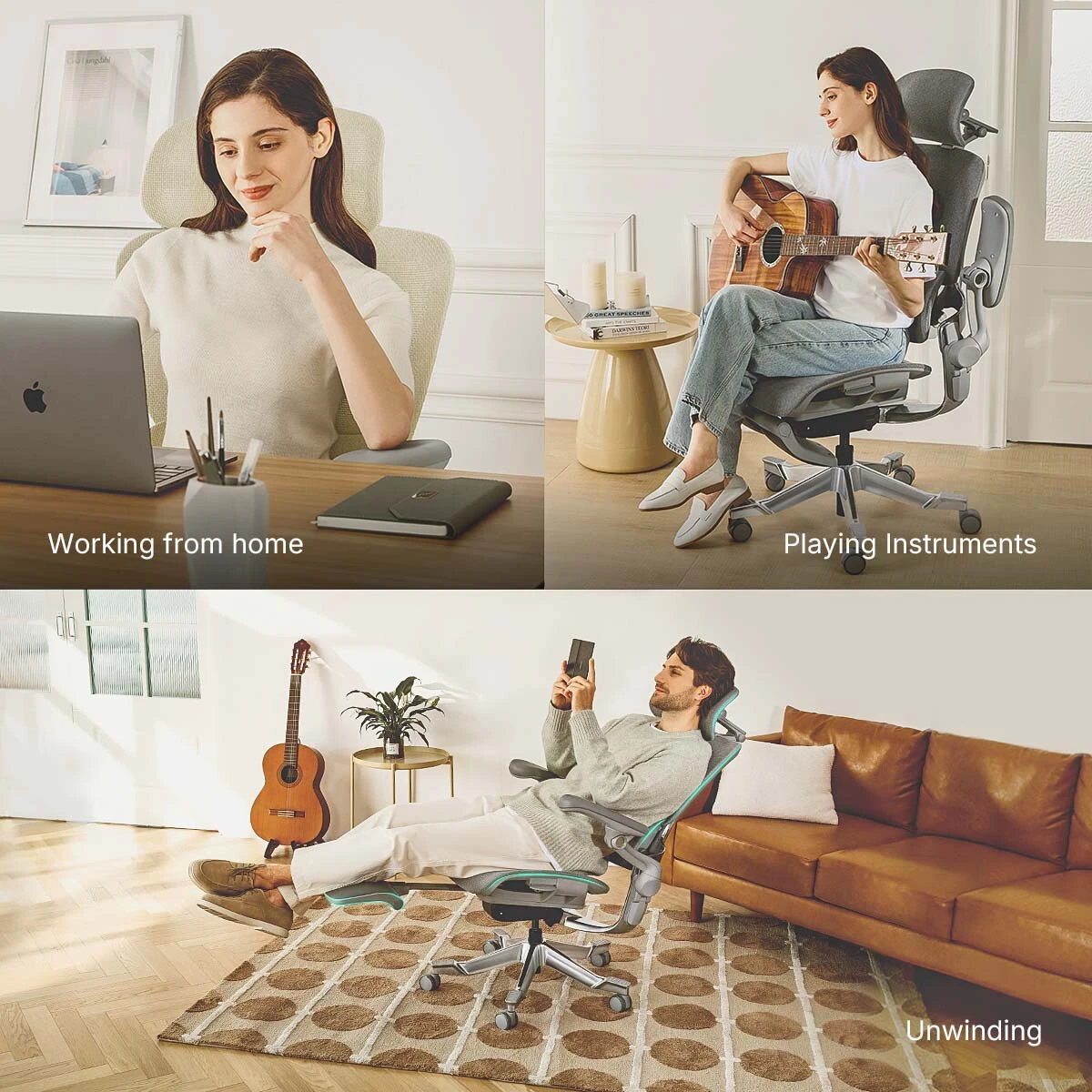
Hinomi H2 Pro used for work and other seated activities

From Focused Work to Deeper Recline

The H2 Pro is designed for more than one sitting position, combining task-oriented adjustments with a broad recline range for work and more relaxed sitting.
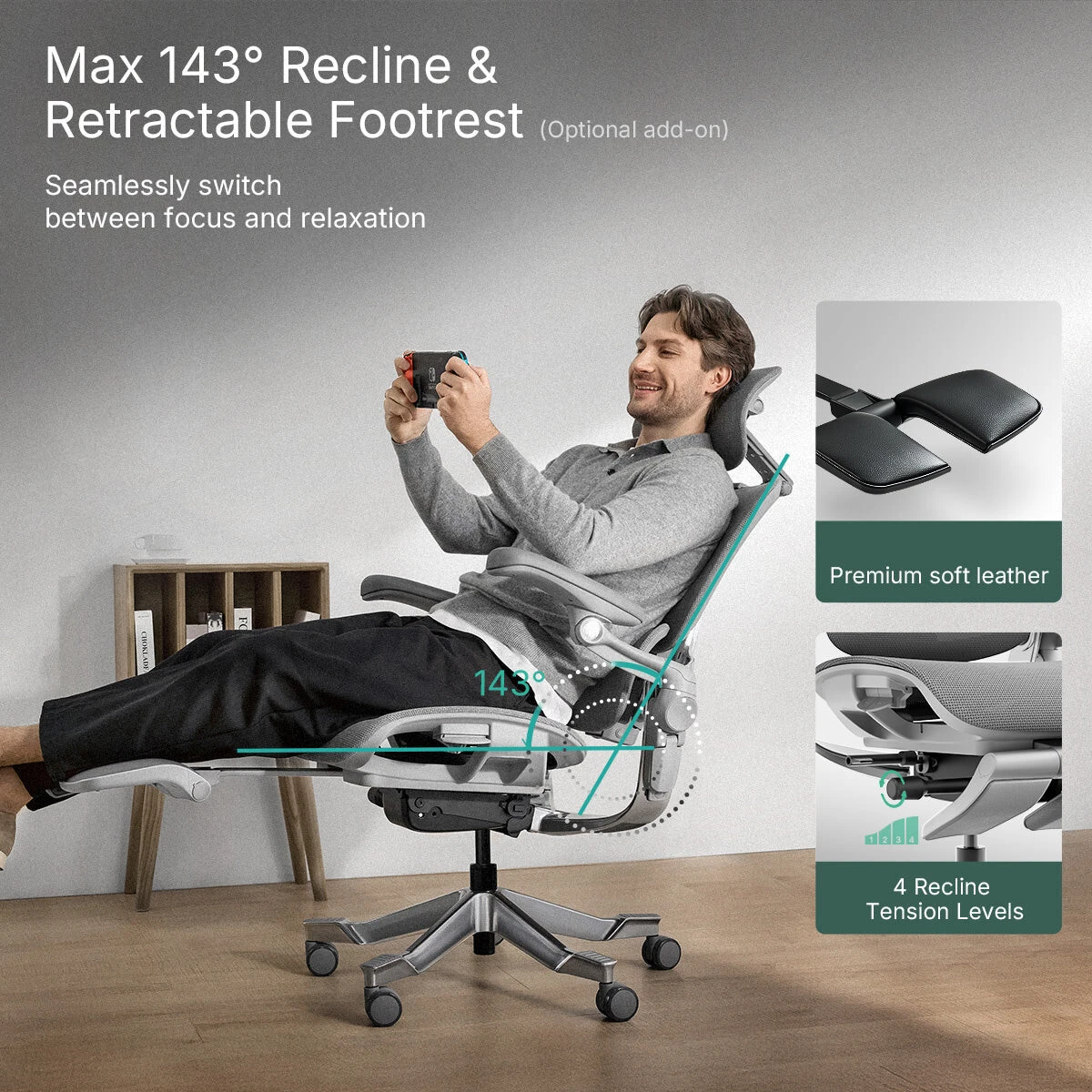
Hinomi H2 Pro reclining with optional retractable legrest

Up to 143° Recline & Optional Legrest

The H2 Pro reclines up to approximately 143° with adjustable tension and locking positions. An attached retractable legrest is available on selected configurations for relaxed sitting.

HPS Fit Note: The attached legrest is a comfort feature and does not replace stable under-desk foot support for tasking.

Compare the Hinomi H2 Pro vs Ergohuman 2 vs X-Chair X2

These three chairs approach ergonomic support differently. Use the comparison below as a starting point, then consider body proportions, workstation setup and the adjustments you are most likely to use.

Feature Hinomi H2 Pro Raynor Ergohuman 2 GEN2 X-Chair X2 Management
Overall Design Highly adjustable mesh chair with forward tilt, adaptive lumbar and deep recline Mesh ergonomic task chair with synchronized adjustments Mesh management chair with dynamic lumbar-focused design
Lumbar Support Independent adaptive lumbar with height and depth adjustment Integrated lumbar support Dynamic Variable Lumbar support
Armrests BiPivot multi-direction adjustment with flip-up capability Multi-adjustable armrests Adjustable armrests
Seat Adjustable depth with forward-tilt capability Adjustable seat positioning Mesh seat with adjustment
Headrest Adjustable height, depth and rotation Adjustable headrest on applicable configuration Headrest depends on configuration
Recline Up to approximately 143° with tension/locking adjustment Multi-position recline Recline with tension adjustment
Legrest Optional retractable legrest Not a standard feature Not a standard feature
Best Starting Point Extensive adjustability and multiple sitting positions Traditional ergonomic task-chair experience Dynamic lumbar-oriented support

Competitor features and configurations may change. Confirm current manufacturer specifications and options before purchase.

Specifications & Dimensions
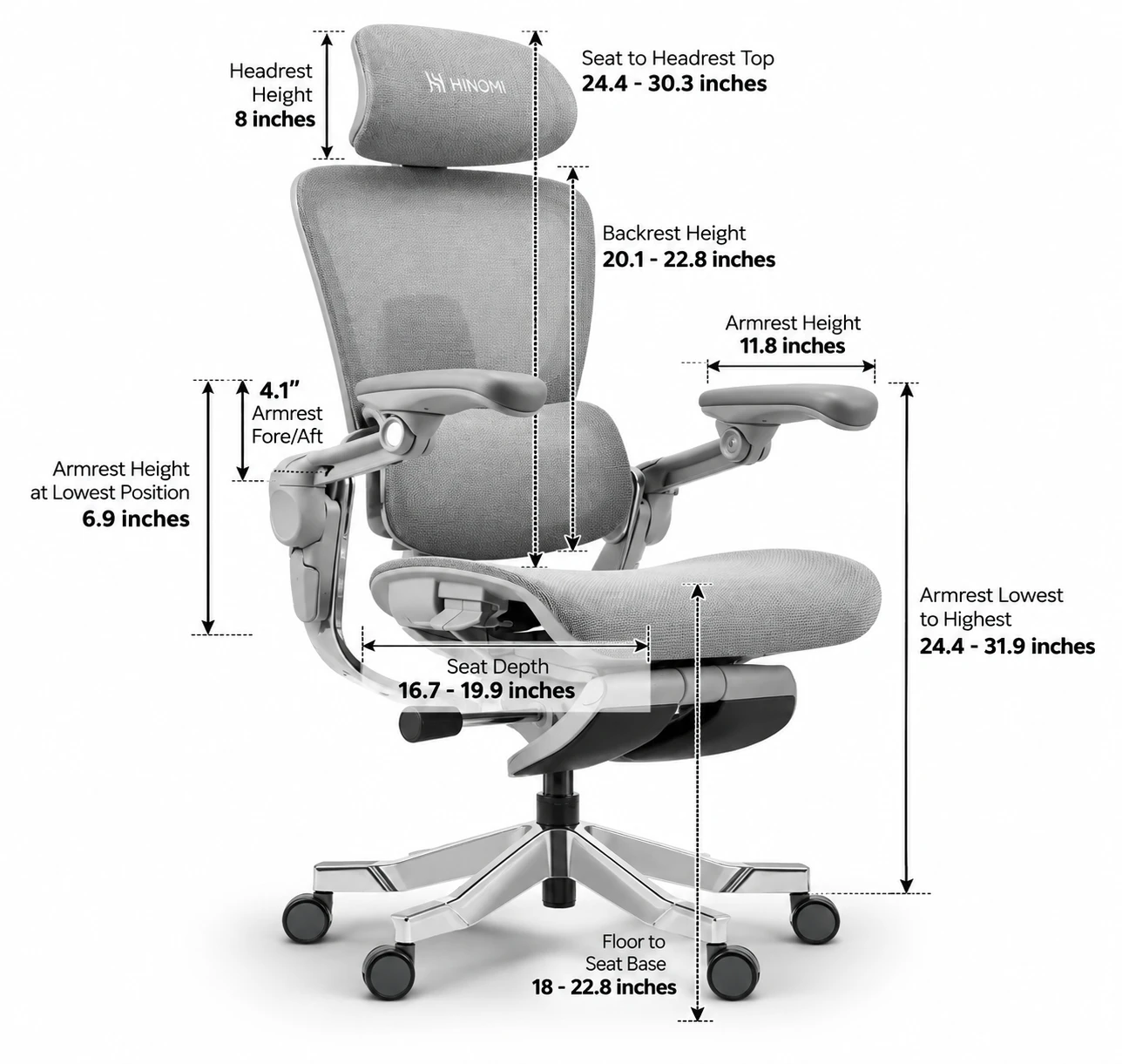
Hinomi H2 Pro side view chair dimensions and adjustment ranges
Fit & Seat
Published User Height
155–200 cm / approx. 5'1"–6'7"
Maximum Load
150 kg / 330 lb
Seat Width
53 cm
Seat Depth
42.5–50.5 cm
Seat Forward Tilt
Approx. 2.5°
Gas Lift
Class 4; approx. 12 cm adjustment range
Back, Lumbar & Recline
Lumbar
Independent adaptive support
Lumbar Height
Approx. 3 cm
Lumbar Depth
Approx. 2.5 cm
Upper Backrest Tilt
Approx. 10° forward
Backrest Height
5 settings
Recline
Up to approx. 143°; adjustable tension and locking positions
Headrest & Armrests
Headrest
Height, depth and rotational adjustment
Headrest Depth
Approx. 7 cm
Armrests
BiPivot multi-direction adjustable
Armrest Height Range
Approx. 12 cm
Armrest Width Range
Approx. 59–84 cm overall
Flip-Up Range
Approx. 95°
Construction & Configuration
Frame / Base
Aluminum alloy
Upholstery
Breathable mesh construction
Adjustments
19 adjustment points
Foldable Frame
Yes
Legrest
Optional retractable configuration
Assembly
Approx. 20–30 minutes; tools included

Published dimensions and adjustment ranges are based on manufacturer information and may be updated. Individual fit varies with body proportions and workstation setup.

H2 Pro Assembly & Adjustment Videos

Watch the official Hinomi guides directly on this page for help assembling the chair and learning its key adjustments.

H2 Pro Assembly Guide

Official Hinomi assembly video.

H2 Pro Usage & Adjustment Guide

Official Hinomi guide to the chair's adjustments and controls.

Frequently Asked Questions

Is the Hinomi H2 Pro difficult to adjust?

It offers many adjustments, but most users can start with the basic fit settings and fine-tune the chair over time.

What height range is the H2 Pro designed for?

Hinomi publishes a range of approximately 155–200 cm. Height is only a starting point; seat depth, body proportions, arm position and workstation height also affect fit.

Does the H2 Pro have adjustable lumbar support?

Yes. The independent lumbar support provides approximately 3 cm of height adjustment and 2.5 cm of depth adjustment and is designed to respond as sitting position changes.

Does the H2 Pro recline?

Yes. It reclines up to approximately 143° with adjustable tension and locking positions.

Should I choose the H2 Pro with the attached legrest?

Choose it if you expect to use the chair for deeper recline and the legrest fits your proportions comfortably. It is an optional comfort feature and does not replace stable under-desk foot support for tasking.

Can I use an under-desk footrest with the H2 Pro?

Yes. If the chair needs to be raised for your desk and your feet no longer rest comfortably on the floor, a properly positioned under-desk footrest can provide stable lower-body support.

Warranty, Shipping & Assembly

The Hinomi H2 Pro is covered by the applicable Hinomi manufacturer warranty. Hinomi advertises warranty coverage of up to 10 years; coverage varies by component and applicable warranty terms.

Why Buy the Hinomi H2 Pro from Healthy Posture Store?

Real-World Fit Guidance

We look beyond feature counts and published height ranges to consider seat depth, body proportions, arm position, desk height, foot support and how you actually work.

Chicago Showroom

Try ergonomic seating in person and get help understanding how chair adjustments work together with your workstation. Showroom models are subject to availability.

Online & Nationwide

Shop from an ergonomic retailer that supports customers beyond the showroom, including individual, business and project purchases.

Fit Before Feature Count

The chair with the longest feature list is not automatically the best chair. Our goal is to help you choose and configure the chair that works for your body and workstation.

Need Help Deciding if the H2 Pro Fits You?

Healthy Posture Store can help you think through chair fit, workstation height, foot support and the adjustments that matter most for the way you work.

Hinomi H2 Pro Ergonomic Office Chair

Extensive Adjustability for Work, Movement & Recline

The Hinomi H2 Pro combines a highly adjustable mesh design with independent lumbar support, forward-tilt capability, BiPivot armrests, adjustable head and neck support, and deep recline. Its strength is not one feature alone, but the range available to configure the chair around the way you sit and work.

19 Adjustment Points Adaptive Lumbar Forward Tilt Up to 143° Recline

Who Is the Hinomi H2 Pro Best For?

Users who value adjustability

Useful for customers who want meaningful control over seat depth, lumbar position, arm support, headrest position, backrest height and recline.

Shared or changing work setups

The broad adjustment range can be helpful when a chair needs to accommodate different tasks, sitting positions or more than one user.

Mesh-chair shoppers

A strong option for customers who prefer a breathable mesh seating surface rather than a heavily cushioned task chair.

Work plus deeper recline

The H2 Pro moves beyond upright task seating with adjustable recline and an optional retractable legrest for relaxed sitting.

HPS Real-World Fit

Fit the Chair to the Workstation — Not Height Alone

Hinomi publishes a broad user-height range for the H2 Pro, but height alone does not determine chair fit. Seat depth, leg and torso proportions, arm position, desk height, keyboard and mouse position, and foot support all matter.

At a standard fixed-height desk, many users need to raise the chair to bring their arms into a better working position. If that leaves the feet unsupported, a separate under-desk footrest can become an important part of the workstation setup.

A great ergonomic chair only works when you're actually sitting in it correctly. The goal is to configure the chair and workstation so you can remain supported while actually working.

19 Adjustments. Set It Up Your Way.

Hinomi H2 Pro ergonomic chair showing its range of adjustable positions

The H2 Pro offers extensive adjustability, but you don't need to master everything at once. Like a new car, you'll explore the controls at first, find the settings that work for you, and soon the chair simply becomes familiar.

Adaptive Lumbar Support

Hinomi H2 Pro adaptive lumbar support height and depth adjustment

The H2 Pro uses an independently adjustable lumbar system with approximately 3 cm of height adjustment and 2.5 cm of depth adjustment. The support is designed to respond as your seated position changes while still giving you control over where and how prominently it contacts the lower back.

Forward Tilt for More Engaged Tasking

Hinomi H2 Pro forward tilting backrest and seat adjustment

The upper backrest can tilt forward approximately 10°, while the seat provides approximately 2.5° of forward tilt. This gives users another positioning option for typing, detailed computer work and other tasks where a more engaged posture is preferred.

Hinomi H2 Pro BiPivot adjustable armrests

BiPivot Adjustable Armrests

The multi-direction armrests provide substantial positioning range so the arm pads can be brought closer to the body, repositioned for different tasks, or flipped up when you want them out of the way.

Hinomi H2 Pro adjustable headrest and neck support

3D Adaptive Neck Support

Height, depth and rotational adjustment help position the headrest for different torso lengths, head positions and reclining angles rather than locking the user into one fixed location.

Hinomi H2 Pro breathable mesh material construction

Breathable Mesh Construction

The H2 Pro uses a breathable, flexible mesh seating surface across the seat and backrest, providing airflow while allowing the chair's support surfaces to move with the user.

Hinomi H2 Pro FlashFold folding space-saving frame

FlashFold™ Space-Saving Design

The folding frame and flip-up armrests can reduce the chair's footprint when it needs to be stored or moved closer beneath a desk.

Hinomi H2 Pro used for work and other seated activities

From Focused Work to Deeper Recline

The H2 Pro is designed for more than one sitting position, combining task-oriented adjustments with a broad recline range for work and more relaxed sitting.

Hinomi H2 Pro reclining with optional retractable legrest

Up to 143° Recline & Optional Legrest

The H2 Pro reclines up to approximately 143° with adjustable tension and locking positions. An attached retractable legrest is available on selected configurations for relaxed sitting.

HPS Fit Note: The attached legrest is a comfort feature and does not replace stable under-desk foot support for tasking.

Compare the Hinomi H2 Pro vs Ergohuman 2 vs X-Chair X2

These three chairs approach ergonomic support differently. Use the comparison below as a starting point, then consider body proportions, workstation setup and the adjustments you are most likely to use.

Feature Hinomi H2 Pro Raynor Ergohuman 2 GEN2 X-Chair X2 Management
Overall Design Highly adjustable mesh chair with forward tilt, adaptive lumbar and deep recline Mesh ergonomic task chair with synchronized adjustments Mesh management chair with dynamic lumbar-focused design
Lumbar Support Independent adaptive lumbar with height and depth adjustment Integrated lumbar support Dynamic Variable Lumbar support
Armrests BiPivot multi-direction adjustment with flip-up capability Multi-adjustable armrests Adjustable armrests
Seat Adjustable depth with forward-tilt capability Adjustable seat positioning Mesh seat with adjustment
Headrest Adjustable height, depth and rotation Adjustable headrest on applicable configuration Headrest depends on configuration
Recline Up to approximately 143° with tension/locking adjustment Multi-position recline Recline with tension adjustment
Legrest Optional retractable legrest Not a standard feature Not a standard feature
Best Starting Point Extensive adjustability and multiple sitting positions Traditional ergonomic task-chair experience Dynamic lumbar-oriented support

Competitor features and configurations may change. Confirm current manufacturer specifications and options before purchase.

Specifications & Dimensions

Hinomi H2 Pro side view chair dimensions and adjustment ranges
Fit & Seat
Published User Height
155–200 cm / approx. 5'1"–6'7"
Maximum Load
150 kg / 330 lb
Seat Width
53 cm
Seat Depth
42.5–50.5 cm
Seat Forward Tilt
Approx. 2.5°
Gas Lift
Class 4; approx. 12 cm adjustment range
Back, Lumbar & Recline
Lumbar
Independent adaptive support
Lumbar Height
Approx. 3 cm
Lumbar Depth
Approx. 2.5 cm
Upper Backrest Tilt
Approx. 10° forward
Backrest Height
5 settings
Recline
Up to approx. 143°; adjustable tension and locking positions
Headrest & Armrests
Headrest
Height, depth and rotational adjustment
Headrest Depth
Approx. 7 cm
Armrests
BiPivot multi-direction adjustable
Armrest Height Range
Approx. 12 cm
Armrest Width Range
Approx. 59–84 cm overall
Flip-Up Range
Approx. 95°
Construction & Configuration
Frame / Base
Aluminum alloy
Upholstery
Breathable mesh construction
Adjustments
19 adjustment points
Foldable Frame
Yes
Legrest
Optional retractable configuration
Assembly
Approx. 20–30 minutes; tools included

Published dimensions and adjustment ranges are based on manufacturer information and may be updated. Individual fit varies with body proportions and workstation setup.

H2 Pro Assembly & Adjustment Videos

Watch the official Hinomi guides directly on this page for help assembling the chair and learning its key adjustments.

H2 Pro Assembly Guide

Official Hinomi assembly video.

H2 Pro Usage & Adjustment Guide

Official Hinomi guide to the chair's adjustments and controls.

Frequently Asked Questions

Is the Hinomi H2 Pro difficult to adjust?

It offers many adjustments, but most users can start with the basic fit settings and fine-tune the chair over time.

What height range is the H2 Pro designed for?

Hinomi publishes a range of approximately 155–200 cm. Height is only a starting point; seat depth, body proportions, arm position and workstation height also affect fit.

Does the H2 Pro have adjustable lumbar support?

Yes. The independent lumbar support provides approximately 3 cm of height adjustment and 2.5 cm of depth adjustment and is designed to respond as sitting position changes.

Does the H2 Pro recline?

Yes. It reclines up to approximately 143° with adjustable tension and locking positions.

Should I choose the H2 Pro with the attached legrest?

Choose it if you expect to use the chair for deeper recline and the legrest fits your proportions comfortably. It is an optional comfort feature and does not replace stable under-desk foot support for tasking.

Can I use an under-desk footrest with the H2 Pro?

Yes. If the chair needs to be raised for your desk and your feet no longer rest comfortably on the floor, a properly positioned under-desk footrest can provide stable lower-body support.

Warranty, Shipping & Assembly

The Hinomi H2 Pro is covered by the applicable Hinomi manufacturer warranty. Hinomi advertises warranty coverage of up to 10 years; coverage varies by component and applicable warranty terms.

Why Buy the Hinomi H2 Pro from Healthy Posture Store?

Real-World Fit Guidance

We look beyond feature counts and published height ranges to consider seat depth, body proportions, arm position, desk height, foot support and how you actually work.

Chicago Showroom

Try ergonomic seating in person and get help understanding how chair adjustments work together with your workstation. Showroom models are subject to availability.

Online & Nationwide

Shop from an ergonomic retailer that supports customers beyond the showroom, including individual, business and project purchases.

Fit Before Feature Count

The chair with the longest feature list is not automatically the best chair. Our goal is to help you choose and configure the chair that works for your body and workstation.

Need Help Deciding if the H2 Pro Fits You?

Healthy Posture Store can help you think through chair fit, workstation height, foot support and the adjustments that matter most for the way you work.

Hinomi H2 Pro Ergonomic Office Chair

Extensive Adjustability for Work, Movement & Recline

The Hinomi H2 Pro combines a highly adjustable mesh design with independent lumbar support, forward-tilt capability, BiPivot armrests, adjustable head and neck support, and deep recline. Its strength is not one feature alone, but the range available to configure the chair around the way you sit and work.

19 Adjustment Points Adaptive Lumbar Forward Tilt Up to 143° Recline

Who Is the Hinomi H2 Pro Best For?

Users who value adjustability

Useful for customers who want meaningful control over seat depth, lumbar position, arm support, headrest position, backrest height and recline.

Shared or changing work setups

The broad adjustment range can be helpful when a chair needs to accommodate different tasks, sitting positions or more than one user.

Mesh-chair shoppers

A strong option for customers who prefer a breathable mesh seating surface rather than a heavily cushioned task chair.

Work plus deeper recline

The H2 Pro moves beyond upright task seating with adjustable recline and an optional retractable legrest for relaxed sitting.

HPS Real-World Fit

Fit the Chair to the Workstation — Not Height Alone

Hinomi publishes a broad user-height range for the H2 Pro, but height alone does not determine chair fit. Seat depth, leg and torso proportions, arm position, desk height, keyboard and mouse position, and foot support all matter.

At a standard fixed-height desk, many users need to raise the chair to bring their arms into a better working position. If that leaves the feet unsupported, a separate under-desk footrest can become an important part of the workstation setup.

A great ergonomic chair only works when you're actually sitting in it correctly. The goal is to configure the chair and workstation so you can remain supported while actually working.

19 Adjustments. Set It Up Your Way.

Hinomi H2 Pro ergonomic chair showing its range of adjustable positions

The H2 Pro offers extensive adjustability, but you don't need to master everything at once. Like a new car, you'll explore the controls at first, find the settings that work for you, and soon the chair simply becomes familiar.

Adaptive Lumbar Support

Hinomi H2 Pro adaptive lumbar support height and depth adjustment

The H2 Pro uses an independently adjustable lumbar system with approximately 3 cm of height adjustment and 2.5 cm of depth adjustment. The support is designed to respond as your seated position changes while still giving you control over where and how prominently it contacts the lower back.

Forward Tilt for More Engaged Tasking

Hinomi H2 Pro forward tilting backrest and seat adjustment

The upper backrest can tilt forward approximately 10°, while the seat provides approximately 2.5° of forward tilt. This gives users another positioning option for typing, detailed computer work and other tasks where a more engaged posture is preferred.

Hinomi H2 Pro BiPivot adjustable armrests

BiPivot Adjustable Armrests

The multi-direction armrests provide substantial positioning range so the arm pads can be brought closer to the body, repositioned for different tasks, or flipped up when you want them out of the way.

Hinomi H2 Pro adjustable headrest and neck support

3D Adaptive Neck Support

Height, depth and rotational adjustment help position the headrest for different torso lengths, head positions and reclining angles rather than locking the user into one fixed location.

Hinomi H2 Pro breathable mesh material construction

Breathable Mesh Construction

The H2 Pro uses a breathable, flexible mesh seating surface across the seat and backrest, providing airflow while allowing the chair's support surfaces to move with the user.

Hinomi H2 Pro FlashFold folding space-saving frame

FlashFold™ Space-Saving Design

The folding frame and flip-up armrests can reduce the chair's footprint when it needs to be stored or moved closer beneath a desk.

Hinomi H2 Pro used for work and other seated activities

From Focused Work to Deeper Recline

The H2 Pro is designed for more than one sitting position, combining task-oriented adjustments with a broad recline range for work and more relaxed sitting.

Hinomi H2 Pro reclining with optional retractable legrest

Up to 143° Recline & Optional Legrest

The H2 Pro reclines up to approximately 143° with adjustable tension and locking positions. An attached retractable legrest is available on selected configurations for relaxed sitting.

HPS Fit Note: The attached legrest is a comfort feature and does not replace stable under-desk foot support for tasking.

Compare the Hinomi H2 Pro vs Ergohuman 2 vs X-Chair X2

These three chairs approach ergonomic support differently. Use the comparison below as a starting point, then consider body proportions, workstation setup and the adjustments you are most likely to use.

Feature Hinomi H2 Pro Raynor Ergohuman 2 GEN2 X-Chair X2 Management
Overall Design Highly adjustable mesh chair with forward tilt, adaptive lumbar and deep recline Mesh ergonomic task chair with synchronized adjustments Mesh management chair with dynamic lumbar-focused design
Lumbar Support Independent adaptive lumbar with height and depth adjustment Integrated lumbar support Dynamic Variable Lumbar support
Armrests BiPivot multi-direction adjustment with flip-up capability Multi-adjustable armrests Adjustable armrests
Seat Adjustable depth with forward-tilt capability Adjustable seat positioning Mesh seat with adjustment
Headrest Adjustable height, depth and rotation Adjustable headrest on applicable configuration Headrest depends on configuration
Recline Up to approximately 143° with tension/locking adjustment Multi-position recline Recline with tension adjustment
Legrest Optional retractable legrest Not a standard feature Not a standard feature
Best Starting Point Extensive adjustability and multiple sitting positions Traditional ergonomic task-chair experience Dynamic lumbar-oriented support

Competitor features and configurations may change. Confirm current manufacturer specifications and options before purchase.

Specifications & Dimensions

Hinomi H2 Pro side view chair dimensions and adjustment ranges
Fit & Seat
Published User Height
155–200 cm / approx. 5'1"–6'7"
Maximum Load
150 kg / 330 lb
Seat Width
53 cm
Seat Depth
42.5–50.5 cm
Seat Forward Tilt
Approx. 2.5°
Gas Lift
Class 4; approx. 12 cm adjustment range
Back, Lumbar & Recline
Lumbar
Independent adaptive support
Lumbar Height
Approx. 3 cm
Lumbar Depth
Approx. 2.5 cm
Upper Backrest Tilt
Approx. 10° forward
Backrest Height
5 settings
Recline
Up to approx. 143°; adjustable tension and locking positions
Headrest & Armrests
Headrest
Height, depth and rotational adjustment
Headrest Depth
Approx. 7 cm
Armrests
BiPivot multi-direction adjustable
Armrest Height Range
Approx. 12 cm
Armrest Width Range
Approx. 59–84 cm overall
Flip-Up Range
Approx. 95°
Construction & Configuration
Frame / Base
Aluminum alloy
Upholstery
Breathable mesh construction
Adjustments
19 adjustment points
Foldable Frame
Yes
Legrest
Optional retractable configuration
Assembly
Approx. 20–30 minutes; tools included

Published dimensions and adjustment ranges are based on manufacturer information and may be updated. Individual fit varies with body proportions and workstation setup.

H2 Pro Assembly & Adjustment Videos

Watch the official Hinomi guides directly on this page for help assembling the chair and learning its key adjustments.

H2 Pro Assembly Guide

Official Hinomi assembly video.

H2 Pro Usage & Adjustment Guide

Official Hinomi guide to the chair's adjustments and controls.

Frequently Asked Questions

Is the Hinomi H2 Pro difficult to adjust?

It offers many adjustments, but most users can start with the basic fit settings and fine-tune the chair over time.

What height range is the H2 Pro designed for?

Hinomi publishes a range of approximately 155–200 cm. Height is only a starting point; seat depth, body proportions, arm position and workstation height also affect fit.

Does the H2 Pro have adjustable lumbar support?

Yes. The independent lumbar support provides approximately 3 cm of height adjustment and 2.5 cm of depth adjustment and is designed to respond as sitting position changes.

Does the H2 Pro recline?

Yes. It reclines up to approximately 143° with adjustable tension and locking positions.

Should I choose the H2 Pro with the attached legrest?

Choose it if you expect to use the chair for deeper recline and the legrest fits your proportions comfortably. It is an optional comfort feature and does not replace stable under-desk foot support for tasking.

Can I use an under-desk footrest with the H2 Pro?

Yes. If the chair needs to be raised for your desk and your feet no longer rest comfortably on the floor, a properly positioned under-desk footrest can provide stable lower-body support.

Warranty, Shipping & Assembly

The Hinomi H2 Pro is covered by the applicable Hinomi manufacturer warranty. Hinomi advertises warranty coverage of up to 10 years; coverage varies by component and applicable warranty terms.

Why Buy the Hinomi H2 Pro from Healthy Posture Store?

Real-World Fit Guidance

We look beyond feature counts and published height ranges to consider seat depth, body proportions, arm position, desk height, foot support and how you actually work.

Chicago Showroom

Try ergonomic seating in person and get help understanding how chair adjustments work together with your workstation. Showroom models are subject to availability.

Online & Nationwide

Shop from an ergonomic retailer that supports customers beyond the showroom, including individual, business and project purchases.

Fit Before Feature Count

The chair with the longest feature list is not automatically the best chair. Our goal is to help you choose and configure the chair that works for your body and workstation.

Need Help Deciding if the H2 Pro Fits You?

Healthy Posture Store can help you think through chair fit, workstation height, foot support and the adjustments that matter most for the way you work.