 773-596-5625







Showroom
Quick Ship
Bestseller

Hinomi X2 Pro Ergonomic Office Chair with Four-Panel Spinal Support
SKU: X2 Pro
Your Price
$699.00+
$899.00
Save
$200.00
Was:
$899.00+
Early Bird Black Friday Access • Fit: 5'5"–6'4" / up to 330 lbs.• Broad Shoulder & Tall Frame Preferred • 10-Year Warranty • Try in Our Chicago Showroom
Save up to 30% with HSA/FSA
*
Savings vary based on eligibility and individual tax rate.
|
Check Eligibility
Powered by
Hinomi X2 Pro Ergonomic Office Chair
Four-Panel Back Support with a Roomier Ergonomic Fit
The Hinomi X2 Pro is an ergonomic mesh office chair for home offices and professional workspaces. Its four-panel backrest provides separate upper- and lower-back support, while adjustable lumbar support, seat depth, forward seat tilt and 6D armrests help you tailor your sitting position. An aluminum-alloy frame and up to 143° recline complete its substantial design.
4-Panel Backrest Adjustable Lumbar 6D Armrests Up to 143° Recline
Who Is the Hinomi X2 Pro Best For?
Shoppers who need more room
Consider the X2 Pro if compact office chairs feel narrow through the seat, backrest or armrest area. Its 20.9-inch seat width provides a useful starting point for comparing fit.
Users who prefer segmented back support
The four-panel backrest offers a different contact and support feel from a traditional one-piece mesh back. It is worth trying if you prefer distinct upper- and lower-back support.
Home-office and workplace users
Breathable mesh and adjustable seating positions make the X2 Pro an option for computer work, meetings and other desk-based tasks.
Users who want tasking and recline options
Seat-depth adjustment, forward seat tilt and adjustable arms let you refine your working position, while the deeper recline offers a more relaxed position between tasks.
HPS Real-World Fit
Is the X2 Pro the Right Size for You?
In our Chicago showroom, customers with broader or fuller body profiles often respond well to the X2 Pro's roomier, more substantial feel. Hinomi publishes a broad recommended height range, but standing height alone does not determine whether this chair fits.
Smaller or very petite users may find the chair larger than necessary. Compare seat depth, shoulder width, torso length and armrest spacing, and check whether you can sit against the backrest with comfortable clearance behind your knees and stable foot support.
HPS fit guidance: Adjust the chair for your body and the work you actually do. Chair height, desk height, keyboard and mouse position, arm support and foot support should work together. If the desk requires a higher sitting position, a separate under-desk footrest may help provide stable foot support.
Four-Panel Backrest for Upper- and Lower-Back Support
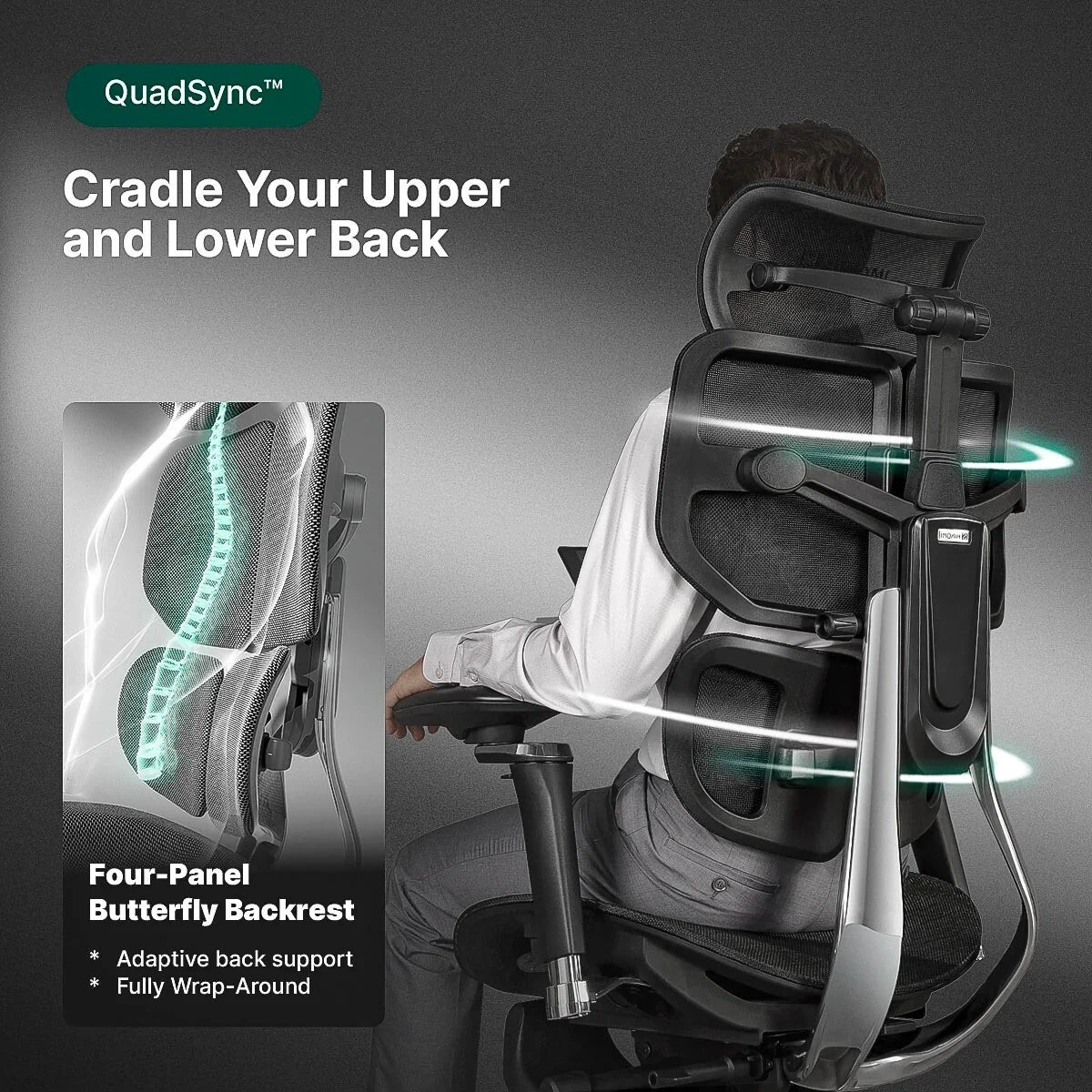
The X2 Pro divides its backrest into four sections instead of using a single continuous panel. The segmented design provides separate contact areas across the upper and lower back.
This construction gives the chair a more structured, encompassing support feel. If you are comparing it with a traditional mesh chair, pay attention to where each section contacts your back when sitting upright and reclining.
Adjustable Lumbar Support
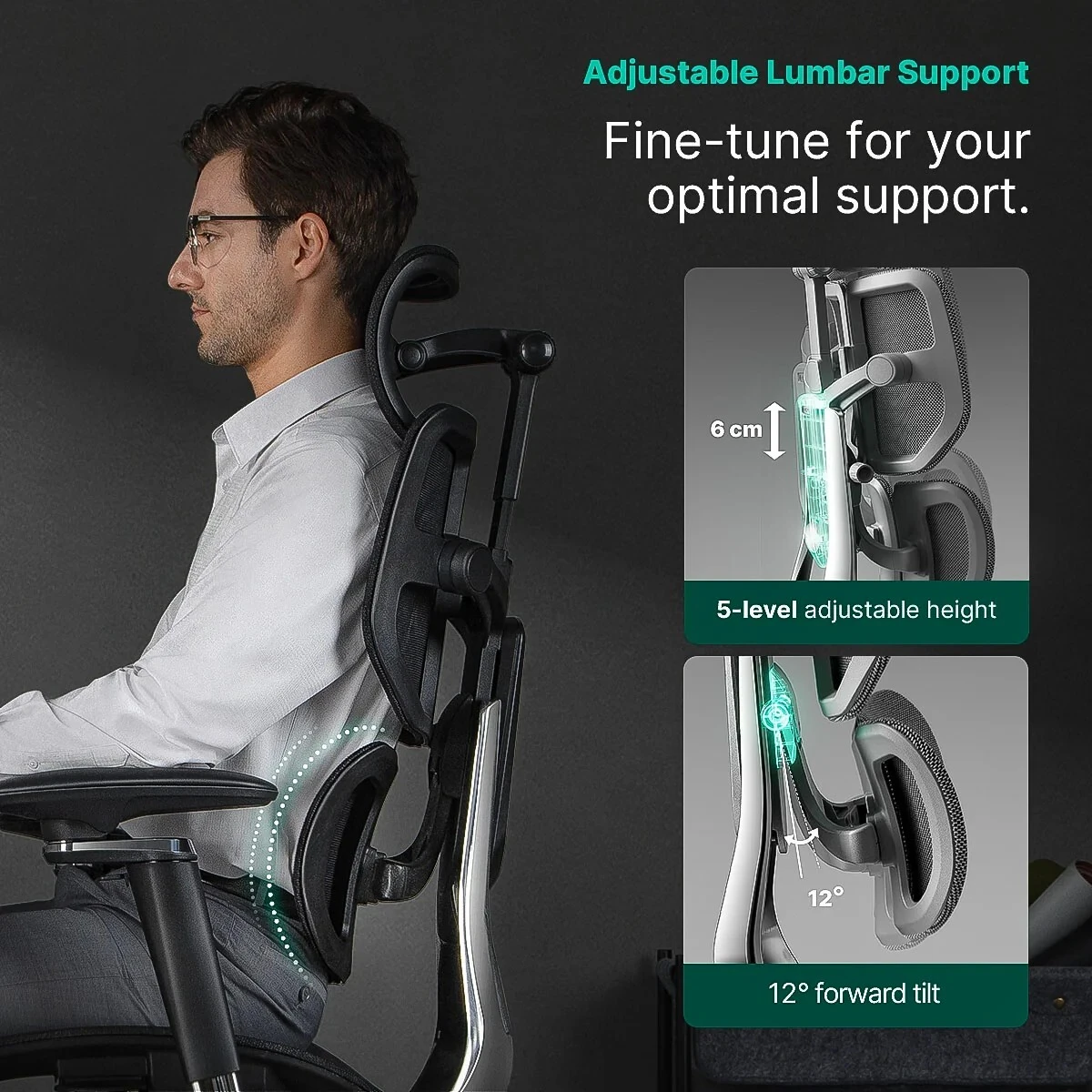
The adjustable lumbar section lets you fine-tune lower-back support within the four-panel backrest. Adjust it to suit your proportions and preferred sitting position rather than assuming the strongest setting will feel best.
HPS fit note: Establish seat height and seat depth first, then adjust the lumbar support. It should feel supportive without pushing you away from the backrest.
Adjustable Seat Depth and Forward Seat Tilt
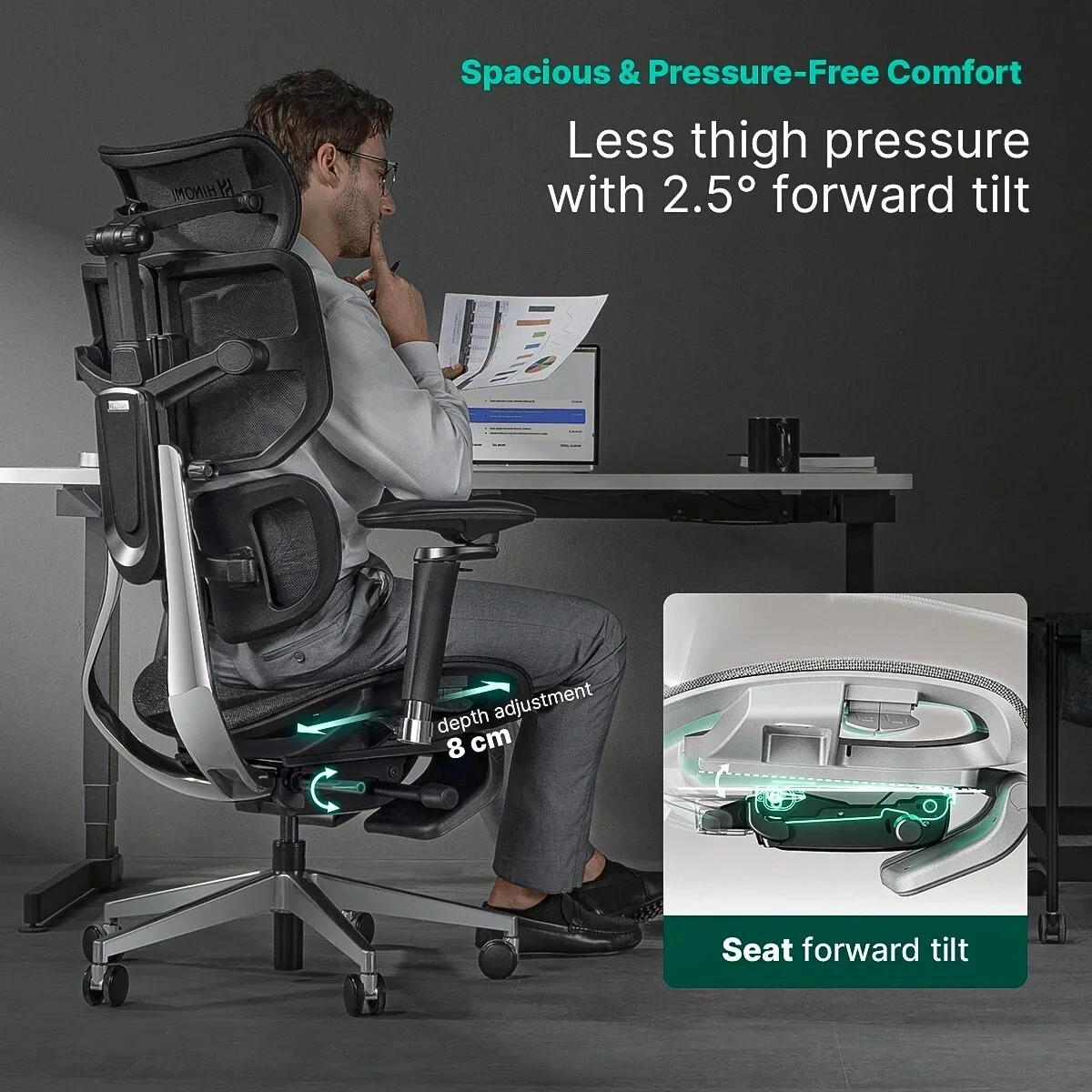
Seat-depth adjustment changes how much of your thighs the seat supports. Set the depth so you can use the backrest while leaving comfortable clearance behind your knees.
The forward seat tilt changes the seat angle for users who prefer this position during focused desk work. Coordinate it with chair height, arm support, keyboard placement and stable foot contact.
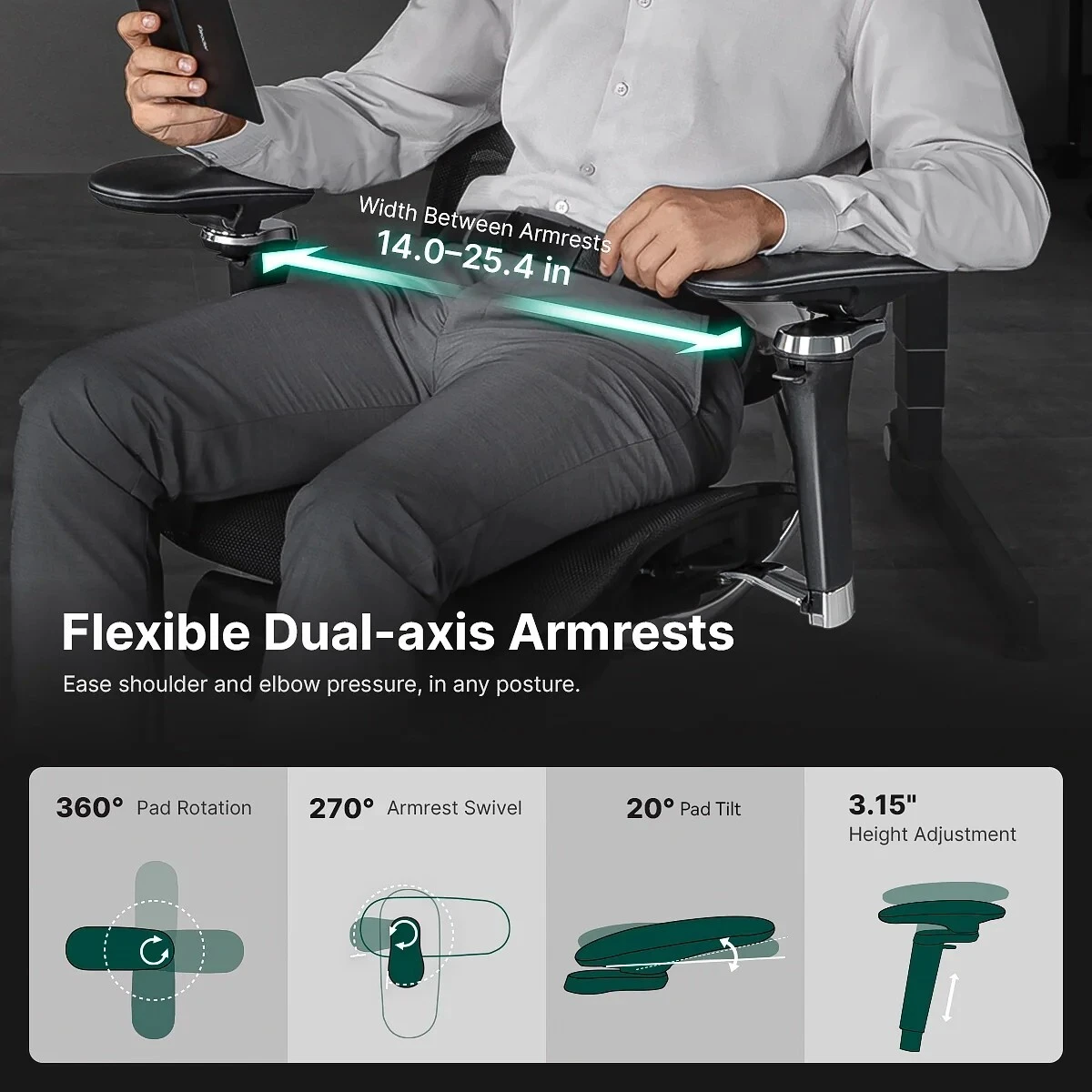
6D Adjustable Armrests
Multi-direction armrest adjustment helps position the arm pads for your shoulder width, desk setup and sitting style. Set them to support your forearms while keeping your shoulders relaxed and your keyboard and mouse within comfortable reach.
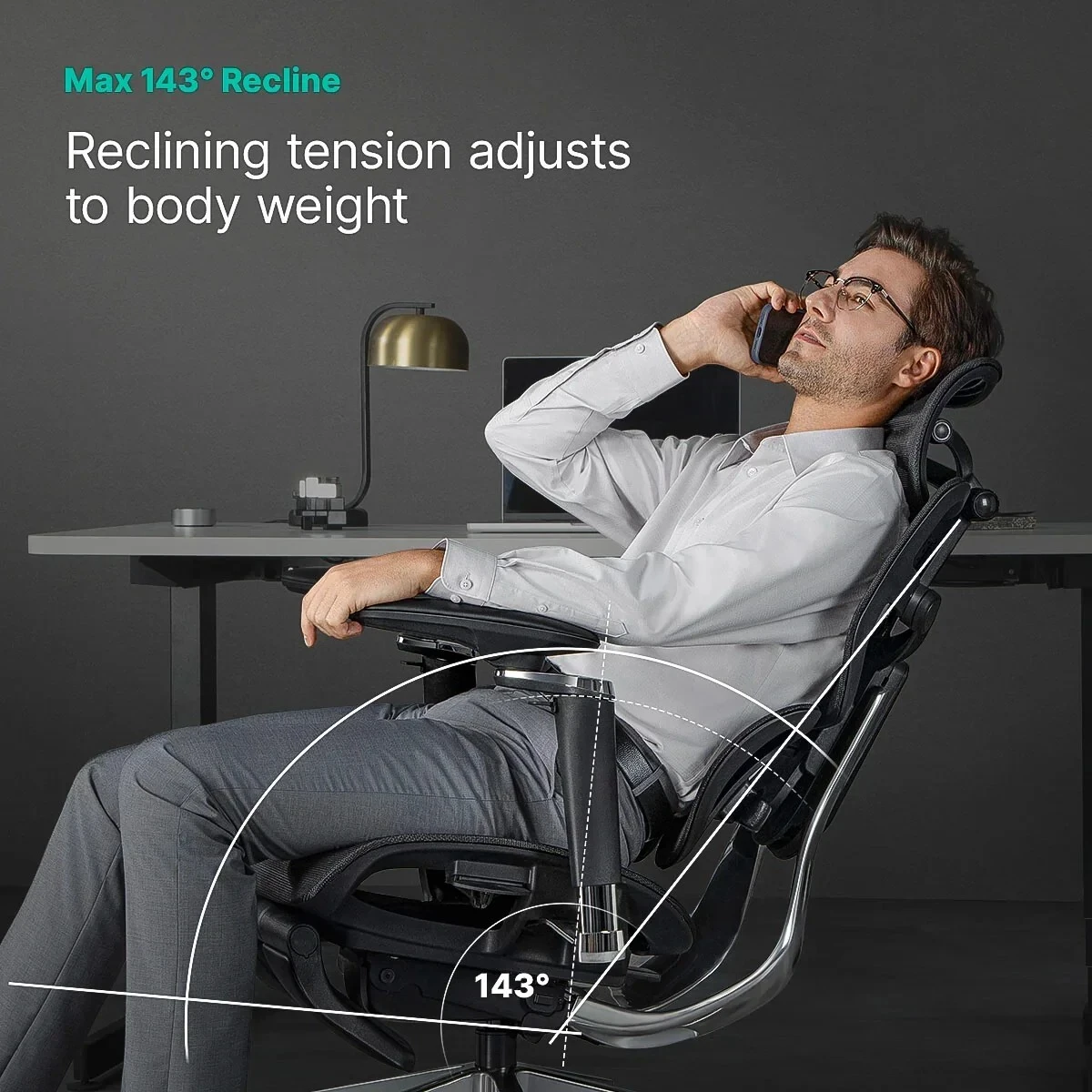
Up to 143° Recline
The X2 Pro reclines up to approximately 143° for a more relaxed sitting position between work sessions. Return to a position that keeps your screen, keyboard and mouse comfortably accessible when resuming desk work.
Comparing a New X2 Pro with a Used Aeron?
If you are choosing between a new Hinomi X2 Pro and a used Herman Miller Aeron, start with fit and support preference. The X2 Pro's four-panel backrest, seat-depth adjustment, 6D armrests and recline offer a different sitting experience.
For a used chair, check its size, condition, adjustment functions, mesh wear and warranty eligibility. For a new X2 Pro, review the applicable Hinomi manufacturer warranty and confirm that its dimensions and support feel suit you.
These are different chair designs. A similar price does not mean they will feel or fit the same, and used-chair condition and warranty eligibility vary.
Hinomi X2 Pro Specifications & Dimensions
Fit & Seat
Published User Height
155–200 cm / approx. 5'1"–6'6"
Maximum Load
330 lb / 150 kg
Seat Width
20.9"
Seat Depth
16.9"–19.9"
Floor to Seat Base
18.3"–23.0"
Forward Tilt
Approx. 2.5° seat forward tilt
Back, Lumbar & Recline
Backrest
Four-panel segmented design
Backrest Width
21.3"
Backrest Length
21.3"
Lumbar
Adjustable / floating lumbar support
Recline
Up to approx. 143°
Seat to Headrest Height
23.8"–33.3"
Headrest & Armrests
Headrest Width
15.6"
Headrest Length
7.7"
Armrests
6D multi-direction adjustable
Armrest Length
10.2"
Armrest Height Range
27.2"–35.4"
Inside Arm Width
14"–25.4"
Construction & Configuration
Frame
Aluminum alloy (ADC12)
Chair Base
Aluminum alloy (ADC12)
Gas Lift
Class 4 hydraulic gas piston
Upholstery
Wear-resistant breathable mesh
Item Weight
Approx. 56.66 lb / 25.7 kg
Verification
Verified by TÜV according to BIFMA standards
Published dimensions and height ranges are based on manufacturer information and may be updated. The recommended height range is a starting point, not a guarantee of fit. Individual fit varies with body proportions and workstation setup.
Hinomi X2 Pro Videos
Explore the chair's features and review setup and adjustment guidance before making your final fit adjustments.
Hinomi X2 Pro Video Guide
Get familiar with the X2 Pro and its key adjustments.
X2 Pro Setup & Usage
Review additional guidance on the chair and its controls.
Hinomi X2 Pro FAQ
Is the Hinomi X2 Pro suitable for larger users?
The X2 Pro is worth considering for broader body profiles, with a 20.9-inch seat width, adjustable armrest spacing and a published maximum load of 330 lb. Check seat depth, backrest contact and arm positioning as well as weight capacity to determine whether it fits you.
Is the X2 Pro a good choice for petite users?
Some smaller users may find it oversized. Although Hinomi publishes a broad recommended height range, torso length, thigh length, shoulder width and workstation height also affect fit. HPS can help you compare the X2 Pro with more compact chairs.
What makes the four-panel backrest different?
The backrest uses four sections rather than one continuous panel, providing separate contact areas across the upper and lower back. This creates a more segmented support feel that is best evaluated by sitting in the chair.
Does the X2 Pro have adjustable seat depth and forward tilt?
Yes. Seat-depth adjustment lets you change thigh support and clearance behind your knees. Forward seat tilt changes the seat angle for users who prefer that position during desk work.
What do the 6D armrests help you adjust?
The multi-direction armrests offer several positioning options to help match your shoulder width, desk setup and sitting style. Adjust them so your forearms feel supported without raising your shoulders or limiting access to your keyboard and mouse.
How far does the Hinomi X2 Pro recline?
The X2 Pro reclines up to approximately 143° for relaxed sitting between tasks. Your working position should still allow comfortable access to your screen, keyboard and mouse.
How does a new X2 Pro compare with a used Herman Miller Aeron?
The chairs have different backrest designs, adjustment systems and fit characteristics. Compare how each supports your body, then consider condition, available adjustments and applicable warranty coverage. Inspect a used chair for mesh and mechanism wear before purchasing.
Can I try the Hinomi X2 Pro in Chicago?
Visit Healthy Posture Store at 2554 W. Lawrence Ave., Chicago, IL 60625, to compare chair fit and adjustments. Call 773-596-5625 before your visit to confirm X2 Pro showroom availability and arrange fitting assistance.
Does Healthy Posture Store ship the X2 Pro?
Yes. Free standard ground shipping is available within the contiguous 48 United States. Alaska, Hawaii and Puerto Rico are excluded from this free-shipping offer. Contact HPS to discuss delivery options outside the lower 48.
What warranty applies to the X2 Pro?
The applicable Hinomi manufacturer warranty provides coverage of up to 10 years, subject to component-specific terms, exclusions and any registration or extension requirements. Review the warranty terms applicable to your purchase for full details.
Does the X2 Pro require assembly?
Yes. Follow the included assembly instructions and manufacturer setup guidance before using the chair. Contact HPS if you need to discuss local delivery and assembly options.
Warranty, Shipping & Assembly
Manufacturer warranty: The Hinomi X2 Pro is covered by the applicable Hinomi manufacturer warranty, with coverage of up to 10 years. Coverage varies by component and is subject to the manufacturer's terms, exclusions and any registration or extension requirements.
Shipping: Free standard ground shipping is available within the contiguous 48 United States. Alaska, Hawaii and Puerto Rico are excluded from this offer. Refer to the availability message above for the current estimated dispatch time; transit time is additional and varies by destination.
Assembly: Assembly is required. Follow the included instructions and manufacturer video guidance. Chicago-area customers can contact HPS to discuss local delivery and assembly availability and pricing.
Why Buy the Hinomi X2 Pro from Healthy Posture Store?
Practical showroom fit guidance
Our recommendations draw on how chairs fit actual customers, including differences in seat depth, back support and armrest position.
Help with your complete workstation
We consider the relationship between your chair, desk, screen, keyboard, mouse and foot support when helping you evaluate fit.
Chicago chair comparisons
Compare ergonomic chairs at our Lincoln Square showroom. Contact us before visiting to confirm the models you would like to try.
Support for customers nationwide
Shop with a specialist ergonomic retailer offering nationwide customer assistance and free standard ground shipping within the lower 48 states.
Get Help Finding Your X2 Pro Fit
Tell us your height, sitting preferences and desk setup so we can help you assess the X2 Pro. For fitting assistance or to arrange a Chicago showroom visit, call 773-596-5625 or email info@healthyposturestore.com.
Hinomi X2 Pro Ergonomic Office Chair
Four-Panel Back Support with a Roomier Ergonomic Fit
The Hinomi X2 Pro is an ergonomic mesh office chair for home offices and professional workspaces. Its four-panel backrest provides separate upper- and lower-back support, while adjustable lumbar support, seat depth, forward seat tilt and 6D armrests help you tailor your sitting position. An aluminum-alloy frame and up to 143° recline complete its substantial design.
4-Panel Backrest Adjustable Lumbar 6D Armrests Up to 143° Recline
Who Is the Hinomi X2 Pro Best For?
Shoppers who need more room
Consider the X2 Pro if compact office chairs feel narrow through the seat, backrest or armrest area. Its 20.9-inch seat width provides a useful starting point for comparing fit.
Users who prefer segmented back support
The four-panel backrest offers a different contact and support feel from a traditional one-piece mesh back. It is worth trying if you prefer distinct upper- and lower-back support.
Home-office and workplace users
Breathable mesh and adjustable seating positions make the X2 Pro an option for computer work, meetings and other desk-based tasks.
Users who want tasking and recline options
Seat-depth adjustment, forward seat tilt and adjustable arms let you refine your working position, while the deeper recline offers a more relaxed position between tasks.
HPS Real-World Fit
Is the X2 Pro the Right Size for You?
In our Chicago showroom, customers with broader or fuller body profiles often respond well to the X2 Pro's roomier, more substantial feel. Hinomi publishes a broad recommended height range, but standing height alone does not determine whether this chair fits.
Smaller or very petite users may find the chair larger than necessary. Compare seat depth, shoulder width, torso length and armrest spacing, and check whether you can sit against the backrest with comfortable clearance behind your knees and stable foot support.
HPS fit guidance: Adjust the chair for your body and the work you actually do. Chair height, desk height, keyboard and mouse position, arm support and foot support should work together. If the desk requires a higher sitting position, a separate under-desk footrest may help provide stable foot support.
Four-Panel Backrest for Upper- and Lower-Back Support
The X2 Pro divides its backrest into four sections instead of using a single continuous panel. The segmented design provides separate contact areas across the upper and lower back.
This construction gives the chair a more structured, encompassing support feel. If you are comparing it with a traditional mesh chair, pay attention to where each section contacts your back when sitting upright and reclining.
Adjustable Lumbar Support
The adjustable lumbar section lets you fine-tune lower-back support within the four-panel backrest. Adjust it to suit your proportions and preferred sitting position rather than assuming the strongest setting will feel best.
HPS fit note: Establish seat height and seat depth first, then adjust the lumbar support. It should feel supportive without pushing you away from the backrest.
Adjustable Seat Depth and Forward Seat Tilt
Seat-depth adjustment changes how much of your thighs the seat supports. Set the depth so you can use the backrest while leaving comfortable clearance behind your knees.
The forward seat tilt changes the seat angle for users who prefer this position during focused desk work. Coordinate it with chair height, arm support, keyboard placement and stable foot contact.
6D Adjustable Armrests
Multi-direction armrest adjustment helps position the arm pads for your shoulder width, desk setup and sitting style. Set them to support your forearms while keeping your shoulders relaxed and your keyboard and mouse within comfortable reach.
Up to 143° Recline
The X2 Pro reclines up to approximately 143° for a more relaxed sitting position between work sessions. Return to a position that keeps your screen, keyboard and mouse comfortably accessible when resuming desk work.
Comparing a New X2 Pro with a Used Aeron?
If you are choosing between a new Hinomi X2 Pro and a used Herman Miller Aeron, start with fit and support preference. The X2 Pro's four-panel backrest, seat-depth adjustment, 6D armrests and recline offer a different sitting experience.
For a used chair, check its size, condition, adjustment functions, mesh wear and warranty eligibility. For a new X2 Pro, review the applicable Hinomi manufacturer warranty and confirm that its dimensions and support feel suit you.
These are different chair designs. A similar price does not mean they will feel or fit the same, and used-chair condition and warranty eligibility vary.
Hinomi X2 Pro Specifications & Dimensions
Fit & Seat
Published User Height
155–200 cm / approx. 5'1"–6'6"
Maximum Load
330 lb / 150 kg
Seat Width
20.9"
Seat Depth
16.9"–19.9"
Floor to Seat Base
18.3"–23.0"
Forward Tilt
Approx. 2.5° seat forward tilt
Back, Lumbar & Recline
Backrest
Four-panel segmented design
Backrest Width
21.3"
Backrest Length
21.3"
Lumbar
Adjustable / floating lumbar support
Recline
Up to approx. 143°
Seat to Headrest Height
23.8"–33.3"
Headrest & Armrests
Headrest Width
15.6"
Headrest Length
7.7"
Armrests
6D multi-direction adjustable
Armrest Length
10.2"
Armrest Height Range
27.2"–35.4"
Inside Arm Width
14"–25.4"
Construction & Configuration
Frame
Aluminum alloy (ADC12)
Chair Base
Aluminum alloy (ADC12)
Gas Lift
Class 4 hydraulic gas piston
Upholstery
Wear-resistant breathable mesh
Item Weight
Approx. 56.66 lb / 25.7 kg
Verification
Verified by TÜV according to BIFMA standards
Published dimensions and height ranges are based on manufacturer information and may be updated. The recommended height range is a starting point, not a guarantee of fit. Individual fit varies with body proportions and workstation setup.
Hinomi X2 Pro Videos
Explore the chair's features and review setup and adjustment guidance before making your final fit adjustments.
Hinomi X2 Pro Video Guide
Get familiar with the X2 Pro and its key adjustments.
X2 Pro Setup & Usage
Review additional guidance on the chair and its controls.
Hinomi X2 Pro FAQ
Is the Hinomi X2 Pro suitable for larger users?
The X2 Pro is worth considering for broader body profiles, with a 20.9-inch seat width, adjustable armrest spacing and a published maximum load of 330 lb. Check seat depth, backrest contact and arm positioning as well as weight capacity to determine whether it fits you.
Is the X2 Pro a good choice for petite users?
Some smaller users may find it oversized. Although Hinomi publishes a broad recommended height range, torso length, thigh length, shoulder width and workstation height also affect fit. HPS can help you compare the X2 Pro with more compact chairs.
What makes the four-panel backrest different?
The backrest uses four sections rather than one continuous panel, providing separate contact areas across the upper and lower back. This creates a more segmented support feel that is best evaluated by sitting in the chair.
Does the X2 Pro have adjustable seat depth and forward tilt?
Yes. Seat-depth adjustment lets you change thigh support and clearance behind your knees. Forward seat tilt changes the seat angle for users who prefer that position during desk work.
What do the 6D armrests help you adjust?
The multi-direction armrests offer several positioning options to help match your shoulder width, desk setup and sitting style. Adjust them so your forearms feel supported without raising your shoulders or limiting access to your keyboard and mouse.
How far does the Hinomi X2 Pro recline?
The X2 Pro reclines up to approximately 143° for relaxed sitting between tasks. Your working position should still allow comfortable access to your screen, keyboard and mouse.
How does a new X2 Pro compare with a used Herman Miller Aeron?
The chairs have different backrest designs, adjustment systems and fit characteristics. Compare how each supports your body, then consider condition, available adjustments and applicable warranty coverage. Inspect a used chair for mesh and mechanism wear before purchasing.
Can I try the Hinomi X2 Pro in Chicago?
Visit Healthy Posture Store at 2554 W. Lawrence Ave., Chicago, IL 60625, to compare chair fit and adjustments. Call 773-596-5625 before your visit to confirm X2 Pro showroom availability and arrange fitting assistance.
Does Healthy Posture Store ship the X2 Pro?
Yes. Free standard ground shipping is available within the contiguous 48 United States. Alaska, Hawaii and Puerto Rico are excluded from this free-shipping offer. Contact HPS to discuss delivery options outside the lower 48.
What warranty applies to the X2 Pro?
The applicable Hinomi manufacturer warranty provides coverage of up to 10 years, subject to component-specific terms, exclusions and any registration or extension requirements. Review the warranty terms applicable to your purchase for full details.
Does the X2 Pro require assembly?
Yes. Follow the included assembly instructions and manufacturer setup guidance before using the chair. Contact HPS if you need to discuss local delivery and assembly options.
Warranty, Shipping & Assembly
Manufacturer warranty: The Hinomi X2 Pro is covered by the applicable Hinomi manufacturer warranty, with coverage of up to 10 years. Coverage varies by component and is subject to the manufacturer's terms, exclusions and any registration or extension requirements.
Shipping: Free standard ground shipping is available within the contiguous 48 United States. Alaska, Hawaii and Puerto Rico are excluded from this offer. Refer to the availability message above for the current estimated dispatch time; transit time is additional and varies by destination.
Assembly: Assembly is required. Follow the included instructions and manufacturer video guidance. Chicago-area customers can contact HPS to discuss local delivery and assembly availability and pricing.
Why Buy the Hinomi X2 Pro from Healthy Posture Store?
Practical showroom fit guidance
Our recommendations draw on how chairs fit actual customers, including differences in seat depth, back support and armrest position.
Help with your complete workstation
We consider the relationship between your chair, desk, screen, keyboard, mouse and foot support when helping you evaluate fit.
Chicago chair comparisons
Compare ergonomic chairs at our Lincoln Square showroom. Contact us before visiting to confirm the models you would like to try.
Support for customers nationwide
Shop with a specialist ergonomic retailer offering nationwide customer assistance and free standard ground shipping within the lower 48 states.
Get Help Finding Your X2 Pro Fit
Tell us your height, sitting preferences and desk setup so we can help you assess the X2 Pro. For fitting assistance or to arrange a Chicago showroom visit, call 773-596-5625 or email info@healthyposturestore.com.
Hinomi X2 Pro Ergonomic Office Chair
Four-Panel Back Support with a Roomier Ergonomic Fit
The Hinomi X2 Pro is an ergonomic mesh office chair for home offices and professional workspaces. Its four-panel backrest provides separate upper- and lower-back support, while adjustable lumbar support, seat depth, forward seat tilt and 6D armrests help you tailor your sitting position. An aluminum-alloy frame and up to 143° recline complete its substantial design.
4-Panel Backrest Adjustable Lumbar 6D Armrests Up to 143° Recline
Who Is the Hinomi X2 Pro Best For?
Shoppers who need more room
Consider the X2 Pro if compact office chairs feel narrow through the seat, backrest or armrest area. Its 20.9-inch seat width provides a useful starting point for comparing fit.
Users who prefer segmented back support
The four-panel backrest offers a different contact and support feel from a traditional one-piece mesh back. It is worth trying if you prefer distinct upper- and lower-back support.
Home-office and workplace users
Breathable mesh and adjustable seating positions make the X2 Pro an option for computer work, meetings and other desk-based tasks.
Users who want tasking and recline options
Seat-depth adjustment, forward seat tilt and adjustable arms let you refine your working position, while the deeper recline offers a more relaxed position between tasks.
HPS Real-World Fit
Is the X2 Pro the Right Size for You?
In our Chicago showroom, customers with broader or fuller body profiles often respond well to the X2 Pro's roomier, more substantial feel. Hinomi publishes a broad recommended height range, but standing height alone does not determine whether this chair fits.
Smaller or very petite users may find the chair larger than necessary. Compare seat depth, shoulder width, torso length and armrest spacing, and check whether you can sit against the backrest with comfortable clearance behind your knees and stable foot support.
HPS fit guidance: Adjust the chair for your body and the work you actually do. Chair height, desk height, keyboard and mouse position, arm support and foot support should work together. If the desk requires a higher sitting position, a separate under-desk footrest may help provide stable foot support.
Four-Panel Backrest for Upper- and Lower-Back Support
The X2 Pro divides its backrest into four sections instead of using a single continuous panel. The segmented design provides separate contact areas across the upper and lower back.
This construction gives the chair a more structured, encompassing support feel. If you are comparing it with a traditional mesh chair, pay attention to where each section contacts your back when sitting upright and reclining.
Adjustable Lumbar Support
The adjustable lumbar section lets you fine-tune lower-back support within the four-panel backrest. Adjust it to suit your proportions and preferred sitting position rather than assuming the strongest setting will feel best.
HPS fit note: Establish seat height and seat depth first, then adjust the lumbar support. It should feel supportive without pushing you away from the backrest.
Adjustable Seat Depth and Forward Seat Tilt
Seat-depth adjustment changes how much of your thighs the seat supports. Set the depth so you can use the backrest while leaving comfortable clearance behind your knees.
The forward seat tilt changes the seat angle for users who prefer this position during focused desk work. Coordinate it with chair height, arm support, keyboard placement and stable foot contact.
6D Adjustable Armrests
Multi-direction armrest adjustment helps position the arm pads for your shoulder width, desk setup and sitting style. Set them to support your forearms while keeping your shoulders relaxed and your keyboard and mouse within comfortable reach.
Up to 143° Recline
The X2 Pro reclines up to approximately 143° for a more relaxed sitting position between work sessions. Return to a position that keeps your screen, keyboard and mouse comfortably accessible when resuming desk work.
Comparing a New X2 Pro with a Used Aeron?
If you are choosing between a new Hinomi X2 Pro and a used Herman Miller Aeron, start with fit and support preference. The X2 Pro's four-panel backrest, seat-depth adjustment, 6D armrests and recline offer a different sitting experience.
For a used chair, check its size, condition, adjustment functions, mesh wear and warranty eligibility. For a new X2 Pro, review the applicable Hinomi manufacturer warranty and confirm that its dimensions and support feel suit you.
These are different chair designs. A similar price does not mean they will feel or fit the same, and used-chair condition and warranty eligibility vary.
Hinomi X2 Pro Specifications & Dimensions
Fit & Seat
Published User Height
155–200 cm / approx. 5'1"–6'6"
Maximum Load
330 lb / 150 kg
Seat Width
20.9"
Seat Depth
16.9"–19.9"
Floor to Seat Base
18.3"–23.0"
Forward Tilt
Approx. 2.5° seat forward tilt
Back, Lumbar & Recline
Backrest
Four-panel segmented design
Backrest Width
21.3"
Backrest Length
21.3"
Lumbar
Adjustable / floating lumbar support
Recline
Up to approx. 143°
Seat to Headrest Height
23.8"–33.3"
Headrest & Armrests
Headrest Width
15.6"
Headrest Length
7.7"
Armrests
6D multi-direction adjustable
Armrest Length
10.2"
Armrest Height Range
27.2"–35.4"
Inside Arm Width
14"–25.4"
Construction & Configuration
Frame
Aluminum alloy (ADC12)
Chair Base
Aluminum alloy (ADC12)
Gas Lift
Class 4 hydraulic gas piston
Upholstery
Wear-resistant breathable mesh
Item Weight
Approx. 56.66 lb / 25.7 kg
Verification
Verified by TÜV according to BIFMA standards
Published dimensions and height ranges are based on manufacturer information and may be updated. The recommended height range is a starting point, not a guarantee of fit. Individual fit varies with body proportions and workstation setup.
Hinomi X2 Pro Videos
Explore the chair's features and review setup and adjustment guidance before making your final fit adjustments.
Hinomi X2 Pro Video Guide
Get familiar with the X2 Pro and its key adjustments.
X2 Pro Setup & Usage
Review additional guidance on the chair and its controls.
Hinomi X2 Pro FAQ
Is the Hinomi X2 Pro suitable for larger users?
The X2 Pro is worth considering for broader body profiles, with a 20.9-inch seat width, adjustable armrest spacing and a published maximum load of 330 lb. Check seat depth, backrest contact and arm positioning as well as weight capacity to determine whether it fits you.
Is the X2 Pro a good choice for petite users?
Some smaller users may find it oversized. Although Hinomi publishes a broad recommended height range, torso length, thigh length, shoulder width and workstation height also affect fit. HPS can help you compare the X2 Pro with more compact chairs.
What makes the four-panel backrest different?
The backrest uses four sections rather than one continuous panel, providing separate contact areas across the upper and lower back. This creates a more segmented support feel that is best evaluated by sitting in the chair.
Does the X2 Pro have adjustable seat depth and forward tilt?
Yes. Seat-depth adjustment lets you change thigh support and clearance behind your knees. Forward seat tilt changes the seat angle for users who prefer that position during desk work.
What do the 6D armrests help you adjust?
The multi-direction armrests offer several positioning options to help match your shoulder width, desk setup and sitting style. Adjust them so your forearms feel supported without raising your shoulders or limiting access to your keyboard and mouse.
How far does the Hinomi X2 Pro recline?
The X2 Pro reclines up to approximately 143° for relaxed sitting between tasks. Your working position should still allow comfortable access to your screen, keyboard and mouse.
How does a new X2 Pro compare with a used Herman Miller Aeron?
The chairs have different backrest designs, adjustment systems and fit characteristics. Compare how each supports your body, then consider condition, available adjustments and applicable warranty coverage. Inspect a used chair for mesh and mechanism wear before purchasing.
Can I try the Hinomi X2 Pro in Chicago?
Visit Healthy Posture Store at 2554 W. Lawrence Ave., Chicago, IL 60625, to compare chair fit and adjustments. Call 773-596-5625 before your visit to confirm X2 Pro showroom availability and arrange fitting assistance.
Does Healthy Posture Store ship the X2 Pro?
Yes. Free standard ground shipping is available within the contiguous 48 United States. Alaska, Hawaii and Puerto Rico are excluded from this free-shipping offer. Contact HPS to discuss delivery options outside the lower 48.
What warranty applies to the X2 Pro?
The applicable Hinomi manufacturer warranty provides coverage of up to 10 years, subject to component-specific terms, exclusions and any registration or extension requirements. Review the warranty terms applicable to your purchase for full details.
Does the X2 Pro require assembly?
Yes. Follow the included assembly instructions and manufacturer setup guidance before using the chair. Contact HPS if you need to discuss local delivery and assembly options.
Warranty, Shipping & Assembly
Manufacturer warranty: The Hinomi X2 Pro is covered by the applicable Hinomi manufacturer warranty, with coverage of up to 10 years. Coverage varies by component and is subject to the manufacturer's terms, exclusions and any registration or extension requirements.
Shipping: Free standard ground shipping is available within the contiguous 48 United States. Alaska, Hawaii and Puerto Rico are excluded from this offer. Refer to the availability message above for the current estimated dispatch time; transit time is additional and varies by destination.
Assembly: Assembly is required. Follow the included instructions and manufacturer video guidance. Chicago-area customers can contact HPS to discuss local delivery and assembly availability and pricing.
Why Buy the Hinomi X2 Pro from Healthy Posture Store?
Practical showroom fit guidance
Our recommendations draw on how chairs fit actual customers, including differences in seat depth, back support and armrest position.
Help with your complete workstation
We consider the relationship between your chair, desk, screen, keyboard, mouse and foot support when helping you evaluate fit.
Chicago chair comparisons
Compare ergonomic chairs at our Lincoln Square showroom. Contact us before visiting to confirm the models you would like to try.
Support for customers nationwide
Shop with a specialist ergonomic retailer offering nationwide customer assistance and free standard ground shipping within the lower 48 states.
Get Help Finding Your X2 Pro Fit
Tell us your height, sitting preferences and desk setup so we can help you assess the X2 Pro. For fitting assistance or to arrange a Chicago showroom visit, call 773-596-5625 or email info@healthyposturestore.com.
Hinomi X2 Pro Ergonomic Office Chair with Four-Panel Spinal Support
×
![Zoomed Variant Image]()
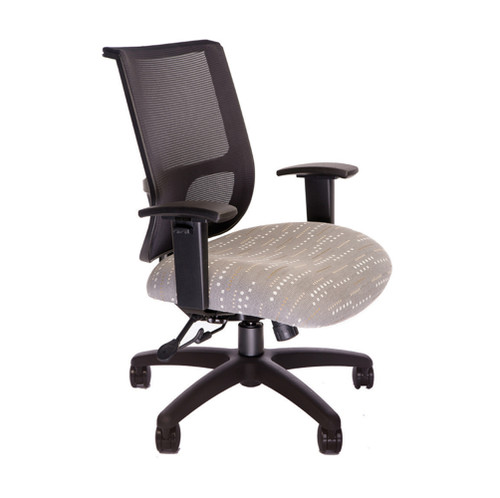
TECH Ergonomic Large Office Chair | Mesh | Supports 400 lbs.
Your Price
$665.50+
$1,210.00
Was:
$1,210.00+
SKU: TECH 1400 - BT12 Task

myCentric Ergonomic Office Chair (Customizable)
Your Price
$746.60 - $899.00
MSRP:
$1,214.00
SKU: myCentric™ - Customized Fit

