 773-596-5625







Quick Ship
Showroom
Bestseller

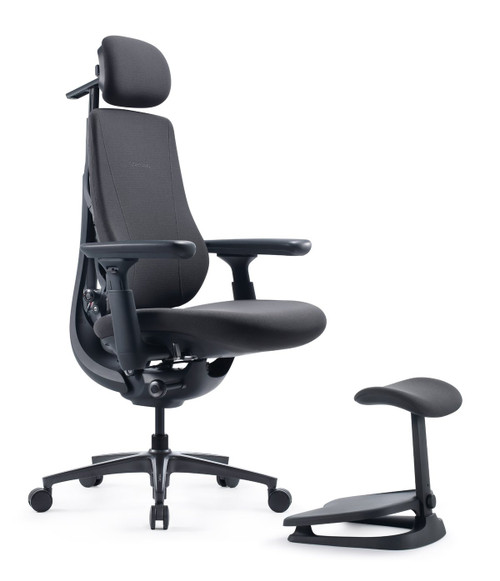
LiberNovo Omni Gen Dynamic Ergonomic Chair
SKU: Omni Zen
Your Price
$1,019.00 - $1,147.00
MSRP:
$1,476.00
Fit: 5'0"–5’10" / up to 300 lbs. • 45cm (up to 5'5") / 48cm (5'6"–5'10") • Battery Powered • 6-Year Frame / 2-Year Electronics • Try in Our Chicago Showroom
Save up to 30% with HSA/FSA
*
Savings vary based on eligibility and individual tax rate.
|
Check Eligibility
Powered by
Dynamic Back Support. Motorized Lumbar Comfort. Cushioned Seating.
The LiberNovo Omni Gen Dynamic Ergonomic Chair combines a Bionic FlexFit backrest, Dynamic Support System, powered lumbar adjustment, and five recline positions in a cushioned seating design.
Omni Gen offers the core dynamic-support features of the LiberNovo Omni Pro without powered Active AirFlow seat ventilation. It uses micro-elastic upholstery and a nylon base, while Omni Pro features Gabriel Atlantic fabric and a reinforced aluminum-alloy base.
Healthy Posture Store helps customers nationwide choose ergonomic seating based on real workstation fit, supported by hands-on fitting experience at our Chicago showroom.
Healthy Posture Quick Fit Guide
| Chair Size | Standard-size ergonomic chair |
|---|---|
| HPS Fit Guidance | Approximately 5'0"–5'10" for many slim-to-average-build users, as a starting point rather than a fit guarantee. Body proportions and workstation setup matter. |
| Seat Depth Choices | 45 cm (17.7") or 48 cm (18.9"). These are separate seat configurations, not a sliding seat-depth adjustment. |
| 45 cm Seat Guidance | Consider the 45 cm option for users up to approximately 5'5", depending on thigh length and knee clearance. |
| Foot Support | HPS recommends checking separate foot support for users below approximately 5'8" or when desk height exceeds 25". Set chair height for the work surface, then ensure the feet remain supported. |
| Seat Feel | Cushioned seat with micro-elastic fabric; no powered seat ventilation. |
| Recline | 105°, 115°, 125°, 135°, and 160° |
| Showroom | Contact HPS to confirm current Omni Gen display and seat-depth availability before visiting. |
Who Is the Omni Gen Best For?
People who prefer a cushioned seat
An alternative to mesh seating, with cushioned surfaces and micro-elastic upholstery.
Shoppers seeking powered lumbar adjustment
Motorized lower-back support allows fine-tuning while seated. Powered functions require battery charge.
Users who change position throughout the day
A flexible backrest, coordinated support, and five recline settings offer options for focused work and relaxation.
Customers comparing Omni Gen and Omni Pro
Choose Omni Gen if powered seat ventilation is not a priority. Evaluate seating comfort and actual workstation fit rather than comparing feature counts alone.
Dynamic Support System & Bionic FlexFit Backrest
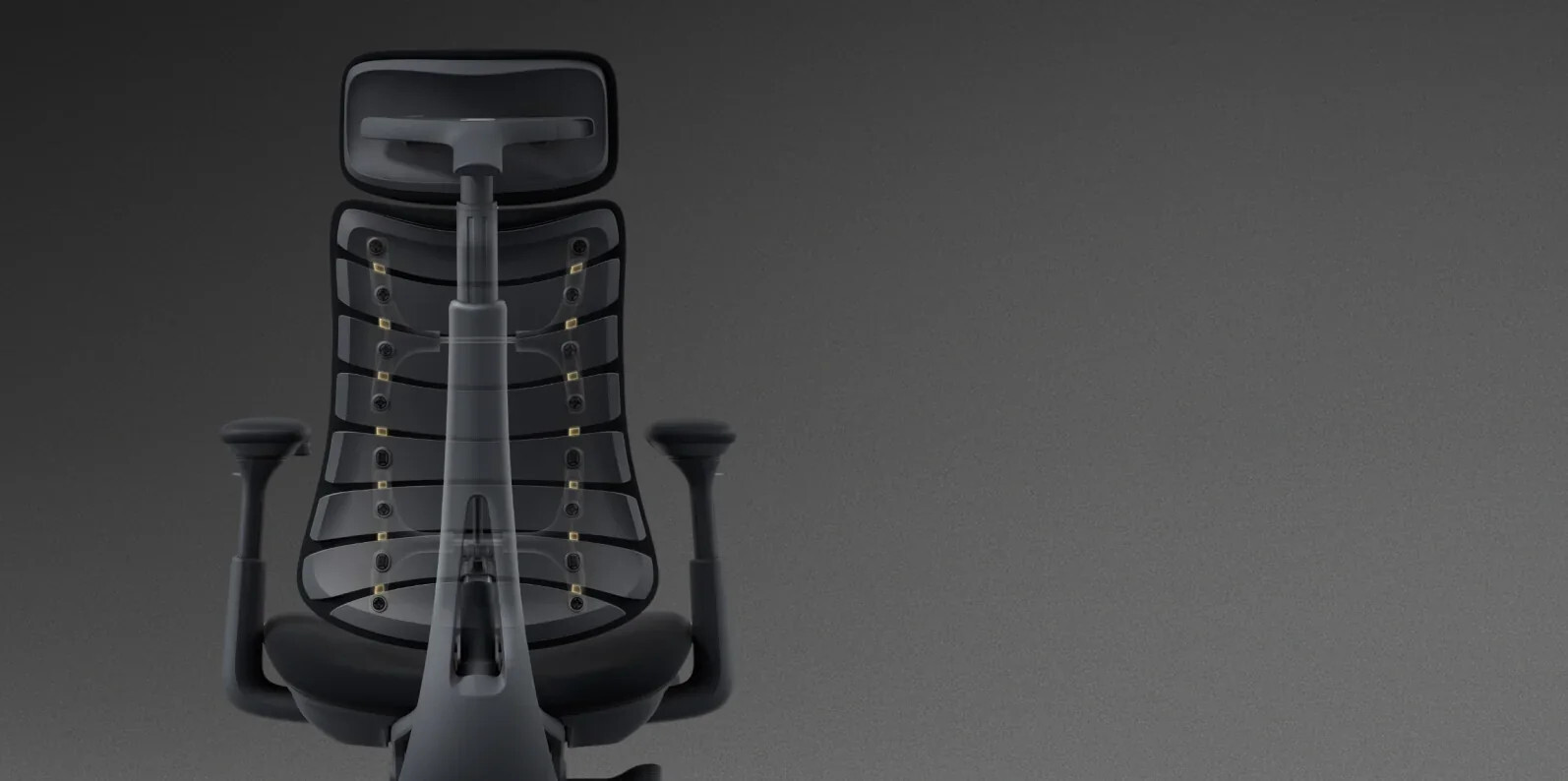
LiberNovo's Dynamic Support System is designed to coordinate movement across the headrest, backrest, seat, and armrests as you change position.
The flexible Bionic FlexFit backrest is intended to maintain supportive contact through movement rather than holding the body in one fixed posture.
For desk work, HPS recommends evaluating whether the chair supports your back while you actually type and use the mouse, not only when sitting still or reclining.
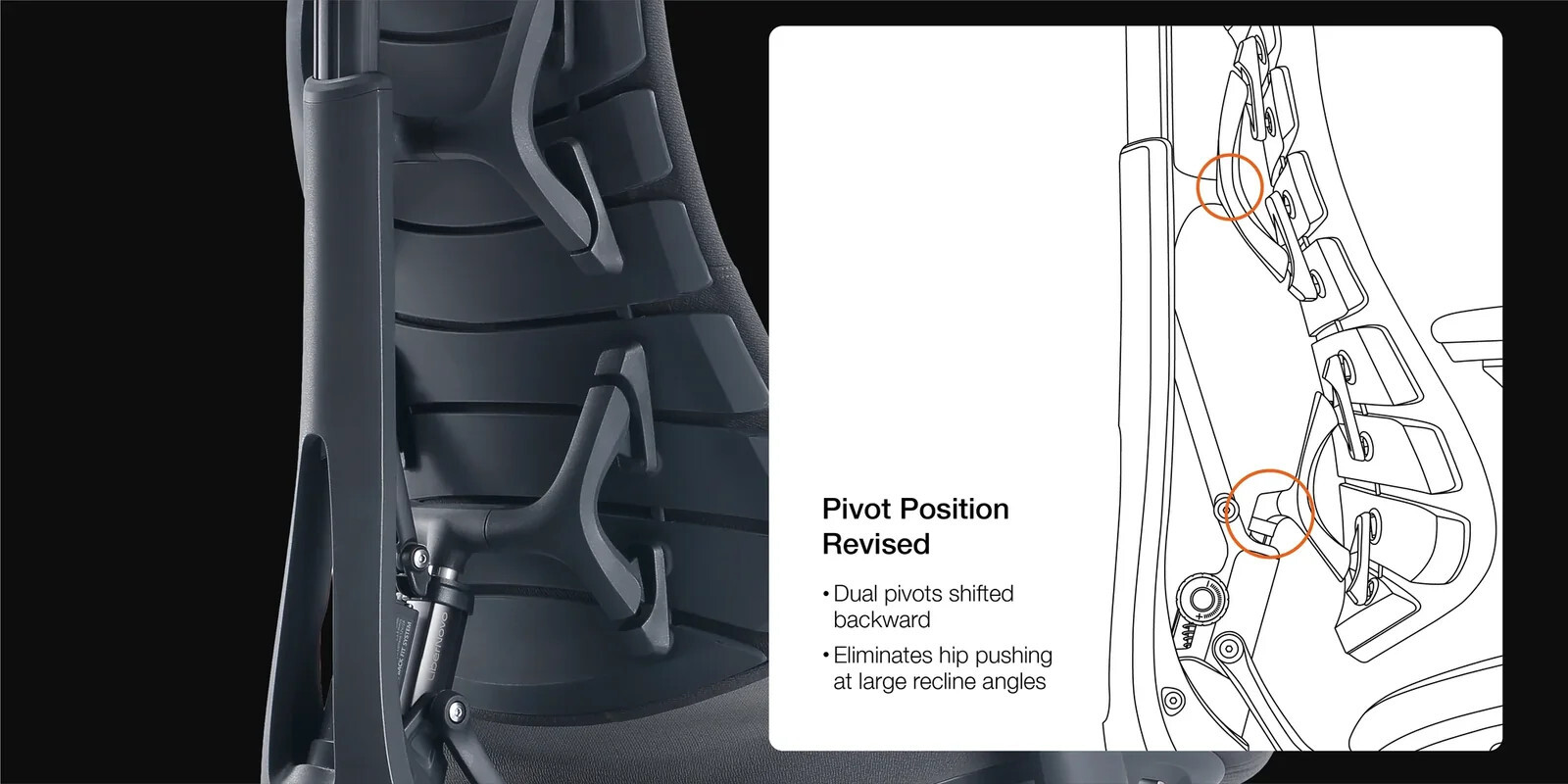
Motorized Lumbar Support & Lumbar Stretch
Omni Gen includes powered lumbar adjustment designed to let users fine-tune lower-back support while seated. The motorized lumbar stretch function provides an additional movement option during breaks.
Lumbar contact should feel supportive without creating excessive pressure. HPS recommends adjusting lumbar support after setting the seat height, seat position, and foot support.
These features are comfort and adjustment functions, not medical treatments or guarantees of pain relief.
Five Recline Positions for Work and Relaxation
Omni Gen offers five recline positions: 105°, 115°, 125°, 135°, and 160°. The range allows users to move between more upright seating and deeper reclining.


For computer work, choose a position that allows you to reach the keyboard and mouse without repeatedly leaning forward and losing backrest support.
Adjustable Headrest
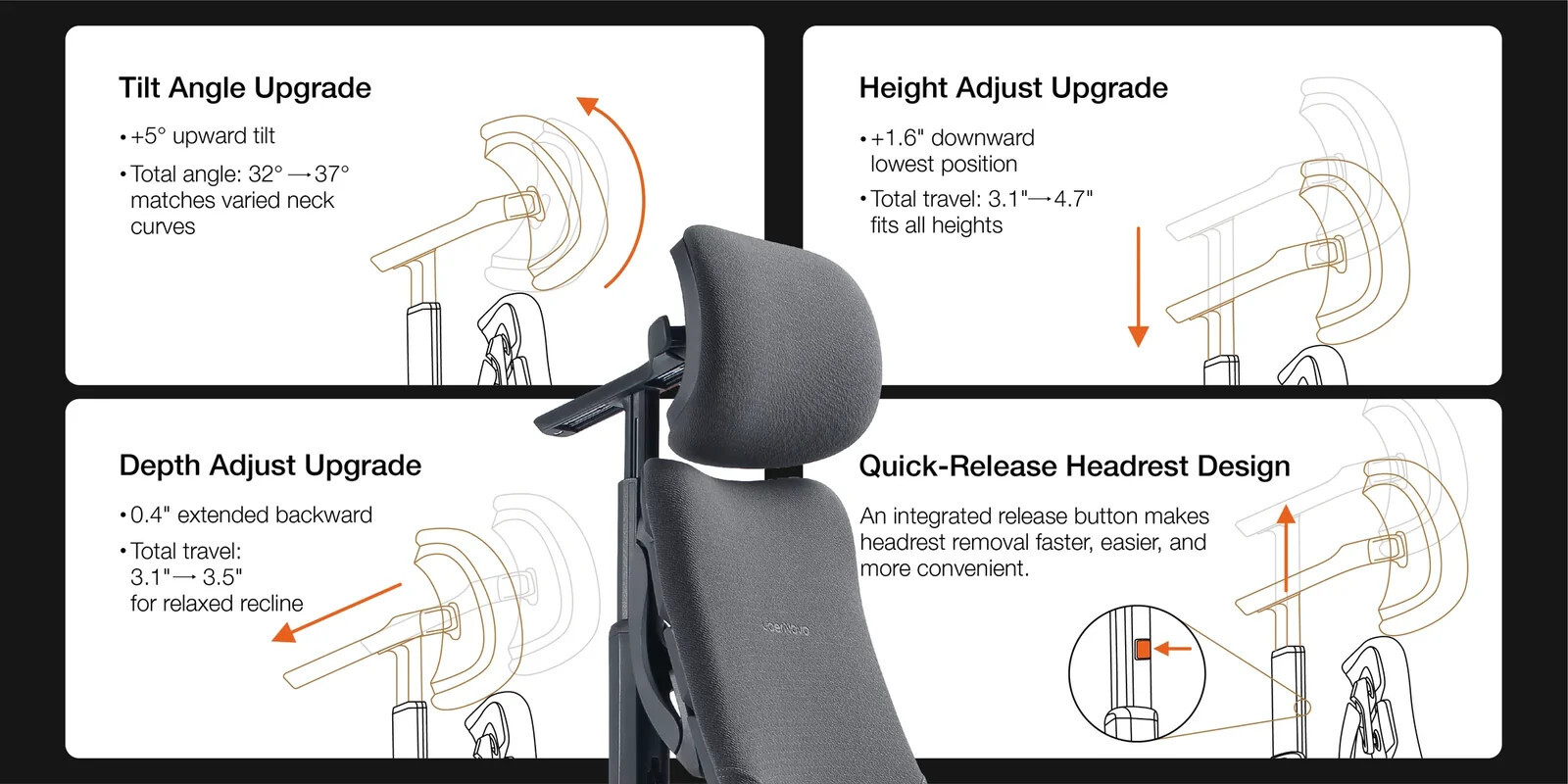
The adjustable headrest provides positioning options for different users and recline angles. Adjust it to support your head and neck comfortably without pushing your head forward during desk work.
Adjustable Armrests
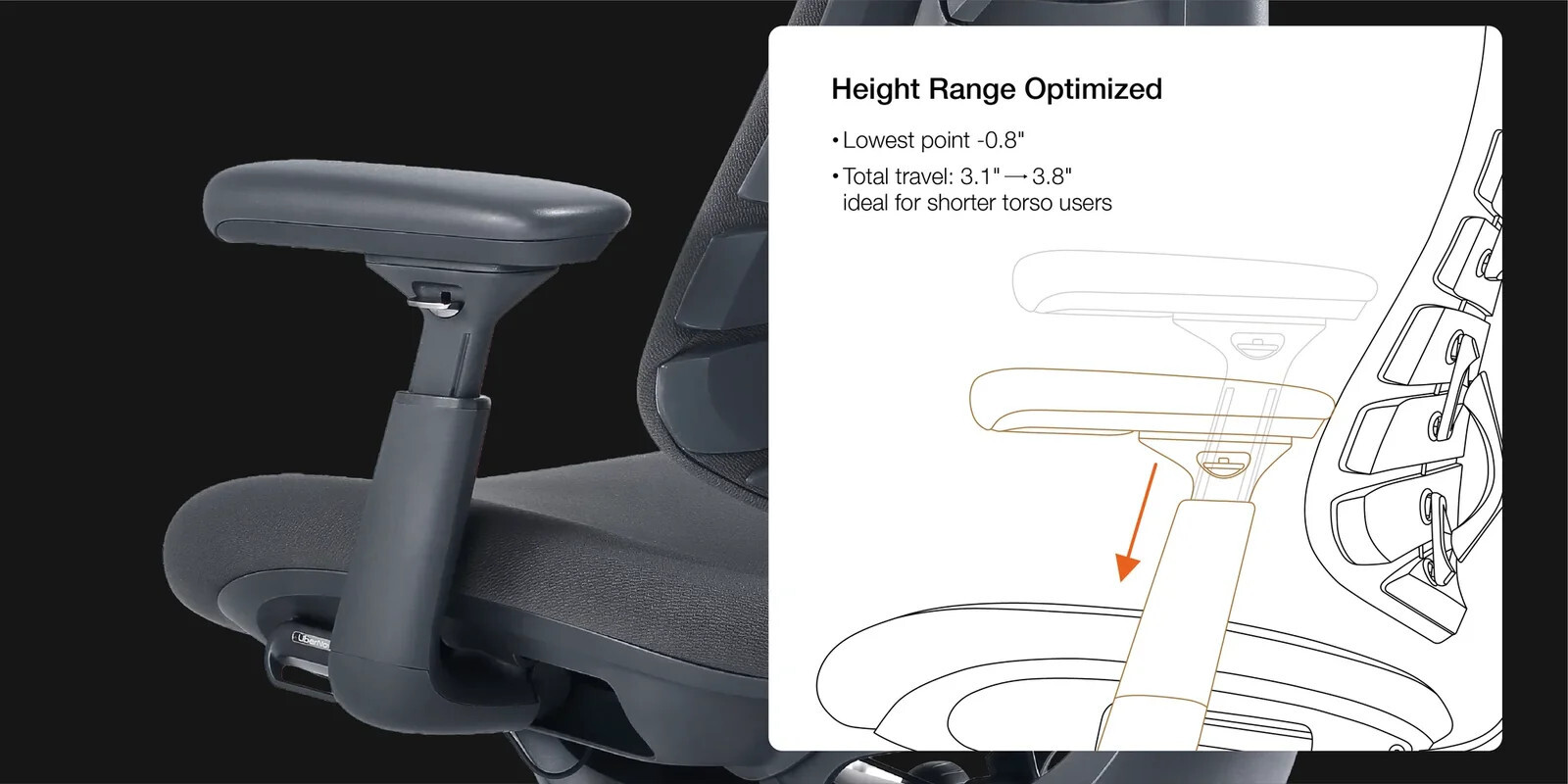
Omni Gen features adjustable armrests designed to accommodate different working positions and changes in recline. The manufacturer describes backward sliding travel of up to 100 mm.
HPS recommends positioning the armrests so the forearms are supported without raising the shoulders. Confirm that the armrests also allow you to sit close enough to your desk and input devices.
Cushioned Seat & Micro-Elastic Fabric
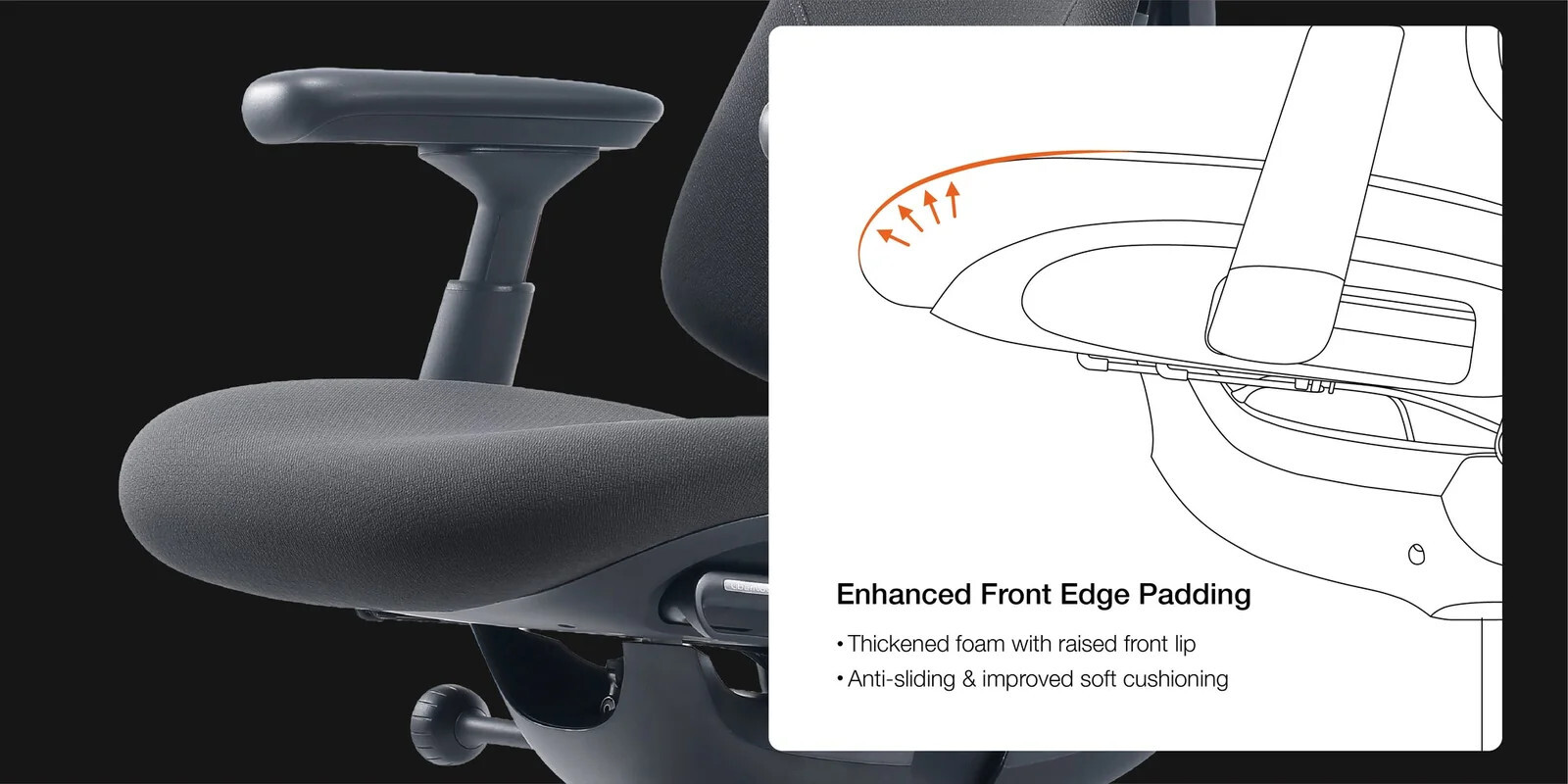
Omni Gen uses micro-elastic fabric over its cushioned seating surfaces. LiberNovo highlights refined front-edge cushioning intended to improve comfort and help manage sliding during recline.
Seat comfort and pressure distribution vary with body proportions, sitting habits, and workstation setup.
Important: Omni Gen does not include the Omni Pro's powered Active AirFlow seat ventilation. Fabric breathability is not the same as powered ventilation.
StepSync Footrest & HPS Foot-Support Guidance
HPS recommends considering separate foot support for users below approximately 5'8" or when desk height exceeds 25".
At many fixed-height desks, the chair must be raised to position the arms comfortably at the keyboard. This can leave the feet unsupported.
First choose the appropriate 45 cm or 48 cm seat. Sit fully back and confirm clearance behind your knees. Then set chair height for the working surface and use stable foot support if your feet do not comfortably reach the floor.
StepSync: Separate Support for Work and Recline
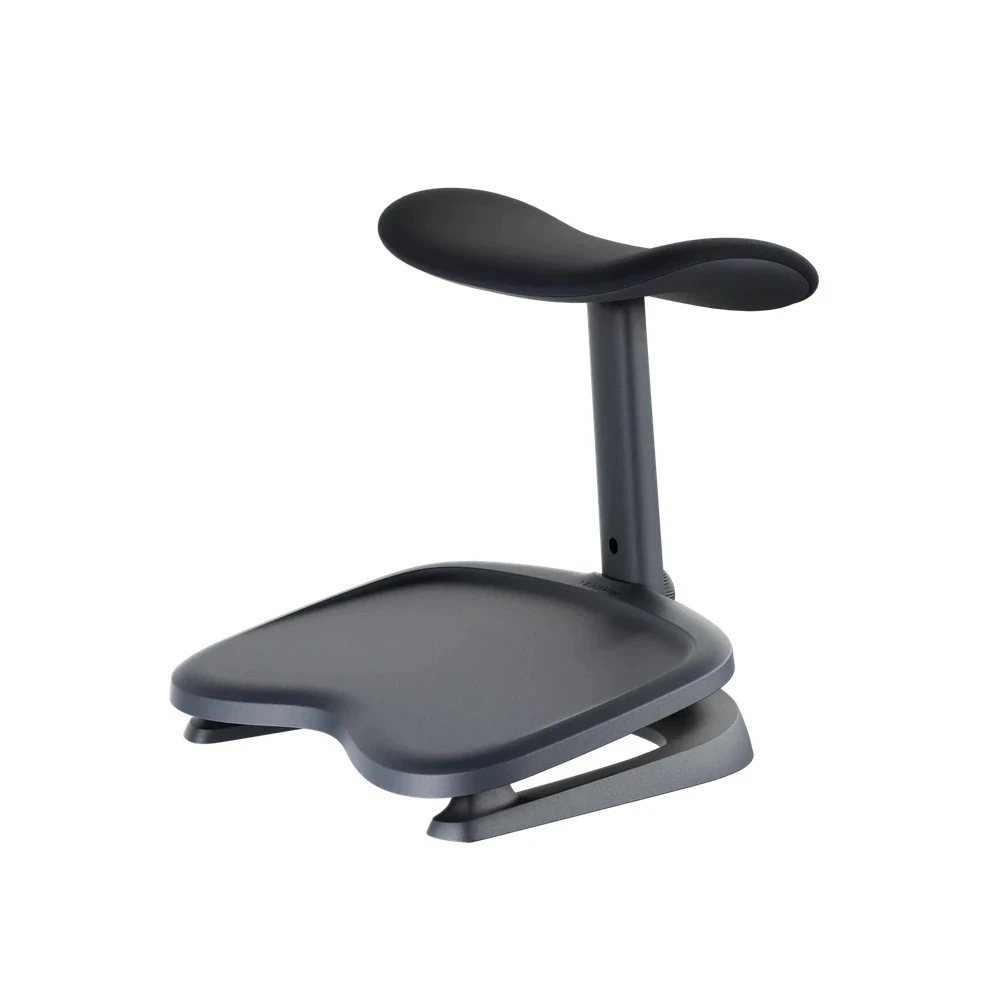
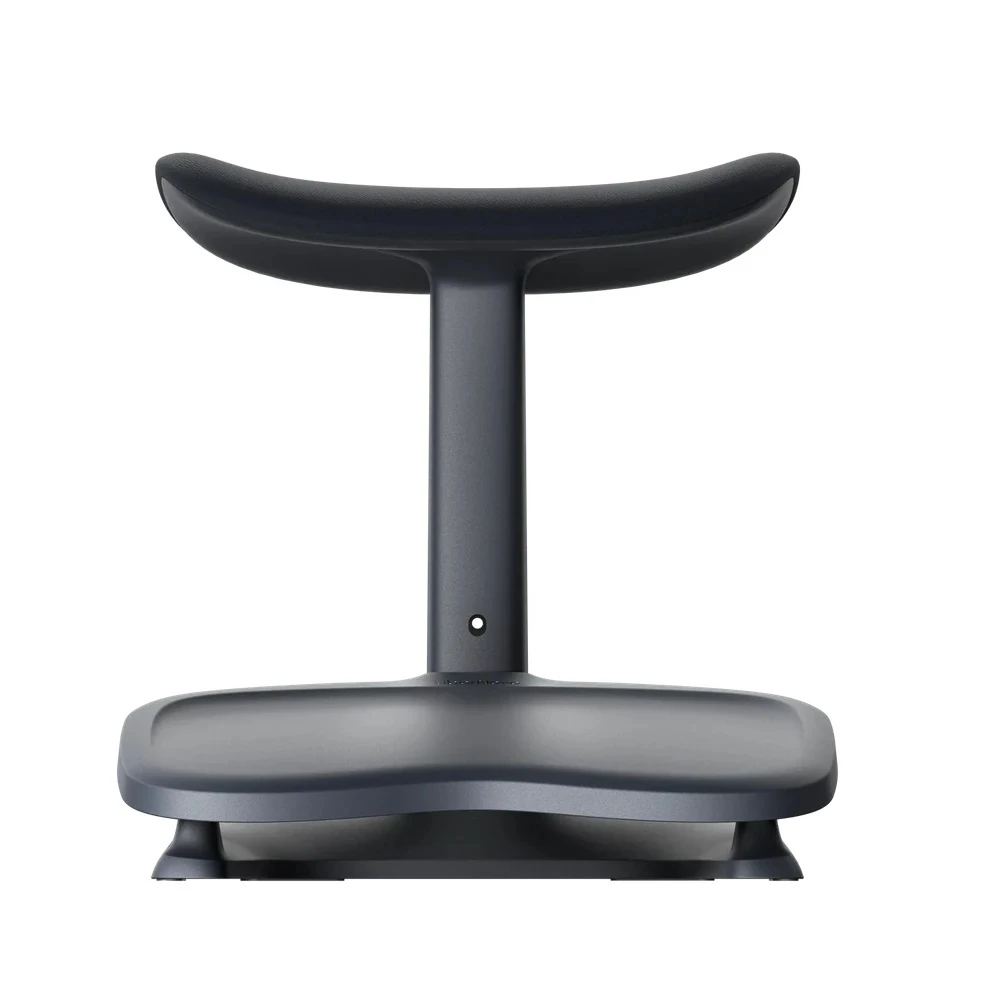
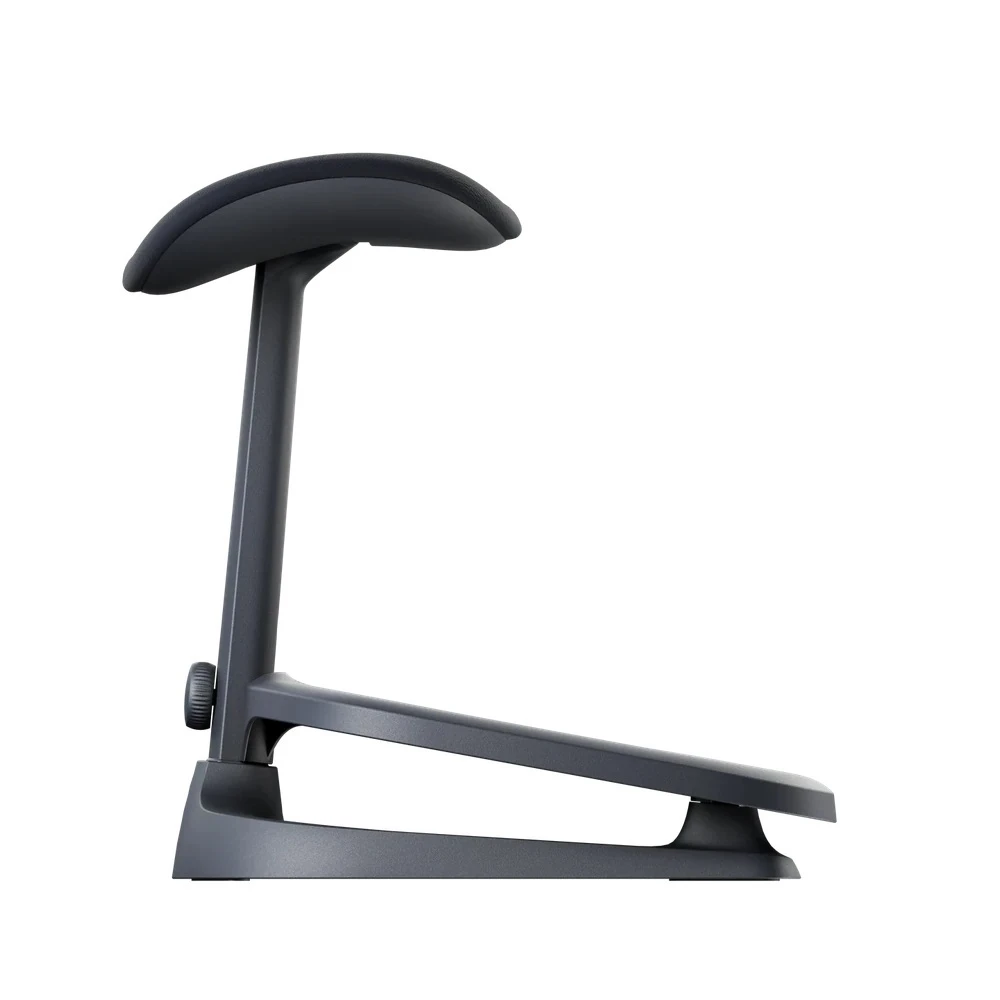
The LiberNovo StepSync is a separate floor-standing accessory with a lower foot platform and a raised padded support. It offers positioning options for supported task seating and reclining.
Select the position based on leg length, chair height, and space beneath your desk. StepSync is sold separately unless expressly included in the selected product package.
Omni Gen vs. Omni Pro — Which Should You Choose?
| Feature | Omni Gen | Omni Pro |
|---|---|---|
| Dynamic Support System | Included | Included |
| Bionic FlexFit Backrest | Included | Included |
| Motorized Lumbar | Included | Included |
| Lumbar Stretch | Included | Included |
| Recline Positions | Five positions | Five positions |
| Seat Depth Options | 45 cm / 48 cm | 45 cm / 48 cm |
| Powered Seat Ventilation | No | Active AirFlow included |
| Upholstery | Micro-elastic fabric | Gabriel Atlantic fabric |
| Base | Nylon | Reinforced aluminum alloy |
| Battery Capacity | 2200 mAh | 3000 mAh |
HPS guidance: Choose Omni Gen if you want the core dynamic-support and powered lumbar features without powered seat ventilation. Consider Omni Pro if ventilation, upholstery, and base construction are important to you.
Frequently Asked Questions
Does the Omni Gen have powered seat ventilation?
No. Unlike Omni Pro, Omni Gen does not include Active AirFlow seat ventilation.
Does Omni Gen have motorized lumbar support?
Yes. It includes powered lumbar adjustment and a motorized lumbar stretch function.
Is the seat depth adjustable?
Omni Gen is offered in separate 45 cm and 48 cm seat-depth configurations. This is not a sliding seat-depth adjustment.
Which seat size should I choose?
HPS recommends considering the 45 cm option for many users up to approximately 5'5", depending on thigh length and knee clearance. The 48 cm version offers a deeper seat.
Do I need a footrest?
If your feet lose stable support after adjusting the chair height for your desk, a separate under-desk footrest may help. It does not compensate for an incorrectly sized seat.
Is the StepSync footrest included?
No, unless the selected product package expressly includes it.
Can I try Omni Gen at the Chicago showroom?
Contact Healthy Posture Store before visiting to confirm current display and seat-size availability.
Specifications & Dimensions
| Product | LiberNovo Omni Gen Dynamic Ergonomic Chair |
|---|---|
| Seat Depth | 45 cm / 17.7" or 48 cm / 18.9" (separate configurations) |
| Recline Positions | 105°, 115°, 125°, 135°, 160° |
| Backrest | Bionic FlexFit flexible backrest with Dynamic Support System |
| Lumbar Support | Motorized lumbar adjustment and lumbar stretch |
| Armrests | Adjustable sliding armrests; up to 100 mm backward travel |
| Headrest | Adjustable height, depth, and angle |
| Upholstery | Micro-elastic fabric |
| Seat Ventilation | No powered Active AirFlow |
| Base | Nylon |
| Battery | 2200 mAh, 12V removable rechargeable battery; USB-C charging (5V/2A). Manufacturer rates up to 30 days of daily use under its stated usage assumptions. Actual runtime varies. |
| Weight Capacity | Up to 300 lb / 136 kg |
| StepSync Footrest | Optional accessory unless included in the selected package |
Shipping, Assembly & Customer Support
| Shipping | Most Omni Gen chairs ship within 2–3 business days, subject to color, seat size, and inventory. Transit time is additional. Standard free shipping applies to the contiguous United States. Contact HPS for Alaska, Hawaii, or Puerto Rico shipping options. |
|---|---|
| Assembly | Approximately 20–30 minutes. Follow the included manufacturer instructions. |
| Warranty | LiberNovo limited warranty: 6 years on the frame and main mechanical components; 2 years on electronics. Manufacturer warranty conditions apply. |
| Returns | Subject to Healthy Posture Store's applicable return-policy conditions. |
| Fit & Setup Support | HPS can help with seat selection, chair adjustments, foot support, and workstation fit. |
Why Buy from Healthy Posture Store?
Healthy Posture Store combines nationwide ergonomic-chair shopping with hands-on fitting experience from our Chicago showroom.
Our approach goes beyond chair features. We help customers consider seat depth, desk height, keyboard and mouse positioning, foot support, and the ability to maintain comfortable backrest contact during actual computer work.
Need help choosing between the 45 cm and 48 cm Omni Gen or comparing Omni Gen with Omni Pro? Call 773-596-5625 or visit Healthy Posture Store . Please confirm showroom display availability before visiting.
Dynamic Back Support. Motorized Lumbar Comfort. Cushioned Seating.
The LiberNovo Omni Gen Dynamic Ergonomic Chair combines a Bionic FlexFit backrest, Dynamic Support System, powered lumbar adjustment, and five recline positions in a cushioned seating design.
Omni Gen offers the core dynamic-support features of the LiberNovo Omni Pro without powered Active AirFlow seat ventilation. It uses micro-elastic upholstery and a nylon base, while Omni Pro features Gabriel Atlantic fabric and a reinforced aluminum-alloy base.
Healthy Posture Store helps customers nationwide choose ergonomic seating based on real workstation fit, supported by hands-on fitting experience at our Chicago showroom.
Healthy Posture Quick Fit Guide
| Chair Size | Standard-size ergonomic chair |
|---|---|
| HPS Fit Guidance | Approximately 5'0"–5'10" for many slim-to-average-build users, as a starting point rather than a fit guarantee. Body proportions and workstation setup matter. |
| Seat Depth Choices | 45 cm (17.7") or 48 cm (18.9"). These are separate seat configurations, not a sliding seat-depth adjustment. |
| 45 cm Seat Guidance | Consider the 45 cm option for users up to approximately 5'5", depending on thigh length and knee clearance. |
| Foot Support | HPS recommends checking separate foot support for users below approximately 5'8" or when desk height exceeds 25". Set chair height for the work surface, then ensure the feet remain supported. |
| Seat Feel | Cushioned seat with micro-elastic fabric; no powered seat ventilation. |
| Recline | 105°, 115°, 125°, 135°, and 160° |
| Showroom | Contact HPS to confirm current Omni Gen display and seat-depth availability before visiting. |
Who Is the Omni Gen Best For?
People who prefer a cushioned seat
An alternative to mesh seating, with cushioned surfaces and micro-elastic upholstery.
Shoppers seeking powered lumbar adjustment
Motorized lower-back support allows fine-tuning while seated. Powered functions require battery charge.
Users who change position throughout the day
A flexible backrest, coordinated support, and five recline settings offer options for focused work and relaxation.
Customers comparing Omni Gen and Omni Pro
Choose Omni Gen if powered seat ventilation is not a priority. Evaluate seating comfort and actual workstation fit rather than comparing feature counts alone.
Dynamic Support System & Bionic FlexFit Backrest
LiberNovo's Dynamic Support System is designed to coordinate movement across the headrest, backrest, seat, and armrests as you change position.
The flexible Bionic FlexFit backrest is intended to maintain supportive contact through movement rather than holding the body in one fixed posture.
For desk work, HPS recommends evaluating whether the chair supports your back while you actually type and use the mouse, not only when sitting still or reclining.
Motorized Lumbar Support & Lumbar Stretch
Omni Gen includes powered lumbar adjustment designed to let users fine-tune lower-back support while seated. The motorized lumbar stretch function provides an additional movement option during breaks.
Lumbar contact should feel supportive without creating excessive pressure. HPS recommends adjusting lumbar support after setting the seat height, seat position, and foot support.
These features are comfort and adjustment functions, not medical treatments or guarantees of pain relief.
Five Recline Positions for Work and Relaxation
Omni Gen offers five recline positions: 105°, 115°, 125°, 135°, and 160°. The range allows users to move between more upright seating and deeper reclining.
For computer work, choose a position that allows you to reach the keyboard and mouse without repeatedly leaning forward and losing backrest support.
Adjustable Headrest
The adjustable headrest provides positioning options for different users and recline angles. Adjust it to support your head and neck comfortably without pushing your head forward during desk work.
Adjustable Armrests
Omni Gen features adjustable armrests designed to accommodate different working positions and changes in recline. The manufacturer describes backward sliding travel of up to 100 mm.
HPS recommends positioning the armrests so the forearms are supported without raising the shoulders. Confirm that the armrests also allow you to sit close enough to your desk and input devices.
Cushioned Seat & Micro-Elastic Fabric
Omni Gen uses micro-elastic fabric over its cushioned seating surfaces. LiberNovo highlights refined front-edge cushioning intended to improve comfort and help manage sliding during recline.
Seat comfort and pressure distribution vary with body proportions, sitting habits, and workstation setup.
Important: Omni Gen does not include the Omni Pro's powered Active AirFlow seat ventilation. Fabric breathability is not the same as powered ventilation.
StepSync Footrest & HPS Foot-Support Guidance
HPS recommends considering separate foot support for users below approximately 5'8" or when desk height exceeds 25".
At many fixed-height desks, the chair must be raised to position the arms comfortably at the keyboard. This can leave the feet unsupported.
First choose the appropriate 45 cm or 48 cm seat. Sit fully back and confirm clearance behind your knees. Then set chair height for the working surface and use stable foot support if your feet do not comfortably reach the floor.
StepSync: Separate Support for Work and Recline
The LiberNovo StepSync is a separate floor-standing accessory with a lower foot platform and a raised padded support. It offers positioning options for supported task seating and reclining.
Select the position based on leg length, chair height, and space beneath your desk. StepSync is sold separately unless expressly included in the selected product package.
Omni Gen vs. Omni Pro — Which Should You Choose?
| Feature | Omni Gen | Omni Pro |
|---|---|---|
| Dynamic Support System | Included | Included |
| Bionic FlexFit Backrest | Included | Included |
| Motorized Lumbar | Included | Included |
| Lumbar Stretch | Included | Included |
| Recline Positions | Five positions | Five positions |
| Seat Depth Options | 45 cm / 48 cm | 45 cm / 48 cm |
| Powered Seat Ventilation | No | Active AirFlow included |
| Upholstery | Micro-elastic fabric | Gabriel Atlantic fabric |
| Base | Nylon | Reinforced aluminum alloy |
| Battery Capacity | 2200 mAh | 3000 mAh |
HPS guidance: Choose Omni Gen if you want the core dynamic-support and powered lumbar features without powered seat ventilation. Consider Omni Pro if ventilation, upholstery, and base construction are important to you.
Frequently Asked Questions
Does the Omni Gen have powered seat ventilation?
No. Unlike Omni Pro, Omni Gen does not include Active AirFlow seat ventilation.
Does Omni Gen have motorized lumbar support?
Yes. It includes powered lumbar adjustment and a motorized lumbar stretch function.
Is the seat depth adjustable?
Omni Gen is offered in separate 45 cm and 48 cm seat-depth configurations. This is not a sliding seat-depth adjustment.
Which seat size should I choose?
HPS recommends considering the 45 cm option for many users up to approximately 5'5", depending on thigh length and knee clearance. The 48 cm version offers a deeper seat.
Do I need a footrest?
If your feet lose stable support after adjusting the chair height for your desk, a separate under-desk footrest may help. It does not compensate for an incorrectly sized seat.
Is the StepSync footrest included?
No, unless the selected product package expressly includes it.
Can I try Omni Gen at the Chicago showroom?
Contact Healthy Posture Store before visiting to confirm current display and seat-size availability.
Specifications & Dimensions
| Product | LiberNovo Omni Gen Dynamic Ergonomic Chair |
|---|---|
| Seat Depth | 45 cm / 17.7" or 48 cm / 18.9" (separate configurations) |
| Recline Positions | 105°, 115°, 125°, 135°, 160° |
| Backrest | Bionic FlexFit flexible backrest with Dynamic Support System |
| Lumbar Support | Motorized lumbar adjustment and lumbar stretch |
| Armrests | Adjustable sliding armrests; up to 100 mm backward travel |
| Headrest | Adjustable height, depth, and angle |
| Upholstery | Micro-elastic fabric |
| Seat Ventilation | No powered Active AirFlow |
| Base | Nylon |
| Battery | 2200 mAh, 12V removable rechargeable battery; USB-C charging (5V/2A). Manufacturer rates up to 30 days of daily use under its stated usage assumptions. Actual runtime varies. |
| Weight Capacity | Up to 300 lb / 136 kg |
| StepSync Footrest | Optional accessory unless included in the selected package |
Shipping, Assembly & Customer Support
| Shipping | Most Omni Gen chairs ship within 2–3 business days, subject to color, seat size, and inventory. Transit time is additional. Standard free shipping applies to the contiguous United States. Contact HPS for Alaska, Hawaii, or Puerto Rico shipping options. |
|---|---|
| Assembly | Approximately 20–30 minutes. Follow the included manufacturer instructions. |
| Warranty | LiberNovo limited warranty: 6 years on the frame and main mechanical components; 2 years on electronics. Manufacturer warranty conditions apply. |
| Returns | Subject to Healthy Posture Store's applicable return-policy conditions. |
| Fit & Setup Support | HPS can help with seat selection, chair adjustments, foot support, and workstation fit. |
Why Buy from Healthy Posture Store?
Healthy Posture Store combines nationwide ergonomic-chair shopping with hands-on fitting experience from our Chicago showroom.
Our approach goes beyond chair features. We help customers consider seat depth, desk height, keyboard and mouse positioning, foot support, and the ability to maintain comfortable backrest contact during actual computer work.
Need help choosing between the 45 cm and 48 cm Omni Gen or comparing Omni Gen with Omni Pro? Call 773-596-5625 or visit Healthy Posture Store . Please confirm showroom display availability before visiting.
Frame: 6 Years
Electronics: 2 Years
Dynamic Back Support. Motorized Lumbar Comfort. Cushioned Seating.
The LiberNovo Omni Gen Dynamic Ergonomic Chair combines a Bionic FlexFit backrest, Dynamic Support System, powered lumbar adjustment, and five recline positions in a cushioned seating design.
Omni Gen offers the core dynamic-support features of the LiberNovo Omni Pro without powered Active AirFlow seat ventilation. It uses micro-elastic upholstery and a nylon base, while Omni Pro features Gabriel Atlantic fabric and a reinforced aluminum-alloy base.
Healthy Posture Store helps customers nationwide choose ergonomic seating based on real workstation fit, supported by hands-on fitting experience at our Chicago showroom.
Healthy Posture Quick Fit Guide
| Chair Size | Standard-size ergonomic chair |
|---|---|
| HPS Fit Guidance | Approximately 5'0"–5'10" for many slim-to-average-build users, as a starting point rather than a fit guarantee. Body proportions and workstation setup matter. |
| Seat Depth Choices | 45 cm (17.7") or 48 cm (18.9"). These are separate seat configurations, not a sliding seat-depth adjustment. |
| 45 cm Seat Guidance | Consider the 45 cm option for users up to approximately 5'5", depending on thigh length and knee clearance. |
| Foot Support | HPS recommends checking separate foot support for users below approximately 5'8" or when desk height exceeds 25". Set chair height for the work surface, then ensure the feet remain supported. |
| Seat Feel | Cushioned seat with micro-elastic fabric; no powered seat ventilation. |
| Recline | 105°, 115°, 125°, 135°, and 160° |
| Showroom | Contact HPS to confirm current Omni Gen display and seat-depth availability before visiting. |
Who Is the Omni Gen Best For?
People who prefer a cushioned seat
An alternative to mesh seating, with cushioned surfaces and micro-elastic upholstery.
Shoppers seeking powered lumbar adjustment
Motorized lower-back support allows fine-tuning while seated. Powered functions require battery charge.
Users who change position throughout the day
A flexible backrest, coordinated support, and five recline settings offer options for focused work and relaxation.
Customers comparing Omni Gen and Omni Pro
Choose Omni Gen if powered seat ventilation is not a priority. Evaluate seating comfort and actual workstation fit rather than comparing feature counts alone.
Dynamic Support System & Bionic FlexFit Backrest
LiberNovo's Dynamic Support System is designed to coordinate movement across the headrest, backrest, seat, and armrests as you change position.
The flexible Bionic FlexFit backrest is intended to maintain supportive contact through movement rather than holding the body in one fixed posture.
For desk work, HPS recommends evaluating whether the chair supports your back while you actually type and use the mouse, not only when sitting still or reclining.
Motorized Lumbar Support & Lumbar Stretch
Omni Gen includes powered lumbar adjustment designed to let users fine-tune lower-back support while seated. The motorized lumbar stretch function provides an additional movement option during breaks.
Lumbar contact should feel supportive without creating excessive pressure. HPS recommends adjusting lumbar support after setting the seat height, seat position, and foot support.
These features are comfort and adjustment functions, not medical treatments or guarantees of pain relief.
Five Recline Positions for Work and Relaxation
Omni Gen offers five recline positions: 105°, 115°, 125°, 135°, and 160°. The range allows users to move between more upright seating and deeper reclining.
For computer work, choose a position that allows you to reach the keyboard and mouse without repeatedly leaning forward and losing backrest support.
Adjustable Headrest
The adjustable headrest provides positioning options for different users and recline angles. Adjust it to support your head and neck comfortably without pushing your head forward during desk work.
Adjustable Armrests
Omni Gen features adjustable armrests designed to accommodate different working positions and changes in recline. The manufacturer describes backward sliding travel of up to 100 mm.
HPS recommends positioning the armrests so the forearms are supported without raising the shoulders. Confirm that the armrests also allow you to sit close enough to your desk and input devices.
Cushioned Seat & Micro-Elastic Fabric
Omni Gen uses micro-elastic fabric over its cushioned seating surfaces. LiberNovo highlights refined front-edge cushioning intended to improve comfort and help manage sliding during recline.
Seat comfort and pressure distribution vary with body proportions, sitting habits, and workstation setup.
Important: Omni Gen does not include the Omni Pro's powered Active AirFlow seat ventilation. Fabric breathability is not the same as powered ventilation.
StepSync Footrest & HPS Foot-Support Guidance
HPS recommends considering separate foot support for users below approximately 5'8" or when desk height exceeds 25".
At many fixed-height desks, the chair must be raised to position the arms comfortably at the keyboard. This can leave the feet unsupported.
First choose the appropriate 45 cm or 48 cm seat. Sit fully back and confirm clearance behind your knees. Then set chair height for the working surface and use stable foot support if your feet do not comfortably reach the floor.
StepSync: Separate Support for Work and Recline
The LiberNovo StepSync is a separate floor-standing accessory with a lower foot platform and a raised padded support. It offers positioning options for supported task seating and reclining.
Select the position based on leg length, chair height, and space beneath your desk. StepSync is sold separately unless expressly included in the selected product package.
Omni Gen vs. Omni Pro — Which Should You Choose?
| Feature | Omni Gen | Omni Pro |
|---|---|---|
| Dynamic Support System | Included | Included |
| Bionic FlexFit Backrest | Included | Included |
| Motorized Lumbar | Included | Included |
| Lumbar Stretch | Included | Included |
| Recline Positions | Five positions | Five positions |
| Seat Depth Options | 45 cm / 48 cm | 45 cm / 48 cm |
| Powered Seat Ventilation | No | Active AirFlow included |
| Upholstery | Micro-elastic fabric | Gabriel Atlantic fabric |
| Base | Nylon | Reinforced aluminum alloy |
| Battery Capacity | 2200 mAh | 3000 mAh |
HPS guidance: Choose Omni Gen if you want the core dynamic-support and powered lumbar features without powered seat ventilation. Consider Omni Pro if ventilation, upholstery, and base construction are important to you.
Frequently Asked Questions
Does the Omni Gen have powered seat ventilation?
No. Unlike Omni Pro, Omni Gen does not include Active AirFlow seat ventilation.
Does Omni Gen have motorized lumbar support?
Yes. It includes powered lumbar adjustment and a motorized lumbar stretch function.
Is the seat depth adjustable?
Omni Gen is offered in separate 45 cm and 48 cm seat-depth configurations. This is not a sliding seat-depth adjustment.
Which seat size should I choose?
HPS recommends considering the 45 cm option for many users up to approximately 5'5", depending on thigh length and knee clearance. The 48 cm version offers a deeper seat.
Do I need a footrest?
If your feet lose stable support after adjusting the chair height for your desk, a separate under-desk footrest may help. It does not compensate for an incorrectly sized seat.
Is the StepSync footrest included?
No, unless the selected product package expressly includes it.
Can I try Omni Gen at the Chicago showroom?
Contact Healthy Posture Store before visiting to confirm current display and seat-size availability.
Specifications & Dimensions
| Product | LiberNovo Omni Gen Dynamic Ergonomic Chair |
|---|---|
| Seat Depth | 45 cm / 17.7" or 48 cm / 18.9" (separate configurations) |
| Recline Positions | 105°, 115°, 125°, 135°, 160° |
| Backrest | Bionic FlexFit flexible backrest with Dynamic Support System |
| Lumbar Support | Motorized lumbar adjustment and lumbar stretch |
| Armrests | Adjustable sliding armrests; up to 100 mm backward travel |
| Headrest | Adjustable height, depth, and angle |
| Upholstery | Micro-elastic fabric |
| Seat Ventilation | No powered Active AirFlow |
| Base | Nylon |
| Battery | 2200 mAh, 12V removable rechargeable battery; USB-C charging (5V/2A). Manufacturer rates up to 30 days of daily use under its stated usage assumptions. Actual runtime varies. |
| Weight Capacity | Up to 300 lb / 136 kg |
| StepSync Footrest | Optional accessory unless included in the selected package |
Shipping, Assembly & Customer Support
| Shipping | Most Omni Gen chairs ship within 2–3 business days, subject to color, seat size, and inventory. Transit time is additional. Standard free shipping applies to the contiguous United States. Contact HPS for Alaska, Hawaii, or Puerto Rico shipping options. |
|---|---|
| Assembly | Approximately 20–30 minutes. Follow the included manufacturer instructions. |
| Warranty | LiberNovo limited warranty: 6 years on the frame and main mechanical components; 2 years on electronics. Manufacturer warranty conditions apply. |
| Returns | Subject to Healthy Posture Store's applicable return-policy conditions. |
| Fit & Setup Support | HPS can help with seat selection, chair adjustments, foot support, and workstation fit. |
Why Buy from Healthy Posture Store?
Healthy Posture Store combines nationwide ergonomic-chair shopping with hands-on fitting experience from our Chicago showroom.
Our approach goes beyond chair features. We help customers consider seat depth, desk height, keyboard and mouse positioning, foot support, and the ability to maintain comfortable backrest contact during actual computer work.
Need help choosing between the 45 cm and 48 cm Omni Gen or comparing Omni Gen with Omni Pro? Call 773-596-5625 or visit Healthy Posture Store . Please confirm showroom display availability before visiting.
LiberNovo Omni Gen Dynamic Ergonomic Chair
×
![Zoomed Variant Image]()

LiberNovo Omni Pro Dynamic Ergonomic Chair with Active AirFlow Ventilation
Your Price
$1,109.00 - $1,247.00
MSRP:
$1,596.00
SKU: Omni Pro
LiberNovo Maxis Manual Ergonomic Chair
Your Price
$1,119.00 - $1,198.00
MSRP:
$1,497.00
SKU: Maxis Manual

LiberNovo Maxis Electric Ergonomic Chair
Your Price
$1,319.00 - $1,432.00
MSRP:
$2,086.00
SKU: CP-GW-1000124-00-05

LiberNovo Maxis Airflow Big & Tall Ergonomic Chair
Your Price
$1,701.00 - $1,814.00
MSRP:
$2,156.00
SKU: Maxis Airflow