null Skip to main content
Quick Ship
Showroom
Bestseller

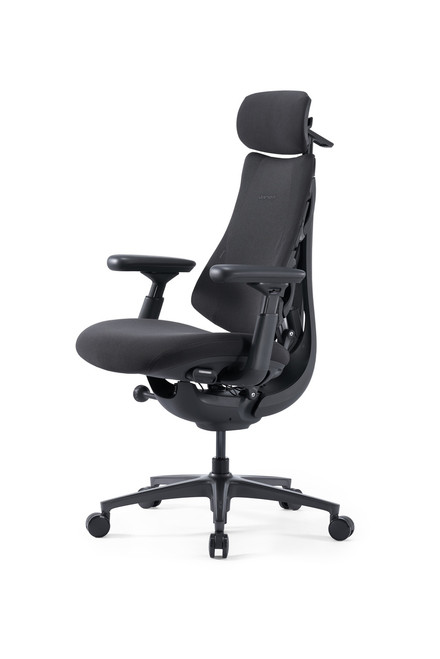
LiberNovo Omni SE Dynamic Ergonomic Chair

SKU: Omni SE

Your Price

$788.00+
$899.00
Save $111.00
Was: $899.00+
Available |
- In Stock - Ships in 3-5 Business Days

The LiberNovo Omni SE offers full dynamic ergonomic support with simple mechanical adjustments, adaptive back comfort, OmniStretch, and reliable all-day seating.

Adding to cart… The item has been added
Save up to 30% with HSA/FSA * Savings vary based on eligibility and individual tax rate. | Check Eligibility
Powered by
  • PayPal icon
LiberNovo Omni SE Dynamic Ergonomic Chair

Your Price

$788.00+
$899.00
Save $111.00
Was: $899.00+

Description

LiberNovo Omni SE Dynamic Ergonomic Chair

The LiberNovo Omni SE is designed for people who want premium ergonomic support without unnecessary complexity. Instead of relying on powered adjustments or electronic features, it combines a dynamic backrest, manual lumbar support, intuitive controls, and a smooth reclining experience to help you stay comfortable as your posture changes throughout the day.

If you work long hours, attend video meetings, study, create, game, or simply want a chair that supports movement instead of locking you into one position, the Omni SE is a smart, practical choice.

At Healthy Posture Store, we see the Omni SE as the approachable LiberNovo model: dynamic, supportive, easy to use, and well suited for customers who want a premium sitting experience without batteries, charging, or motorized controls.

Is the Omni SE Right for You?

The Omni SE is a strong fit if you want a chair that supports active sitting, frequent posture changes, and long work sessions while keeping adjustments simple and manual.

Your Priority Choose the Omni SE if you want premium ergonomic support with simple manual adjustments.
Sitting Style Best for people who shift positions during the day instead of sitting in one fixed posture.
Workday Use Well suited for home offices, professional workstations, study spaces, creative work, and gaming setups.
Lumbar Preference Ideal if you prefer manual lumbar adjustment instead of powered lumbar support.
Recline Preference A good choice if you like to recline during reading, calls, breaks, or relaxed work.
Consider Another Chair If You specifically want powered lumbar adjustment, a heavy-duty big-and-tall chair, or a very traditional task-chair feel.

Not sure? Our ergonomic specialists can help you compare the Omni SE with other chairs based on your height, body type, sitting habits, and workspace.

Our Ergonomic Perspective

The Omni SE is one of the easiest LiberNovo chairs to recommend for customers who want dynamic ergonomic support without electronic features.

What makes it appealing is not just one feature. It is the combination of a flexible backrest, manual lumbar support, coordinated movement, adjustable arms, head support, and deep recline in a chair that remains simple to operate.

If someone walked into our showroom looking for a premium ergonomic chair that feels modern, supports movement, and avoids the complexity of powered controls, the Omni SE would be one of the first models we would suggest trying.

Why People Choose the Omni SE

It feels less rigid than a traditional office chair
The Omni SE is designed to move with you, making it easier to shift between upright focus, relaxed sitting, and reclined breaks.
It keeps adjustments simple
Manual lumbar support gives you control without batteries, charging, or motorized parts.
It supports long work sessions
The dynamic backrest, adjustable armrests, head support, and cushioned seat are designed for people who spend serious time at their desk.
It offers strong value in the LiberNovo lineup
The Omni SE gives customers the core dynamic sitting experience in a more approachable, manual-control design.

Features That Make a Difference

Bionic FlexFit™ Backrest
The backrest is designed to follow the natural curve of your spine as you move, helping you feel supported whether you are upright, leaning forward, or reclining.
Dynamic Support System
The headrest, backrest, seat, and armrests work together as your posture changes, creating a more fluid sitting experience than a fixed-position task chair.
Manual Lumbar Adjustment
Fine-tune lower back support by hand. This keeps the chair simple, easy to understand, and free from powered controls.
Five Lockable Recline Positions
Move between focused work and deeper recline with five lockable positions from 105° to 160°. This makes the chair useful for typing, reading, calls, breaks, and relaxation.
4D Adjustable Armrests
Adjust your arm support for typing, writing, gaming, or video meetings. Better arm positioning can help reduce shoulder and upper-back strain during long workdays.
Integrated Head Support
Head and neck support becomes especially helpful when reclining, taking a short break, or shifting away from an upright work posture.
Optional StepSync™ Footrest
Pair the chair with the LiberNovo StepSync™ Footrest if you want added leg support during reclined sitting or relaxation breaks.

Omni SE vs. Omni Pro: Which Should You Choose?

The Omni SE and Omni Pro are both part of the LiberNovo dynamic ergonomic chair family, but they are designed for different buyers.

Choose Omni SE If You want the core LiberNovo dynamic sitting experience with manual lumbar support, no powered controls, and a more approachable price point.
Choose Omni Pro If You want the more advanced LiberNovo experience with upgraded comfort technology and powered ergonomic features.
Best Fit for SE Customers who value simplicity, manual adjustment, dynamic movement, and long workday comfort.
Best Fit for Pro Customers who want the most premium version of the Omni experience and are comfortable with electronic features.

Our recommendation: choose the Omni SE for simple, manual dynamic support. Choose the Omni Pro if you specifically want the upgraded powered experience.

Choosing the Right Chair for Your Work Style

The best ergonomic chair is not always the chair with the longest feature list. It is the chair that fits the way you actually sit, work, and move during the day.

If You Want a Traditional Task Chair You may prefer a chair like the Haworth Soji, which focuses on familiar office-chair adjustments and a traditional task seating feel.
If You Want a Classic Workstation Chair You may prefer a chair like the Steelcase Series 2, which is designed around ergonomic adjustability and flexible back support for focused desk work.
If You Want Dynamic Movement The Omni SE is well suited for people who shift often, recline during the day, and want the chair to support posture changes instead of holding them in one fixed position.
If You Want Simple Premium Ergonomics The Omni SE is a strong choice if you want a modern ergonomic experience without batteries, charging, or powered controls.

Should You Buy the LiberNovo Omni SE?

Choose the Omni SE If...

  • You want dynamic ergonomic support with simple manual controls.
  • You change positions frequently while working.
  • You want head, back, arm, and recline support in one chair.
  • You prefer not to manage batteries or powered features.
  • You want a premium chair that feels modern but not overly complicated.

Consider Another Chair If...

  • You specifically want powered lumbar adjustment.
  • You need a larger big-and-tall ergonomic chair.
  • You prefer a very firm traditional task chair.
  • You want the most advanced LiberNovo model available.
  • You need a chair selected around very specific medical or fit concerns.

Frequently Asked Questions

Is the LiberNovo Omni SE electric?
No. The Omni SE is fully manual. It does not use a battery, charger, motorized lumbar system, or electronic controls.
Does the Omni SE recline?
Yes. The chair offers five lockable recline positions from 105° to 160°.
Is the Omni SE good for long workdays?
Yes. The Omni SE is designed for long sitting sessions, especially for people who benefit from dynamic back support, adjustable arms, head support, and the ability to change positions throughout the day.
Who should choose the Omni SE instead of the Omni Pro?
Choose the Omni SE if you want the core dynamic ergonomic experience with manual adjustments. Choose the Omni Pro if you want the upgraded powered experience.
Is the Omni SE only for office work?
No. It can work well for home offices, professional workstations, studying, creative work, gaming, video meetings, and relaxed computer use.
Can Healthy Posture Store help me decide if this is the right chair?
Yes. Our team can help you compare the Omni SE with other ergonomic chairs based on your height, sitting style, comfort preferences, and workspace setup.

Why Customers Trust Healthy Posture Store

At Healthy Posture Store, we do more than list chair features. We help you understand which chair is likely to fit your body, work habits, and workspace.

Our Chicago showroom gives customers the opportunity to compare ergonomic chairs, ask questions, and receive practical guidance before making a purchase.

If you are deciding between the Omni SE, Omni Pro, or another ergonomic chair, our team can help you choose with confidence.

Specification

LiberNovo Omni SE Dynamic Ergonomic Chair

The LiberNovo Omni SE is designed for people who want premium ergonomic support without unnecessary complexity. Instead of relying on powered adjustments or electronic features, it combines a dynamic backrest, manual lumbar support, intuitive controls, and a smooth reclining experience to help you stay comfortable as your posture changes throughout the day.

If you work long hours, attend video meetings, study, create, game, or simply want a chair that supports movement instead of locking you into one position, the Omni SE is a smart, practical choice.

At Healthy Posture Store, we see the Omni SE as the approachable LiberNovo model: dynamic, supportive, easy to use, and well suited for customers who want a premium sitting experience without batteries, charging, or motorized controls.

Is the Omni SE Right for You?

The Omni SE is a strong fit if you want a chair that supports active sitting, frequent posture changes, and long work sessions while keeping adjustments simple and manual.

Your Priority Choose the Omni SE if you want premium ergonomic support with simple manual adjustments.
Sitting Style Best for people who shift positions during the day instead of sitting in one fixed posture.
Workday Use Well suited for home offices, professional workstations, study spaces, creative work, and gaming setups.
Lumbar Preference Ideal if you prefer manual lumbar adjustment instead of powered lumbar support.
Recline Preference A good choice if you like to recline during reading, calls, breaks, or relaxed work.
Consider Another Chair If You specifically want powered lumbar adjustment, a heavy-duty big-and-tall chair, or a very traditional task-chair feel.

Not sure? Our ergonomic specialists can help you compare the Omni SE with other chairs based on your height, body type, sitting habits, and workspace.

Our Ergonomic Perspective

The Omni SE is one of the easiest LiberNovo chairs to recommend for customers who want dynamic ergonomic support without electronic features.

What makes it appealing is not just one feature. It is the combination of a flexible backrest, manual lumbar support, coordinated movement, adjustable arms, head support, and deep recline in a chair that remains simple to operate.

If someone walked into our showroom looking for a premium ergonomic chair that feels modern, supports movement, and avoids the complexity of powered controls, the Omni SE would be one of the first models we would suggest trying.

Why People Choose the Omni SE

It feels less rigid than a traditional office chair
The Omni SE is designed to move with you, making it easier to shift between upright focus, relaxed sitting, and reclined breaks.
It keeps adjustments simple
Manual lumbar support gives you control without batteries, charging, or motorized parts.
It supports long work sessions
The dynamic backrest, adjustable armrests, head support, and cushioned seat are designed for people who spend serious time at their desk.
It offers strong value in the LiberNovo lineup
The Omni SE gives customers the core dynamic sitting experience in a more approachable, manual-control design.

Features That Make a Difference

Bionic FlexFit™ Backrest
The backrest is designed to follow the natural curve of your spine as you move, helping you feel supported whether you are upright, leaning forward, or reclining.
Dynamic Support System
The headrest, backrest, seat, and armrests work together as your posture changes, creating a more fluid sitting experience than a fixed-position task chair.
Manual Lumbar Adjustment
Fine-tune lower back support by hand. This keeps the chair simple, easy to understand, and free from powered controls.
Five Lockable Recline Positions
Move between focused work and deeper recline with five lockable positions from 105° to 160°. This makes the chair useful for typing, reading, calls, breaks, and relaxation.
4D Adjustable Armrests
Adjust your arm support for typing, writing, gaming, or video meetings. Better arm positioning can help reduce shoulder and upper-back strain during long workdays.
Integrated Head Support
Head and neck support becomes especially helpful when reclining, taking a short break, or shifting away from an upright work posture.
Optional StepSync™ Footrest
Pair the chair with the LiberNovo StepSync™ Footrest if you want added leg support during reclined sitting or relaxation breaks.

Omni SE vs. Omni Pro: Which Should You Choose?

The Omni SE and Omni Pro are both part of the LiberNovo dynamic ergonomic chair family, but they are designed for different buyers.

Choose Omni SE If You want the core LiberNovo dynamic sitting experience with manual lumbar support, no powered controls, and a more approachable price point.
Choose Omni Pro If You want the more advanced LiberNovo experience with upgraded comfort technology and powered ergonomic features.
Best Fit for SE Customers who value simplicity, manual adjustment, dynamic movement, and long workday comfort.
Best Fit for Pro Customers who want the most premium version of the Omni experience and are comfortable with electronic features.

Our recommendation: choose the Omni SE for simple, manual dynamic support. Choose the Omni Pro if you specifically want the upgraded powered experience.

Choosing the Right Chair for Your Work Style

The best ergonomic chair is not always the chair with the longest feature list. It is the chair that fits the way you actually sit, work, and move during the day.

If You Want a Traditional Task Chair You may prefer a chair like the Haworth Soji, which focuses on familiar office-chair adjustments and a traditional task seating feel.
If You Want a Classic Workstation Chair You may prefer a chair like the Steelcase Series 2, which is designed around ergonomic adjustability and flexible back support for focused desk work.
If You Want Dynamic Movement The Omni SE is well suited for people who shift often, recline during the day, and want the chair to support posture changes instead of holding them in one fixed position.
If You Want Simple Premium Ergonomics The Omni SE is a strong choice if you want a modern ergonomic experience without batteries, charging, or powered controls.

Should You Buy the LiberNovo Omni SE?

Choose the Omni SE If...

  • You want dynamic ergonomic support with simple manual controls.
  • You change positions frequently while working.
  • You want head, back, arm, and recline support in one chair.
  • You prefer not to manage batteries or powered features.
  • You want a premium chair that feels modern but not overly complicated.

Consider Another Chair If...

  • You specifically want powered lumbar adjustment.
  • You need a larger big-and-tall ergonomic chair.
  • You prefer a very firm traditional task chair.
  • You want the most advanced LiberNovo model available.
  • You need a chair selected around very specific medical or fit concerns.

Frequently Asked Questions

Is the LiberNovo Omni SE electric?
No. The Omni SE is fully manual. It does not use a battery, charger, motorized lumbar system, or electronic controls.
Does the Omni SE recline?
Yes. The chair offers five lockable recline positions from 105° to 160°.
Is the Omni SE good for long workdays?
Yes. The Omni SE is designed for long sitting sessions, especially for people who benefit from dynamic back support, adjustable arms, head support, and the ability to change positions throughout the day.
Who should choose the Omni SE instead of the Omni Pro?
Choose the Omni SE if you want the core dynamic ergonomic experience with manual adjustments. Choose the Omni Pro if you want the upgraded powered experience.
Is the Omni SE only for office work?
No. It can work well for home offices, professional workstations, studying, creative work, gaming, video meetings, and relaxed computer use.
Can Healthy Posture Store help me decide if this is the right chair?
Yes. Our team can help you compare the Omni SE with other ergonomic chairs based on your height, sitting style, comfort preferences, and workspace setup.

Why Customers Trust Healthy Posture Store

At Healthy Posture Store, we do more than list chair features. We help you understand which chair is likely to fit your body, work habits, and workspace.

Our Chicago showroom gives customers the opportunity to compare ergonomic chairs, ask questions, and receive practical guidance before making a purchase.

If you are deciding between the Omni SE, Omni Pro, or another ergonomic chair, our team can help you choose with confidence.

Warranty

Frame: 5 Years Electronics: 2 Years

Faq

LiberNovo Omni SE Dynamic Ergonomic Chair

The LiberNovo Omni SE is designed for people who want premium ergonomic support without unnecessary complexity. Instead of relying on powered adjustments or electronic features, it combines a dynamic backrest, manual lumbar support, intuitive controls, and a smooth reclining experience to help you stay comfortable as your posture changes throughout the day.

If you work long hours, attend video meetings, study, create, game, or simply want a chair that supports movement instead of locking you into one position, the Omni SE is a smart, practical choice.

At Healthy Posture Store, we see the Omni SE as the approachable LiberNovo model: dynamic, supportive, easy to use, and well suited for customers who want a premium sitting experience without batteries, charging, or motorized controls.

Is the Omni SE Right for You?

The Omni SE is a strong fit if you want a chair that supports active sitting, frequent posture changes, and long work sessions while keeping adjustments simple and manual.

Your Priority Choose the Omni SE if you want premium ergonomic support with simple manual adjustments.
Sitting Style Best for people who shift positions during the day instead of sitting in one fixed posture.
Workday Use Well suited for home offices, professional workstations, study spaces, creative work, and gaming setups.
Lumbar Preference Ideal if you prefer manual lumbar adjustment instead of powered lumbar support.
Recline Preference A good choice if you like to recline during reading, calls, breaks, or relaxed work.
Consider Another Chair If You specifically want powered lumbar adjustment, a heavy-duty big-and-tall chair, or a very traditional task-chair feel.

Not sure? Our ergonomic specialists can help you compare the Omni SE with other chairs based on your height, body type, sitting habits, and workspace.

Our Ergonomic Perspective

The Omni SE is one of the easiest LiberNovo chairs to recommend for customers who want dynamic ergonomic support without electronic features.

What makes it appealing is not just one feature. It is the combination of a flexible backrest, manual lumbar support, coordinated movement, adjustable arms, head support, and deep recline in a chair that remains simple to operate.

If someone walked into our showroom looking for a premium ergonomic chair that feels modern, supports movement, and avoids the complexity of powered controls, the Omni SE would be one of the first models we would suggest trying.

Why People Choose the Omni SE

It feels less rigid than a traditional office chair
The Omni SE is designed to move with you, making it easier to shift between upright focus, relaxed sitting, and reclined breaks.
It keeps adjustments simple
Manual lumbar support gives you control without batteries, charging, or motorized parts.
It supports long work sessions
The dynamic backrest, adjustable armrests, head support, and cushioned seat are designed for people who spend serious time at their desk.
It offers strong value in the LiberNovo lineup
The Omni SE gives customers the core dynamic sitting experience in a more approachable, manual-control design.

Features That Make a Difference

Bionic FlexFit™ Backrest
The backrest is designed to follow the natural curve of your spine as you move, helping you feel supported whether you are upright, leaning forward, or reclining.
Dynamic Support System
The headrest, backrest, seat, and armrests work together as your posture changes, creating a more fluid sitting experience than a fixed-position task chair.
Manual Lumbar Adjustment
Fine-tune lower back support by hand. This keeps the chair simple, easy to understand, and free from powered controls.
Five Lockable Recline Positions
Move between focused work and deeper recline with five lockable positions from 105° to 160°. This makes the chair useful for typing, reading, calls, breaks, and relaxation.
4D Adjustable Armrests
Adjust your arm support for typing, writing, gaming, or video meetings. Better arm positioning can help reduce shoulder and upper-back strain during long workdays.
Integrated Head Support
Head and neck support becomes especially helpful when reclining, taking a short break, or shifting away from an upright work posture.
Optional StepSync™ Footrest
Pair the chair with the LiberNovo StepSync™ Footrest if you want added leg support during reclined sitting or relaxation breaks.

Omni SE vs. Omni Pro: Which Should You Choose?

The Omni SE and Omni Pro are both part of the LiberNovo dynamic ergonomic chair family, but they are designed for different buyers.

Choose Omni SE If You want the core LiberNovo dynamic sitting experience with manual lumbar support, no powered controls, and a more approachable price point.
Choose Omni Pro If You want the more advanced LiberNovo experience with upgraded comfort technology and powered ergonomic features.
Best Fit for SE Customers who value simplicity, manual adjustment, dynamic movement, and long workday comfort.
Best Fit for Pro Customers who want the most premium version of the Omni experience and are comfortable with electronic features.

Our recommendation: choose the Omni SE for simple, manual dynamic support. Choose the Omni Pro if you specifically want the upgraded powered experience.

Choosing the Right Chair for Your Work Style

The best ergonomic chair is not always the chair with the longest feature list. It is the chair that fits the way you actually sit, work, and move during the day.

If You Want a Traditional Task Chair You may prefer a chair like the Haworth Soji, which focuses on familiar office-chair adjustments and a traditional task seating feel.
If You Want a Classic Workstation Chair You may prefer a chair like the Steelcase Series 2, which is designed around ergonomic adjustability and flexible back support for focused desk work.
If You Want Dynamic Movement The Omni SE is well suited for people who shift often, recline during the day, and want the chair to support posture changes instead of holding them in one fixed position.
If You Want Simple Premium Ergonomics The Omni SE is a strong choice if you want a modern ergonomic experience without batteries, charging, or powered controls.

Should You Buy the LiberNovo Omni SE?

Choose the Omni SE If...

  • You want dynamic ergonomic support with simple manual controls.
  • You change positions frequently while working.
  • You want head, back, arm, and recline support in one chair.
  • You prefer not to manage batteries or powered features.
  • You want a premium chair that feels modern but not overly complicated.

Consider Another Chair If...

  • You specifically want powered lumbar adjustment.
  • You need a larger big-and-tall ergonomic chair.
  • You prefer a very firm traditional task chair.
  • You want the most advanced LiberNovo model available.
  • You need a chair selected around very specific medical or fit concerns.

Frequently Asked Questions

Is the LiberNovo Omni SE electric?
No. The Omni SE is fully manual. It does not use a battery, charger, motorized lumbar system, or electronic controls.
Does the Omni SE recline?
Yes. The chair offers five lockable recline positions from 105° to 160°.
Is the Omni SE good for long workdays?
Yes. The Omni SE is designed for long sitting sessions, especially for people who benefit from dynamic back support, adjustable arms, head support, and the ability to change positions throughout the day.
Who should choose the Omni SE instead of the Omni Pro?
Choose the Omni SE if you want the core dynamic ergonomic experience with manual adjustments. Choose the Omni Pro if you want the upgraded powered experience.
Is the Omni SE only for office work?
No. It can work well for home offices, professional workstations, studying, creative work, gaming, video meetings, and relaxed computer use.
Can Healthy Posture Store help me decide if this is the right chair?
Yes. Our team can help you compare the Omni SE with other ergonomic chairs based on your height, sitting style, comfort preferences, and workspace setup.

Why Customers Trust Healthy Posture Store

At Healthy Posture Store, we do more than list chair features. We help you understand which chair is likely to fit your body, work habits, and workspace.

Our Chicago showroom gives customers the opportunity to compare ergonomic chairs, ask questions, and receive practical guidance before making a purchase.

If you are deciding between the Omni SE, Omni Pro, or another ergonomic chair, our team can help you choose with confidence.

Reviews