773-596-5625






Showroom

OTO Ergo Zenpex Ergonomic Mesh Office Chair
SKU: ZP-01
Your Price
$369.00+Fit: 5'0"–5'10" / up to 300 lbs • Seat: 20.1" W x 16.5"–18.5" D • Dynamic Dual Lumbar & 360° Adjustable Arms • Seat Height: 17.3"–20.3" • 3-Year Warranty • Try In Our Chicago Showroom
Save up to 30% with HSA/FSA
*
Savings vary based on eligibility and individual tax rate.
|
Check Eligibility
Powered by
OTO Ergo Zenpex Ergonomic Mesh Office Chair
An HPS Showroom Favorite. Adjusted Around You.
After three months of hands-on evaluation in our Chicago showroom, the OTO Ergo Zenpex has impressed us with its build quality, adjustment features and comfortable support. Its mesh seat and back, adjustable seat depth and adaptive lumbar system give you several ways to personalize your sitting position.
Adaptive Dual-Zone Lumbar Adjustable Seat Depth Height-Adjustable Backrest 360° Armrest Pad Rotation 135° Recline
Comfort for Work, Study & Gaming
Set up the Zenpex for your desk, then adjust its support as you move between focused work and a relaxed break. Available in black and gray, its open mesh design complements both home-office and gaming spaces.

HPS Real-World Fit
Start with Your Body and Your Desk
In our showroom, the Zenpex has been a particularly good fit for users around 5'8" and below. Its seat-depth slider and adjustable backrest help position the chair around different leg and torso proportions.
Some taller gamers have also preferred its seating feel. Taller users should check thigh support, seat height, lumbar placement and headrest position at their usual workstation. The manufacturer lists a recommended height range of 5'3"–6'3"; individual fit varies.
Chair height and desk height work together. Set the chair so you can reach your keyboard and mouse with relaxed shoulders. If that leaves your feet unsupported, use a separate under-desk footrest. The attached pull-out legrest is intended for reclining breaks and does not replace stable foot support during desk work.
Adjust the Chair in Three Steps
1. Set Your Seat
Adjust seat height for your work surface, then slide the seat to leave comfortable clearance behind your knees while sitting against the backrest.
2. Position Your Support
Set backrest height and lumbar support, then adjust the headrest to suit your torso length and preferred reclining position.
3. Bring Your Arms In
Position the arm pads beneath your forearms. Adjust their height, forward/backward placement and rotation so your shoulders remain relaxed.
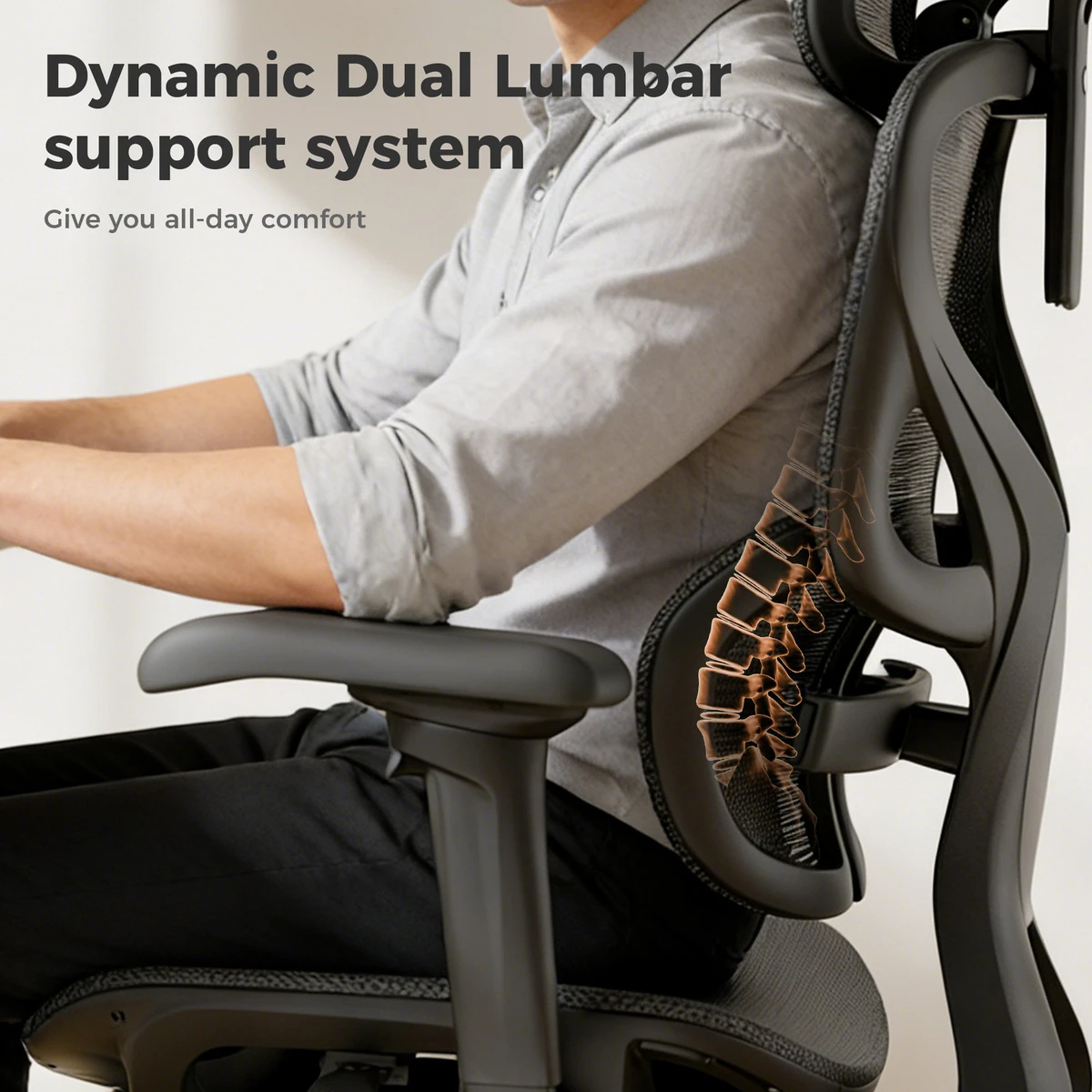
Adaptive Dual-Zone Lumbar Support
The two-part lumbar system responds as you shift your sitting position, providing flexible contact with your lower back.
Adjust the support tension and locking setting to find a comfortable feel. The four-position backrest-height adjustment helps you position the support around your torso.
Arm Support That Follows Your Position
Adjust armrest height and forward/backward placement, then rotate the pads through 360° to support your forearms in different sitting positions.
Position them for keyboard work, controller use or a reclining break while keeping your shoulders relaxed.

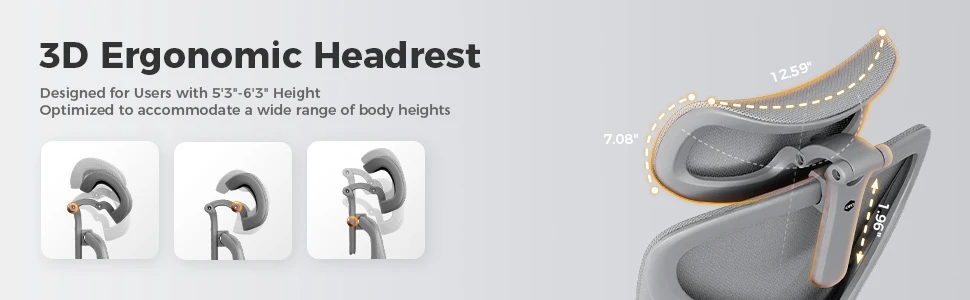
Adjustable Head and Neck Support
Adjust the dual-joint headrest in height and angle to suit your sitting position. Approximately 2" of height travel helps place the support comfortably when leaning back.
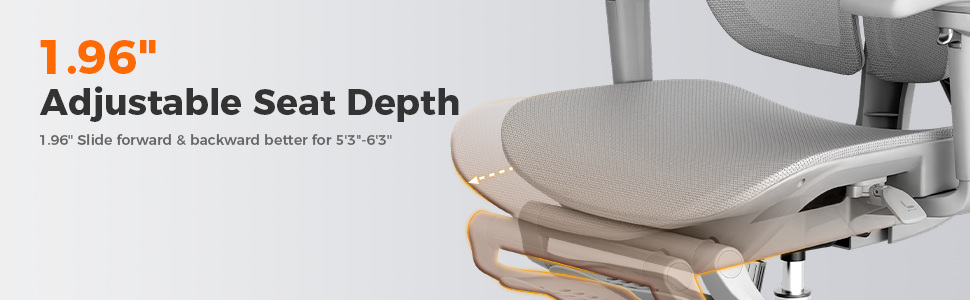
Slide the Seat for a Better Fit
Adjust the five-position slider to suit your thigh length. Approximately 2" of travel provides a seat-depth range of 16.5"–18.5", helping you maintain back contact and clearance behind your knees.
Recline up to 135°
Use the three-position recline lock and tension control to choose a supported angle for work or a break.
Pull-Out Legrest
Extend the attached support when reclining if it fits your proportions comfortably. Return it beneath the seat for regular desk use.

Breathable Mesh Seating
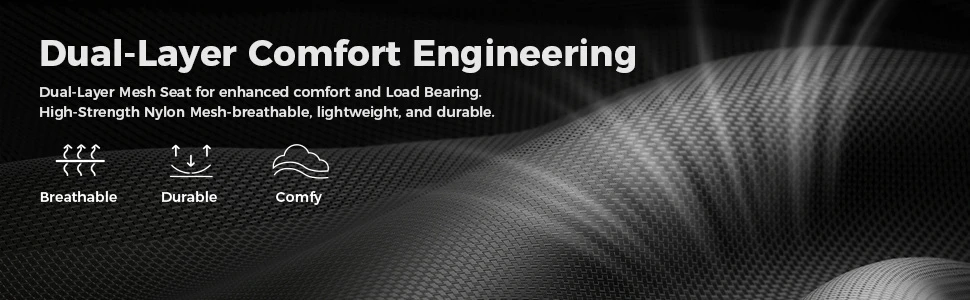
Mesh across the seat and back allows airflow and provides a supported, flexible seating surface. Its feel differs from a cushioned chair; try both surfaces if you are unsure which you prefer.
Black or Gray for Your Workspace


Manufacturer Durability Testing
OTO Ergo states that the Zenpex is tested to BIFMA X5.1-2017 standards and lists a 300 lb weight capacity. The manufacturer’s testing graphic illustrates load and durability checks across several chair components.

Product Specifications
| Brand / Product | OTO Ergo Zenpex |
|---|---|
| Model | ZP-01 |
| Colors | Black and gray |
| Overall Dimensions | 28.3" W × 29.5" D 41.7"–51.2" H |
| Seat Width | 20.1" |
| Seat Depth | 16.5"–18.5" |
| Seat Height | 17.3"–20.3" |
| Backrest Height | 21.7" |
| Manufacturer Height Guidance | 5'3"–6'3"; individual fit varies |
| Weight Capacity | 300 lb |
| Lumbar Support | Adaptive dual-zone support |
|---|---|
| Backrest Adjustment | Four-position height adjustment |
| Seat Slider | Five positions; approximately 2" adjustment |
| Headrest Adjustment | Approximately 2" height travel Large-axis rotation: 70° Small-axis rotation: 50° |
| Armrest Adjustment | Height: 2.6" travel Forward/backward: 2.8" travel Pad rotation: 360° |
| Recline | Three-position lock; up to 135° |
| Attached Legrest | Pull-out and flip-up design |
| Product Weight | 40.1 lb |
| Package Dimensions | 30.7" × 26.8" × 15.0" |
| Shipping Weight | 48.5 lb |
Specifications follow OTO Ergo’s published Zenpex product page. Dimensions are approximate and may vary slightly. Adjustment travel describes the amount of movement, rather than the component’s total size.
Frequently Asked Questions
Is Zenpex suitable for shorter users?
Its adjustable seat depth makes it worth considering for users who find deeper seats difficult to use. Check the minimum seat height of 17.3" against your leg length and desk setup. A separate footrest may be needed for stable foot support.
Can taller users choose Zenpex?
Some taller customers have enjoyed its seating feel in our showroom. Compare the maximum seat depth and height with your proportions, and check the backrest and headrest while using your normal keyboard, mouse or controller.
How should I position the seat slider?
Sit against the backrest and adjust the seat so it supports your thighs without pressing against the backs of your knees. Avoid extending it so far that you lose comfortable back contact.
Does the attached legrest replace an under-desk footrest?
No. The attached support is intended for reclining breaks. A separate under-desk footrest provides a stable surface for your feet when the chair is raised to match your work surface.
Can I try the chair at Healthy Posture Store?
Yes. Visit our Chicago showroom to try Zenpex, explore its adjustments and compare its fit with other ergonomic chairs. If you are shopping online, contact HPS for guidance before ordering.
Why Buy OTO Ergo Zenpex from Healthy Posture Store?
Try and Compare in Chicago
Evaluate seat feel and support in person, with guidance on chair adjustments and how the chair works with your desk.
Order with Nationwide Support
Get help choosing before purchase and support afterward from an ergonomic retailer serving customers nationwide since 2004.
Visit 2554 W. Lawrence Ave., Chicago, IL 60625, or call 773-596-5625.
OTO Ergo Zenpex Ergonomic Mesh Office Chair
An HPS Showroom Favorite. Adjusted Around You.
After three months of hands-on evaluation in our Chicago showroom, the OTO Ergo Zenpex has impressed us with its build quality, adjustment features and comfortable support. Its mesh seat and back, adjustable seat depth and adaptive lumbar system give you several ways to personalize your sitting position.
Adaptive Dual-Zone Lumbar Adjustable Seat Depth Height-Adjustable Backrest 360° Armrest Pad Rotation 135° Recline
Comfort for Work, Study & Gaming
Set up the Zenpex for your desk, then adjust its support as you move between focused work and a relaxed break. Available in black and gray, its open mesh design complements both home-office and gaming spaces.
HPS Real-World Fit
Start with Your Body and Your Desk
In our showroom, the Zenpex has been a particularly good fit for users around 5'8" and below. Its seat-depth slider and adjustable backrest help position the chair around different leg and torso proportions.
Some taller gamers have also preferred its seating feel. Taller users should check thigh support, seat height, lumbar placement and headrest position at their usual workstation. The manufacturer lists a recommended height range of 5'3"–6'3"; individual fit varies.
Chair height and desk height work together. Set the chair so you can reach your keyboard and mouse with relaxed shoulders. If that leaves your feet unsupported, use a separate under-desk footrest. The attached pull-out legrest is intended for reclining breaks and does not replace stable foot support during desk work.
Adjust the Chair in Three Steps
1. Set Your Seat
Adjust seat height for your work surface, then slide the seat to leave comfortable clearance behind your knees while sitting against the backrest.
2. Position Your Support
Set backrest height and lumbar support, then adjust the headrest to suit your torso length and preferred reclining position.
3. Bring Your Arms In
Position the arm pads beneath your forearms. Adjust their height, forward/backward placement and rotation so your shoulders remain relaxed.
Adaptive Dual-Zone Lumbar Support
The two-part lumbar system responds as you shift your sitting position, providing flexible contact with your lower back.
Adjust the support tension and locking setting to find a comfortable feel. The four-position backrest-height adjustment helps you position the support around your torso.
Arm Support That Follows Your Position
Adjust armrest height and forward/backward placement, then rotate the pads through 360° to support your forearms in different sitting positions.
Position them for keyboard work, controller use or a reclining break while keeping your shoulders relaxed.
Adjustable Head and Neck Support
Adjust the dual-joint headrest in height and angle to suit your sitting position. Approximately 2" of height travel helps place the support comfortably when leaning back.
Slide the Seat for a Better Fit
Adjust the five-position slider to suit your thigh length. Approximately 2" of travel provides a seat-depth range of 16.5"–18.5", helping you maintain back contact and clearance behind your knees.
Recline up to 135°
Use the three-position recline lock and tension control to choose a supported angle for work or a break.
Pull-Out Legrest
Extend the attached support when reclining if it fits your proportions comfortably. Return it beneath the seat for regular desk use.
Breathable Mesh Seating
Mesh across the seat and back allows airflow and provides a supported, flexible seating surface. Its feel differs from a cushioned chair; try both surfaces if you are unsure which you prefer.
Black or Gray for Your Workspace
Manufacturer Durability Testing
OTO Ergo states that the Zenpex is tested to BIFMA X5.1-2017 standards and lists a 300 lb weight capacity. The manufacturer’s testing graphic illustrates load and durability checks across several chair components.
Product Specifications
| Brand / Product | OTO Ergo Zenpex |
|---|---|
| Model | ZP-01 |
| Colors | Black and gray |
| Overall Dimensions | 28.3" W × 29.5" D 41.7"–51.2" H |
| Seat Width | 20.1" |
| Seat Depth | 16.5"–18.5" |
| Seat Height | 17.3"–20.3" |
| Backrest Height | 21.7" |
| Manufacturer Height Guidance | 5'3"–6'3"; individual fit varies |
| Weight Capacity | 300 lb |
| Lumbar Support | Adaptive dual-zone support |
|---|---|
| Backrest Adjustment | Four-position height adjustment |
| Seat Slider | Five positions; approximately 2" adjustment |
| Headrest Adjustment | Approximately 2" height travel Large-axis rotation: 70° Small-axis rotation: 50° |
| Armrest Adjustment | Height: 2.6" travel Forward/backward: 2.8" travel Pad rotation: 360° |
| Recline | Three-position lock; up to 135° |
| Attached Legrest | Pull-out and flip-up design |
| Product Weight | 40.1 lb |
| Package Dimensions | 30.7" × 26.8" × 15.0" |
| Shipping Weight | 48.5 lb |
Specifications follow OTO Ergo’s published Zenpex product page. Dimensions are approximate and may vary slightly. Adjustment travel describes the amount of movement, rather than the component’s total size.
Frequently Asked Questions
Is Zenpex suitable for shorter users?
Its adjustable seat depth makes it worth considering for users who find deeper seats difficult to use. Check the minimum seat height of 17.3" against your leg length and desk setup. A separate footrest may be needed for stable foot support.
Can taller users choose Zenpex?
Some taller customers have enjoyed its seating feel in our showroom. Compare the maximum seat depth and height with your proportions, and check the backrest and headrest while using your normal keyboard, mouse or controller.
How should I position the seat slider?
Sit against the backrest and adjust the seat so it supports your thighs without pressing against the backs of your knees. Avoid extending it so far that you lose comfortable back contact.
Does the attached legrest replace an under-desk footrest?
No. The attached support is intended for reclining breaks. A separate under-desk footrest provides a stable surface for your feet when the chair is raised to match your work surface.
Can I try the chair at Healthy Posture Store?
Yes. Visit our Chicago showroom to try Zenpex, explore its adjustments and compare its fit with other ergonomic chairs. If you are shopping online, contact HPS for guidance before ordering.
Why Buy OTO Ergo Zenpex from Healthy Posture Store?
Try and Compare in Chicago
Evaluate seat feel and support in person, with guidance on chair adjustments and how the chair works with your desk.
Order with Nationwide Support
Get help choosing before purchase and support afterward from an ergonomic retailer serving customers nationwide since 2004.
Visit 2554 W. Lawrence Ave., Chicago, IL 60625, or call 773-596-5625.
OTO offers a 3-year limited warranty .
OTO Ergo Zenpex Ergonomic Mesh Office Chair
An HPS Showroom Favorite. Adjusted Around You.
After three months of hands-on evaluation in our Chicago showroom, the OTO Ergo Zenpex has impressed us with its build quality, adjustment features and comfortable support. Its mesh seat and back, adjustable seat depth and adaptive lumbar system give you several ways to personalize your sitting position.
Adaptive Dual-Zone Lumbar Adjustable Seat Depth Height-Adjustable Backrest 360° Armrest Pad Rotation 135° Recline
Comfort for Work, Study & Gaming
Set up the Zenpex for your desk, then adjust its support as you move between focused work and a relaxed break. Available in black and gray, its open mesh design complements both home-office and gaming spaces.
HPS Real-World Fit
Start with Your Body and Your Desk
In our showroom, the Zenpex has been a particularly good fit for users around 5'8" and below. Its seat-depth slider and adjustable backrest help position the chair around different leg and torso proportions.
Some taller gamers have also preferred its seating feel. Taller users should check thigh support, seat height, lumbar placement and headrest position at their usual workstation. The manufacturer lists a recommended height range of 5'3"–6'3"; individual fit varies.
Chair height and desk height work together. Set the chair so you can reach your keyboard and mouse with relaxed shoulders. If that leaves your feet unsupported, use a separate under-desk footrest. The attached pull-out legrest is intended for reclining breaks and does not replace stable foot support during desk work.
Adjust the Chair in Three Steps
1. Set Your Seat
Adjust seat height for your work surface, then slide the seat to leave comfortable clearance behind your knees while sitting against the backrest.
2. Position Your Support
Set backrest height and lumbar support, then adjust the headrest to suit your torso length and preferred reclining position.
3. Bring Your Arms In
Position the arm pads beneath your forearms. Adjust their height, forward/backward placement and rotation so your shoulders remain relaxed.
Adaptive Dual-Zone Lumbar Support
The two-part lumbar system responds as you shift your sitting position, providing flexible contact with your lower back.
Adjust the support tension and locking setting to find a comfortable feel. The four-position backrest-height adjustment helps you position the support around your torso.
Arm Support That Follows Your Position
Adjust armrest height and forward/backward placement, then rotate the pads through 360° to support your forearms in different sitting positions.
Position them for keyboard work, controller use or a reclining break while keeping your shoulders relaxed.
Adjustable Head and Neck Support
Adjust the dual-joint headrest in height and angle to suit your sitting position. Approximately 2" of height travel helps place the support comfortably when leaning back.
Slide the Seat for a Better Fit
Adjust the five-position slider to suit your thigh length. Approximately 2" of travel provides a seat-depth range of 16.5"–18.5", helping you maintain back contact and clearance behind your knees.
Recline up to 135°
Use the three-position recline lock and tension control to choose a supported angle for work or a break.
Pull-Out Legrest
Extend the attached support when reclining if it fits your proportions comfortably. Return it beneath the seat for regular desk use.
Breathable Mesh Seating
Mesh across the seat and back allows airflow and provides a supported, flexible seating surface. Its feel differs from a cushioned chair; try both surfaces if you are unsure which you prefer.
Black or Gray for Your Workspace
Manufacturer Durability Testing
OTO Ergo states that the Zenpex is tested to BIFMA X5.1-2017 standards and lists a 300 lb weight capacity. The manufacturer’s testing graphic illustrates load and durability checks across several chair components.
Product Specifications
| Brand / Product | OTO Ergo Zenpex |
|---|---|
| Model | ZP-01 |
| Colors | Black and gray |
| Overall Dimensions | 28.3" W × 29.5" D 41.7"–51.2" H |
| Seat Width | 20.1" |
| Seat Depth | 16.5"–18.5" |
| Seat Height | 17.3"–20.3" |
| Backrest Height | 21.7" |
| Manufacturer Height Guidance | 5'3"–6'3"; individual fit varies |
| Weight Capacity | 300 lb |
| Lumbar Support | Adaptive dual-zone support |
|---|---|
| Backrest Adjustment | Four-position height adjustment |
| Seat Slider | Five positions; approximately 2" adjustment |
| Headrest Adjustment | Approximately 2" height travel Large-axis rotation: 70° Small-axis rotation: 50° |
| Armrest Adjustment | Height: 2.6" travel Forward/backward: 2.8" travel Pad rotation: 360° |
| Recline | Three-position lock; up to 135° |
| Attached Legrest | Pull-out and flip-up design |
| Product Weight | 40.1 lb |
| Package Dimensions | 30.7" × 26.8" × 15.0" |
| Shipping Weight | 48.5 lb |
Specifications follow OTO Ergo’s published Zenpex product page. Dimensions are approximate and may vary slightly. Adjustment travel describes the amount of movement, rather than the component’s total size.
Frequently Asked Questions
Is Zenpex suitable for shorter users?
Its adjustable seat depth makes it worth considering for users who find deeper seats difficult to use. Check the minimum seat height of 17.3" against your leg length and desk setup. A separate footrest may be needed for stable foot support.
Can taller users choose Zenpex?
Some taller customers have enjoyed its seating feel in our showroom. Compare the maximum seat depth and height with your proportions, and check the backrest and headrest while using your normal keyboard, mouse or controller.
How should I position the seat slider?
Sit against the backrest and adjust the seat so it supports your thighs without pressing against the backs of your knees. Avoid extending it so far that you lose comfortable back contact.
Does the attached legrest replace an under-desk footrest?
No. The attached support is intended for reclining breaks. A separate under-desk footrest provides a stable surface for your feet when the chair is raised to match your work surface.
Can I try the chair at Healthy Posture Store?
Yes. Visit our Chicago showroom to try Zenpex, explore its adjustments and compare its fit with other ergonomic chairs. If you are shopping online, contact HPS for guidance before ordering.
Why Buy OTO Ergo Zenpex from Healthy Posture Store?
Try and Compare in Chicago
Evaluate seat feel and support in person, with guidance on chair adjustments and how the chair works with your desk.
Order with Nationwide Support
Get help choosing before purchase and support afterward from an ergonomic retailer serving customers nationwide since 2004.
Visit 2554 W. Lawrence Ave., Chicago, IL 60625, or call 773-596-5625.
OTO Ergo Zenpex Ergonomic Mesh Office Chair
×
![Zoomed Variant Image]()
TECH Ergonomic Large Office Chair | Mesh | Supports 400 lbs.
Your Price
$665.50+
$1,210.00
Was:
$1,210.00+
SKU: TECH 1400 - BT12 Task

Anthros Customizable Ergonomic Office Chair
Your Price
$2,249.00 - $2,249.99
MSRP:
$2,895.00
SKU: ANT-CUSTOM

myCentric Ergonomic Office Chair (Customizable)
Your Price
$746.60 - $899.00
MSRP:
$1,214.00
SKU: myCentric™ - Customized Fit